What each one is for
They answer different questions. Each admin console asks "how is our ChatGPT, Claude or Copilot being used?". Typort asks "how is the team using AI across all of them, what is the work, and what is it costing?".
The admin consoles are good at
- Exact figures for their own tool, straight from the vendor
- Claude Team: a CSV of tokens and spend per person per model, and a monthly spend limit per member
- ChatGPT Business: active users, messages and credits, with a table by member
- Microsoft 365 Copilot: prompts submitted, active days and last activity per person, per Copilot app
- Hard limits and seat changes, in the tool that does the work
Typort is good at
- Who is using AI, how much, and which tools, per person and over 13 weeks
- Estimated spend per person, with allowances and 80% and 100% warnings
- A pie of what the team spends its time with AI doing
- Flags for what went in, and client rules marked broke or close
- Searching the team's chats and meetings, and asking questions of them with Ask Typort
- Five plain switches for what the company sees, shown to everyone
What the admin consoles show
From OpenAI's, Anthropic's and Microsoft's own help pages.
Claude Team. Owners get usage analytics and can export a spend report as a CSV: one row per person per model, with requests, tokens and spend. Anthropic says spend data refreshes daily and has a one-day delay. Owners can set a monthly spend limit for each member, and when a member reaches it their usage credits pause until the end of the month.
ChatGPT Business. Workspace analytics, added in April 2026, shows active users, total messages and credits spent, and a table by member with seat type, credits spent and messages sent. OpenAI's pricing page lists "Usage analytics and spend controls" for Business. A fuller per-user export and task insights are documented for Enterprise and Edu.
Microsoft 365 Copilot. The Copilot usage report in the Microsoft 365 admin center shows, per person, prompts submitted, active days and the last activity date in each Copilot app, and exports to CSV. Microsoft says a day's activity typically appears within 48 hours. The same data is in Microsoft Graph.
What the seats cost
From each vendor's own pricing page, checked 2 November 2026. The admin views above come with the seat.
ChatGPT Business. Standard seat "$20/month if billed annually. $25/month if billed monthly." Premium seat "$100/month if billed annually. $125/month if billed monthly."
Claude Team. For teams of 2 to 150. Standard seat "$20 per seat / month if billed annually. $25 if billed monthly." Premium seat "$100 per seat / month if billed annually. $125 if billed monthly."
Microsoft 365 Copilot. "$30.00 user/month, paid yearly", as an add-on to a Microsoft 365 plan. For smaller businesses, Microsoft 365 Copilot Business is an add-on at "$18.00 user/month, paid yearly", down from $21.00.
Typort vs the admin consoles, side by side
| ChatGPT Business | Claude Team | Microsoft 365 Copilot report | Typort | |
|---|---|---|---|---|
| Which tools | ChatGPT and Codex in that workspace | Claude in that organization | Microsoft Copilot apps | ChatGPT, Claude, Perplexity and Grok together. Microsoft 365 Copilot in the next extension update |
| Per person | Seat type, credits spent, messages sent | Requests, tokens and spend per model, in a CSV | Prompts submitted, active days, last activity per app | Tokens, active days, tool mix and estimated spend at API list price |
| Kinds of work | Task insights are documented for Enterprise and Edu | Usage by model and product | Which Copilot app was used | A pie of the kinds of work across every tool |
| Flags and client rules | Not in the Business usage view | Not in the usage analytics | Not in the usage report | Flags for what went in, and chats marked broke a client rule or close to one |
| Monthly limit per person | Seat types, shared workspace credits and spend controls | Yes, a monthly spend limit per member that pauses usage credits | Not part of the usage report | An allowance you set, with warnings at 80% and 100%. A warning, not a cap |
| How fresh | Not stated in OpenAI's Business notes | Updated daily, a day behind | Typically within 48 hours | Counted as each chat syncs from the browser |
See it in Typort
One team page with ChatGPT, Claude, Perplexity and Grok use per person, the kinds of work, and the allowance warnings.
What you get
Screens from a sample 16-person agency.
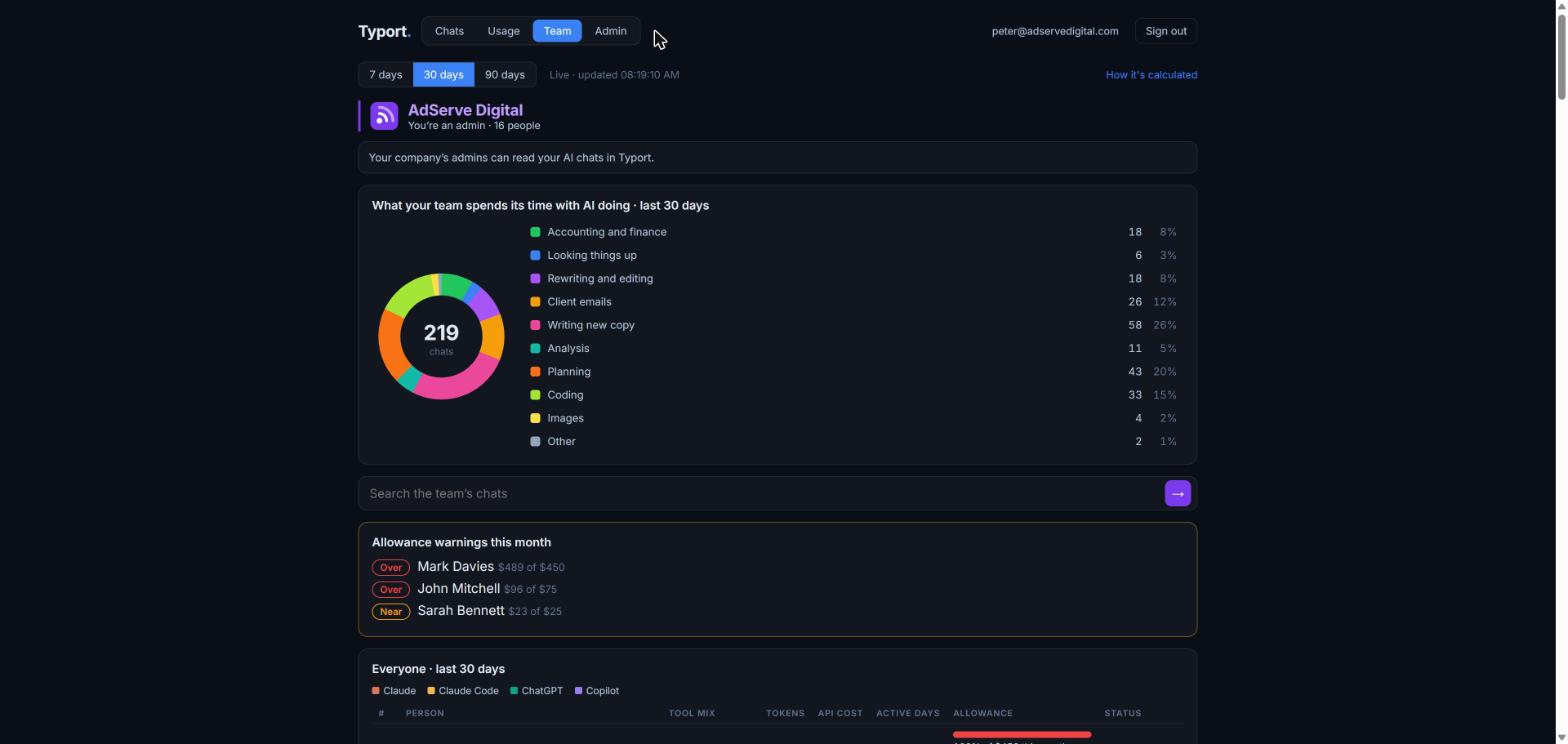
The whole team on one page
What the team spends its time with AI doing over the last 30 days, a search box for the team's chats, allowance warnings for the month, and each person's use by tool.
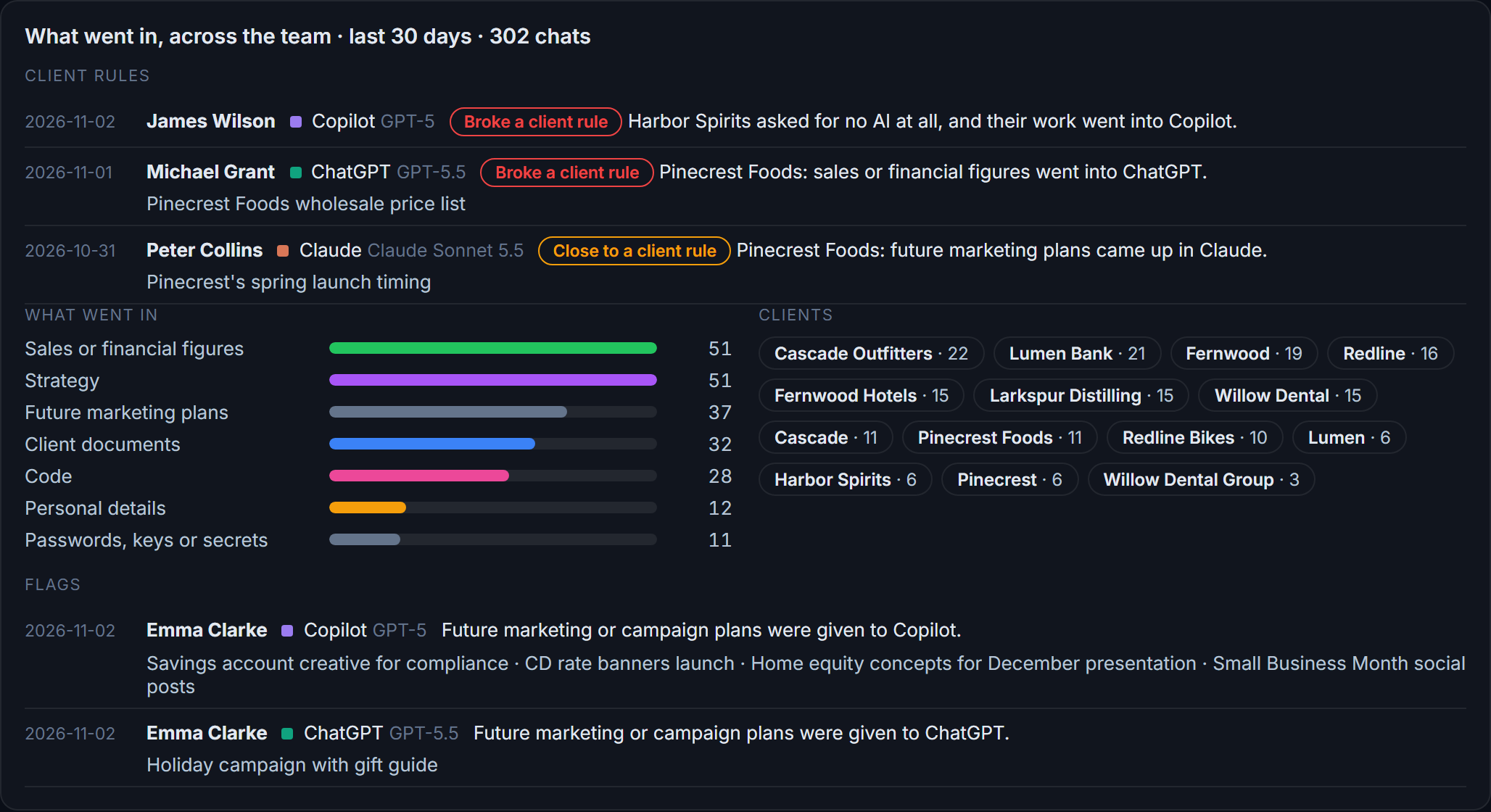
Flags and client rules
What went in across the team: client figures and documents, personal details, passwords and keys. Record per client what must not go into AI, and every chat that breaks a rule, or comes close, is listed with the person, the tool and the date.
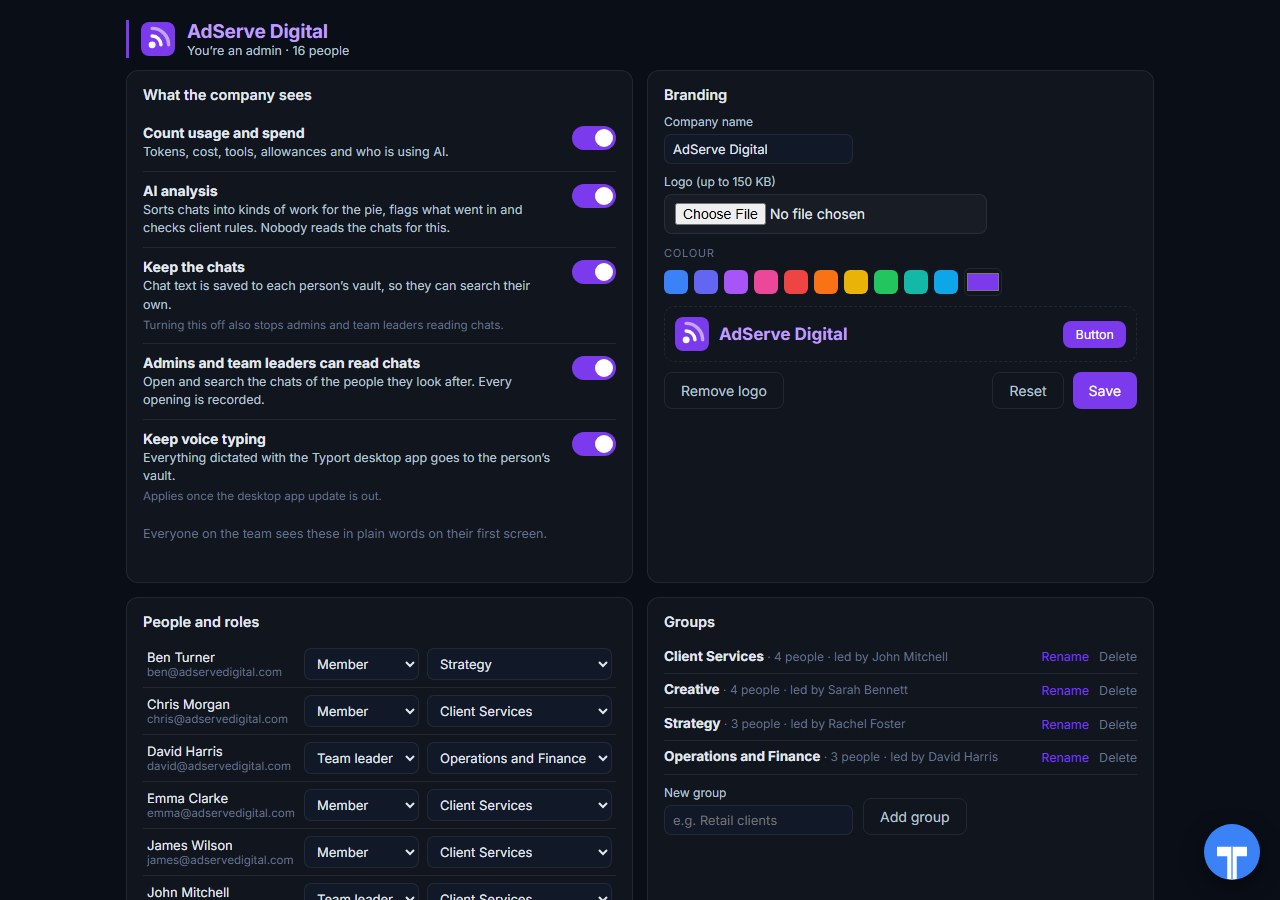
Five switches
Count usage and spend, AI analysis, keep the chats, let admins and team leaders read chats, keep voice typing. Everyone sees the switches in plain words, and every opening of a chat is recorded. Chats in the AI's own temporary or incognito mode are never collected.
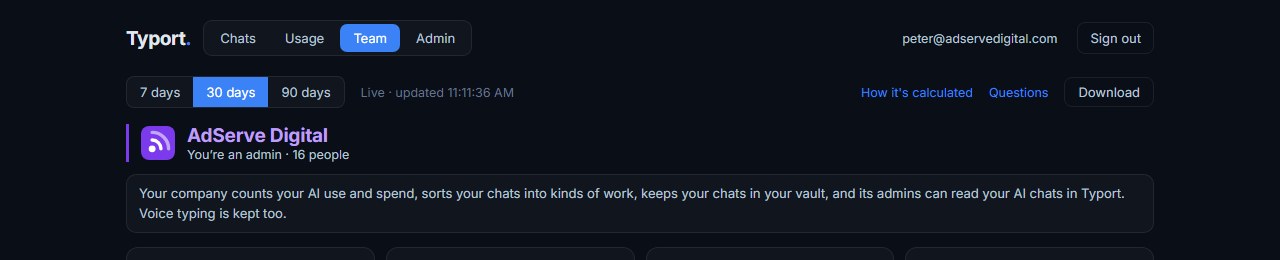
A spreadsheet when you need one
Download the team page as a .csv for the range you pick: people, usage, spend and allowance, flags and client rule hits. Never chat text or titles.
Use them together
Keep the hard limits where they are. A cap belongs in the tool that does the work. Claude Team's monthly limit per member, ChatGPT's seat types and workspace credits, and Microsoft's licences all stay as they are. Typort needs no change to any of them.
Use Typort for the whole picture. One page that shows who is using which tool, what the work is, who is near their allowance, and what went in that should not have. Search the team's chats and meetings, or use Ask Typort to get an answer in plain words, with the chats it used.
The team view runs on Typort's servers. It is free for a limited time and will move to Typort Pro later.
FAQ
Don't ChatGPT Business, Claude Team and Copilot already report usage?
Yes, each one reports on its own tool, in its own admin screen. Typort puts the team's AI use on one page, per person, and adds what the work is, flags, client rules and search across the team's chats and meetings.
Which AI tools does Typort see?
ChatGPT, Claude, Perplexity and Grok in the browser, through the Typort browser extension. It reads the page, so it works on Business and Team seats and needs no API keys from the AI vendors. Claude and ChatGPT account history can be imported. Microsoft 365 Copilot capture is built and comes in the next extension update. Gemini is being added.
Can Typort stop someone at their limit?
No. Typort shows each person against a monthly allowance you set and warns at 80% and 100%. Hard limits stay in each tool's own admin settings, such as Claude Team's monthly spend limit per member.
Are Typort's dollar figures our real bill?
No. They are estimates from the tokens in each chat at the AI vendor's API list price. Your bill is your seat price plus any extra usage you have switched on.
Can admins read people's chats?
Only if the company turns that switch on. Admins see everyone, team leaders see their own group, and every opening of a chat is recorded. Chats in the AI's own temporary or incognito mode are never collected. With the switch off, admins see counts and kinds of work, not the chats.
How do people get started?
They install the Typort browser extension and sign in to the team view with Microsoft or a code sent to their work email. A company Microsoft sign-in puts them on their company's team.
What does the team view cost?
The team view runs on Typort's servers. It is free for a limited time and will move to Typort Pro later.
Your team's AI tools, on one page.
Sources
Every fact about ChatGPT Business, Claude Team and Microsoft 365 Copilot on this page comes from OpenAI's, Anthropic's and Microsoft's own pricing and help pages, checked on 2 November 2026. Typort facts come from the product itself.
| ChatGPT Business: Standard seat "$20/month if billed annually. $25/month if billed monthly." Premium seat "$100/month if billed annually. $125/month if billed monthly." Business includes "Usage analytics and spend controls" and "Basic user analytics". Checked 2 November 2026. | OpenAI: ChatGPT Business pricing |
| ChatGPT Business, April 2026: Workspace analytics with "active users, total messages sent, and total credits spent", and a "Member-level usage table: See usage by workspace member, including seat type, credits spent, and messages sent." "Workspace owners can add shared workspace credits when additional usage is needed." | OpenAI help: Business release notes |
| ChatGPT Enterprise and Edu: workspace analytics, "Export a report by user", and "Task insights shows aggregated patterns of work in ChatGPT by classifying conversations into broad task categories and topics." | OpenAI help: Enterprise and Edu analytics |
| Claude Team: "For teams of 2 to 150." Standard seat "$20 Per seat / month if billed annually. $25 if billed monthly." Premium seat "$100 Per seat / month if billed annually. $125 if billed monthly." Team includes "Usage analytics". Checked 2 November 2026. | Claude pricing |
| Claude Team and Enterprise: "Usage analytics are available to Team plan Owners and Primary Owners". A spend report CSV where "Each row in the CSV represents a specific person's usage of a specific model", with request count, prompt and completion tokens and spend. "Spend data refreshes daily and has a one-day delay." | Claude help: usage analytics |
| Claude Team: owners "can also set individual monthly spend limits for each member"; "Once a user reaches their defined spend limit, this will automatically pause their usage credits until the end of the month." | Claude help: extra usage for Team |
| Microsoft 365 Copilot: "$30.00 user/month, paid yearly". Microsoft 365 Copilot Business (add-on): "Originally starting from $21.00 now starting from $18.00 user/month, paid yearly". Checked 2 November 2026. | Microsoft 365 Copilot enterprise pricing, Copilot business pricing |
| Microsoft Copilot usage report: per user, prompts submitted, active days and last activity date across Copilot apps, exportable to an Excel .csv file. "the report typically becomes available within 48 hours of the end of that day (in UTC)". | Microsoft Learn: Copilot usage report |
| Microsoft Graph: getMicrosoft365CopilotUsageUserDetail returns last activity dates per Copilot app for each user. | Microsoft Graph: Copilot usage user detail |
typort.com | Typort Business | Typort for compliance | AI usage monitoring | Privacy | Terms
© 2024-2026 Human Compute, LLC. ChatGPT is a trademark of OpenAI. Claude is a trademark of Anthropic. Microsoft and Microsoft 365 Copilot are trademarks of the Microsoft group of companies. Typort is not affiliated with or endorsed by OpenAI, Anthropic or Microsoft.