What each one is for
Island is a secure workspace with AI controls built in. Typort is a view of how the team uses AI: who, how much, what it costs, and what the work is.
Island is good at
- Controlling data at the last mile: copy, paste, print, downloads and screenshots
- Redacting personal data in prompts, files and tool calls
- An audit of every prompt, response and tool call
- AI cost per user, team and project, with waste flagged
- Replacing VDI and VPN for contractors and unmanaged devices
- Governing AI agents and the tools they call, as well as chat sites
Typort is good at
- Who is using AI, how much, and which tools, per person and over time
- Estimated spend per person, with allowances and warnings
- A pie of what the team spends its time with AI doing
- Flags for what went in, and client rules marked broke or close
- Searching the team's chats and meetings, and asking questions of them with Ask Typort
- Five plain switches for what the company sees, shown to everyone on their first screen
What Island does with AI
From Island's own website.
Governs the AI chat sites. Island says it "governs AI interactions across browser-based tools (ChatGPT, Claude, Gemini, Copilot, Perplexity)", and can "Detect and redact PII on prompts, files, and tool calls."
Audits every prompt. Its AI page offers to "Audit every prompt, response, tool call, and tool response."
Tracks AI cost per person. Island says it "aggregates real usage, cost, and performance into one view, per person and per agent", and offers to "Track AI token spend and detect waste per team & project." On this point Island and Typort overlap.
Runs in its own browser, or an extension. Island is a Chromium-based browser for Windows, macOS, Linux and Chromebook, and is "also available as a browser extension for Chrome, Edge, Safari, Firefox, and any Chromium-based browser."
What it needs
A browser roll-out, or its extension. For AI it adds control points beyond the browser: the Island extension, Island Desktop, Island Network and a gateway for AI agents.
A quote. Island asks you to request a custom quote and does not publish a price.
Typort vs Island, side by side
| Island | Typort | |
|---|---|---|
| Redact or block in a prompt | Yes: redacts personal data and blocks prompt injections | No. Typort shows what went in after the fact |
| Last-mile controls | Copy, paste, print, downloads and screenshots | Not something Typort does |
| Usage and spend per person | Usage, cost and performance per person, per agent and per project | Tokens, tools, active days and estimated spend per person, with an allowance and a near or over warning |
| What the work is | Not on Island's website | Chats sorted into kinds of work, from client emails to coding, shown as a pie |
| Client rules | Not on Island's website | Rules per client, with chats marked broke a client rule or close to one |
| Meetings | Not on Island's website | Search the team's chats and meetings together, and ask questions of them with Ask Typort |
| What it needs | Its own browser or extension, plus desktop and network control points for AI | The Typort browser extension and a sign in with Microsoft or a work email. No API keys |
| Price | Custom quote | Free for a limited time, and will move to Typort Pro later |
See it in Typort
A walk through the team page: usage and estimated spend per person, what the work is, and the chats that broke or came close to a client rule.
What you get
The team page, flags and client rules, and the five switches.
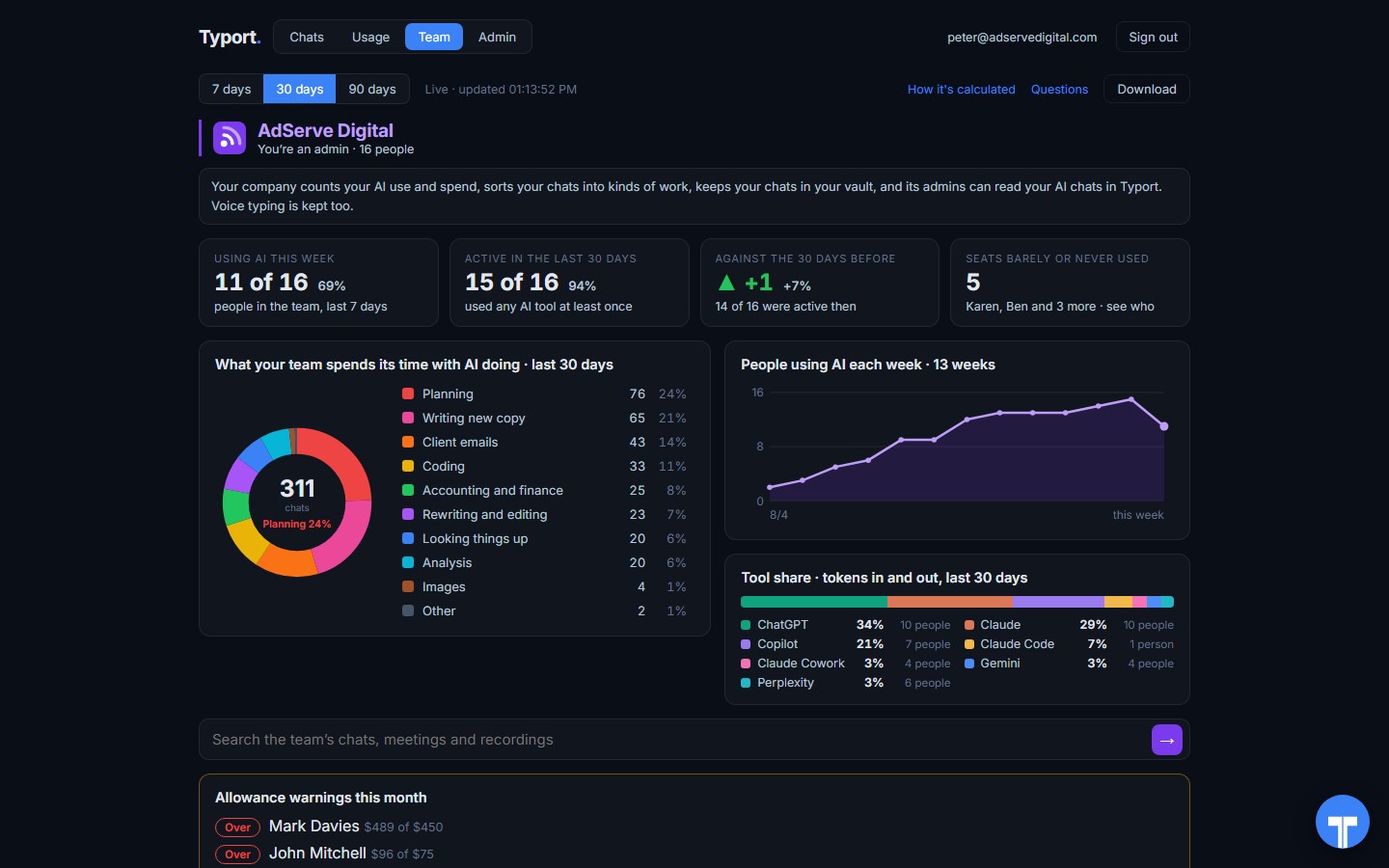
The team page
Who is using AI this week, what the work is, people using AI each week, tool share by AI tool, and allowance warnings for anyone near or over.
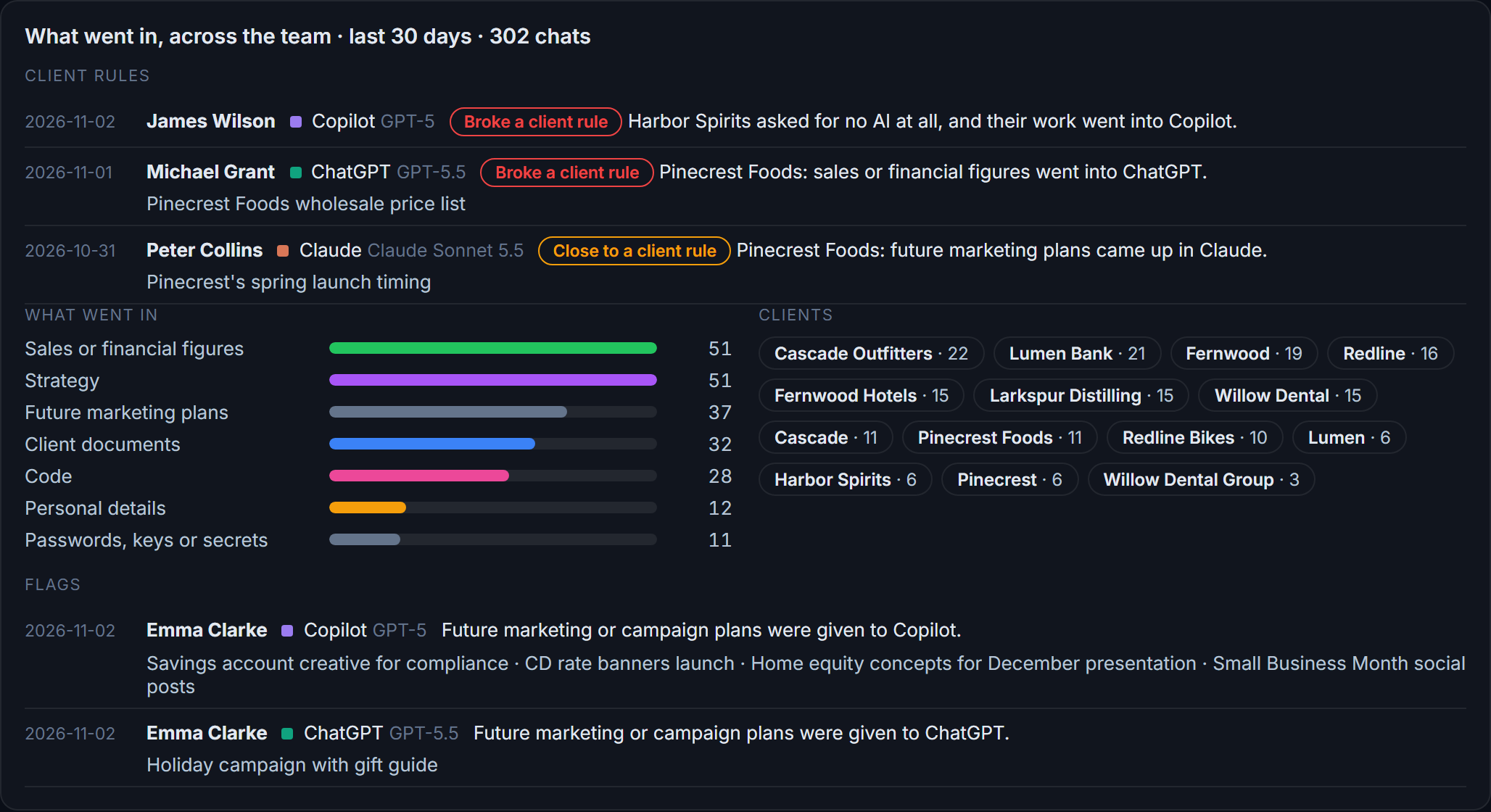
Flags and client rules
What went in across the team: sales figures, strategy, client documents, passwords and keys. Each chat that broke a client rule, or came close, is listed with the person and the tool.
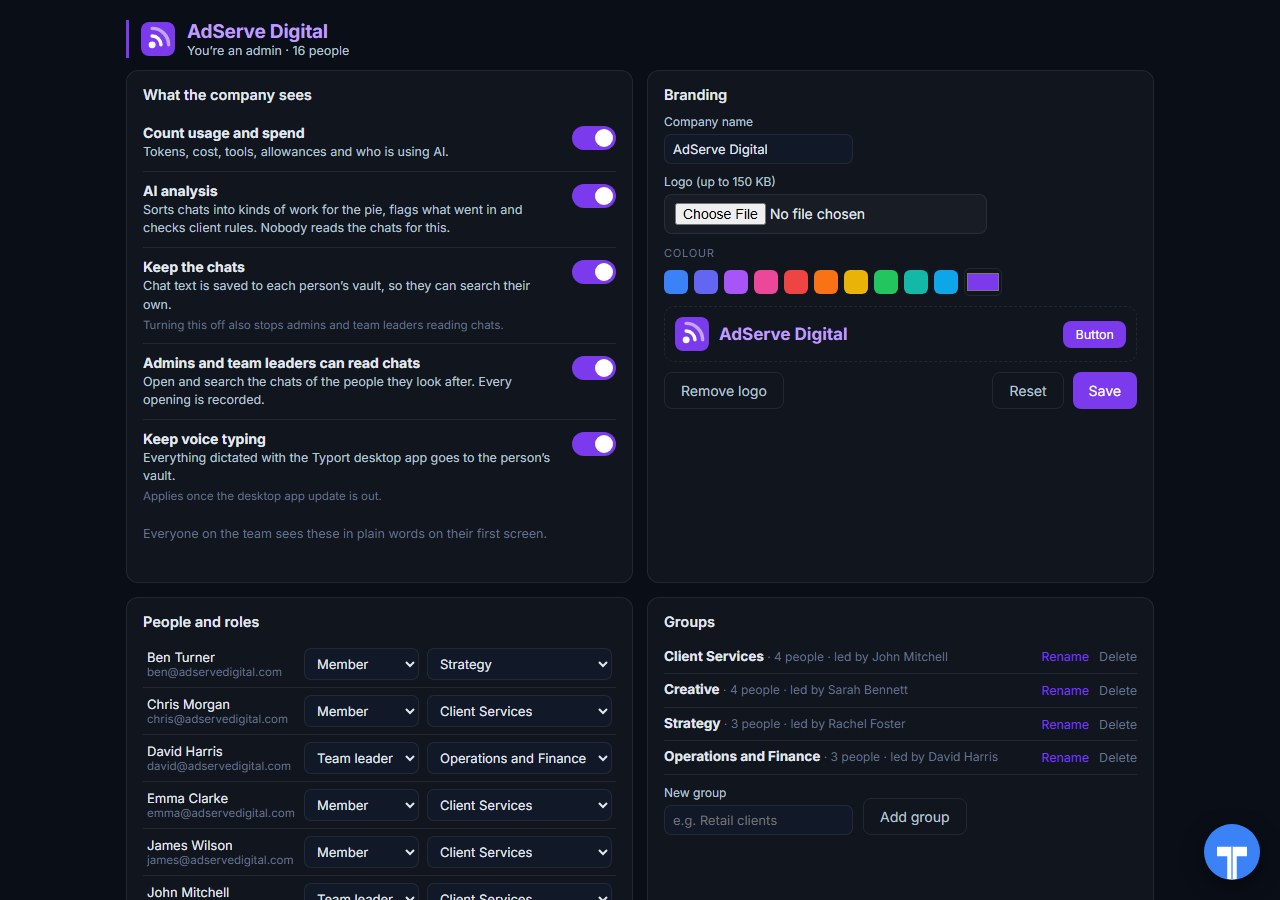
Five switches
Count usage and spend, AI analysis, keep the chats, let admins and team leaders read chats, keep voice typing. Every opening of a chat is recorded, and everyone sees the switches in plain words. Chats in the AI's own temporary or incognito mode are never collected.
Use them together
Island controls the session. Typort explains the work. If you run Island, keep it for redaction, last-mile controls and the prompt audit. Typort adds what the work is, client rules, meetings in the same search, and a plain view staff can see too.
If you do not run Island. Typort needs no new browser. People keep the browser they use, add the Typort extension, and sign in.
The team view runs on Typort's servers. It is free for a limited time and will move to Typort Pro later.
FAQ
Is Typort a replacement for Island?
No. Island is an enterprise browser with controls over data, access and AI. Typort shows how a team uses AI: usage and estimated spend per person, allowances, what the work is, flags and client rules. It does not control the browser.
Does Island track AI spend per person?
Yes. Island says it tracks usage, cost and performance per person and per agent, and token spend per team and project. Typort does the same per person for chat seats, and adds what the work is and client rules.
Do people have to change browser for Typort?
No. Typort is an extension in the browser people already use.
Can Typort block a prompt?
No. Typort shows what went in after the fact, with flags and client rules marked broke or close. If you need a paste or a prompt stopped before it is sent, use a tool built to block.
Which AI tools does Typort see?
ChatGPT, Claude, Perplexity and Grok in the browser, through the Typort browser extension. Microsoft 365 Copilot capture is built and comes in the next extension update. It reads what is on the page, so it works on Business and Team seats and needs no API keys from the AI vendors.
Are the dollar figures exact?
No, they are estimates from the tokens in each chat at the AI vendor's API list price. A chat page cannot show system prompts, hidden reasoning, attachments or tool calls, so the figures are a floor. They are there to compare people and tools, not to replace the invoice.
What does the team view cost?
The team view runs on Typort's servers. It is free for a limited time and will move to Typort Pro later.
Sources
Every Island fact on this page comes from Island's own website and documentation, checked on 2 November 2026. Typort facts come from the product itself.
| "Island governs AI interactions across browser-based tools (ChatGPT, Claude, Gemini, Copilot, Perplexity)"; "Detect and redact PII on prompts, files, and tool calls."; "Audit every prompt, response, tool call, and tool response."; "Track AI token spend and detect waste per team & project." | Island: AI |
| "Island aggregates real usage, cost, and performance into one view, per person and per agent" | Island blog, 3 August 2026 |
| "It is also available as a browser extension for Chrome, Edge, Safari, Firefox, and any Chromium-based browser."; "Last-mile controls govern print, downloads, screenshots, and copy/paste even outside the browser." | Island Enterprise Browser |
| "Request a custom quote". No public price. Checked 2 November 2026. | Island: request a quote |
typort.com | Typort Business | Typort for compliance | AI usage monitoring | Privacy | Terms
© 2024-2026 Human Compute, LLC. Island is a trademark of its respective owner. Typort is not affiliated with or endorsed by Island.