What each one is for
They answer different questions. Defender asks "which AI apps are we using, and are they safe?". Typort asks "how is the team using AI, and what is it costing?".
Microsoft Defender for Cloud Apps is good at
- Finding the AI apps people use, from a catalog of more than 31,000 cloud apps
- A risk score for each app, built from more than 90 risk factors
- Blocking an unsanctioned app on devices running Defender for Endpoint
- Warning people with a link to the approved apps, and counting who clicks past
- Policies that unsanction new AI apps automatically
- Often already paid for, inside Microsoft 365 E5 and Microsoft Defender Suite
Typort is good at
- Who is using AI, how much, and which tools, per person and over time
- Estimated spend per person, with allowances and warnings
- A pie of what the team spends its time with AI doing
- Flags for what went in, and client rules marked broke or close
- Searching the team's chats and meetings, and asking questions of them with Ask Typort
- Five plain switches for what the company sees, shown to everyone on their first screen
What Defender for Cloud Apps does with AI apps
From Microsoft's own documentation.
A Generative AI category. Microsoft says the catalog includes "more than a thousand generative AI-related apps". You can filter discovered apps to that category, see a risk assessment for each, and sanction or unsanction them.
Discovery from traffic logs. Cloud discovery reads traffic logs from Defender for Endpoint, from a log collector on your network, or from a web gateway such as Zscaler, and updates four times a day. Per app it shows users, IP addresses, traffic and transactions.
Block or warn. An app marked unsanctioned is blocked on devices onboarded to Defender for Endpoint, which Microsoft says can take up to three hours. Admins can instead warn people and send them to a page of approved apps.
Prompts are a different product. Prompt logging and data loss prevention for AI prompts sit in Microsoft Purview DSPM for AI, not in Defender for Cloud Apps. See Typort vs Microsoft Purview.
What it needs
A licence that includes it. Microsoft sells Defender for Cloud Apps as a standalone licence and inside plans such as Microsoft 365 E5 and Microsoft Defender Suite. Microsoft prices Microsoft 365 E5 at $60.00 per user a month, paid yearly, and Microsoft Defender Suite at $12.00 per user a month, paid yearly, on top of Microsoft 365 E3. Microsoft does not publish a standalone price.
Traffic to read. Defender for Endpoint on each device, a log collector on your network, or an integrated web gateway.
Typort vs Microsoft Defender for Cloud Apps, side by side
| Microsoft Defender for Cloud Apps | Typort | |
|---|---|---|
| Which AI apps are in use | More than 1,000 generative AI apps in the catalog, each with a risk score | The AI tools each person uses, from the browser extension |
| Usage per person | Users, IP addresses, traffic and transactions per app | Tokens, tools and active days per person, with adoption over 13 weeks |
| Spend | Not among the discovery reports in Microsoft's documentation | Estimated spend per person, with an allowance and a near or over warning |
| What the work is | The app's category, not what people do inside it | Chats sorted into kinds of work, from client emails to coding, shown as a pie |
| Block an app | Yes, on devices running Defender for Endpoint | No. Typort shows what went in after the fact |
| What went in | Prompts are covered by Purview, a separate product | Flags for personal details, client figures, passwords and keys, and rules per client marked broke or close |
| What it needs | Traffic logs from Defender for Endpoint, a log collector or a web gateway | The Typort browser extension and a sign in with Microsoft or a work email. No API keys |
| Who sees what | Roles in the Microsoft Defender portal | Five switches, shown in plain words to everyone on the team |
See it in Typort
A walk through the team page: who uses which AI tool, what it is costing, and what the work is.
What you get
The team page, flags and client rules, and the five switches.
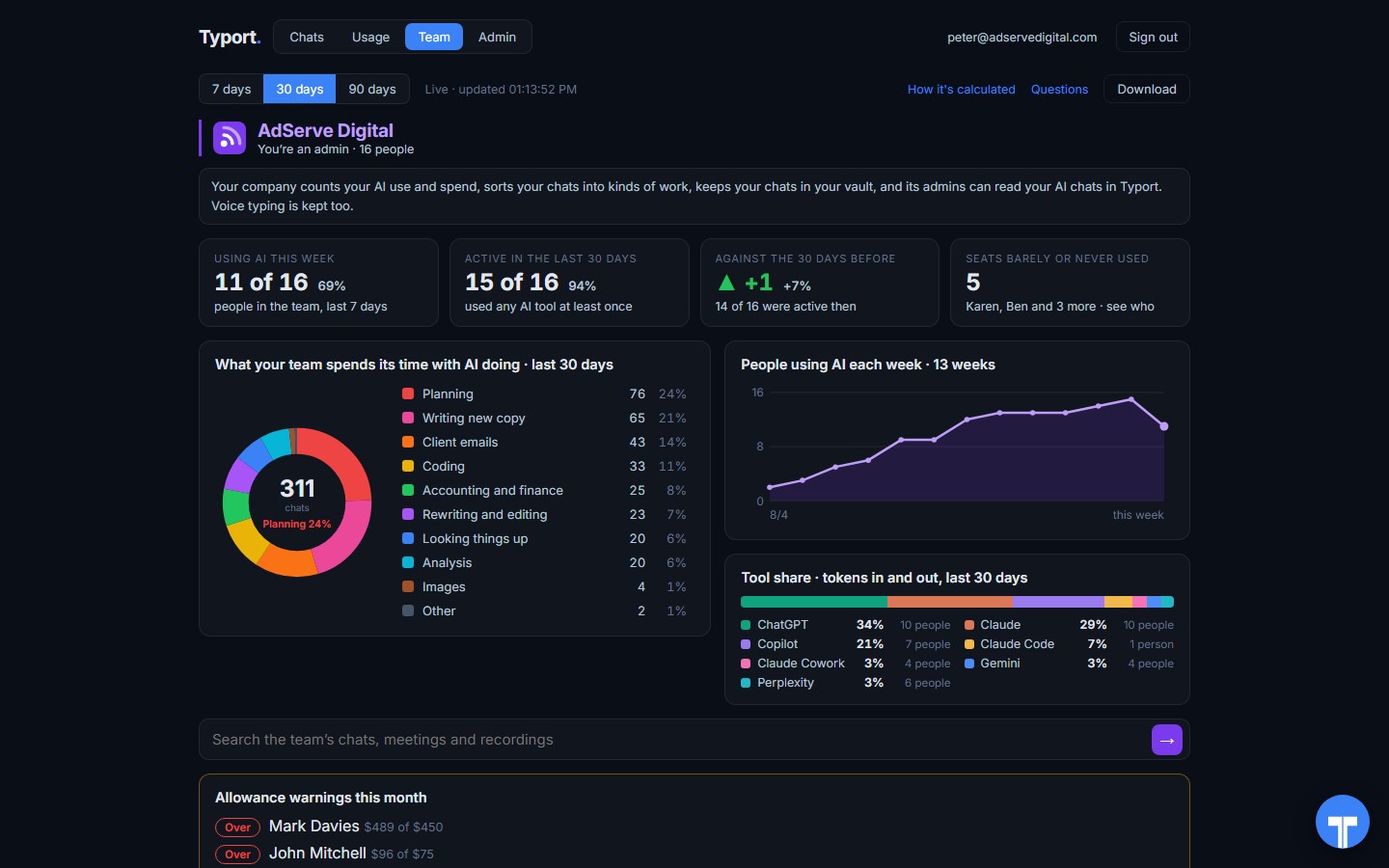
The team page
Who is using AI this week, what the work is, people using AI each week, tool share by AI tool, and allowance warnings for anyone near or over.
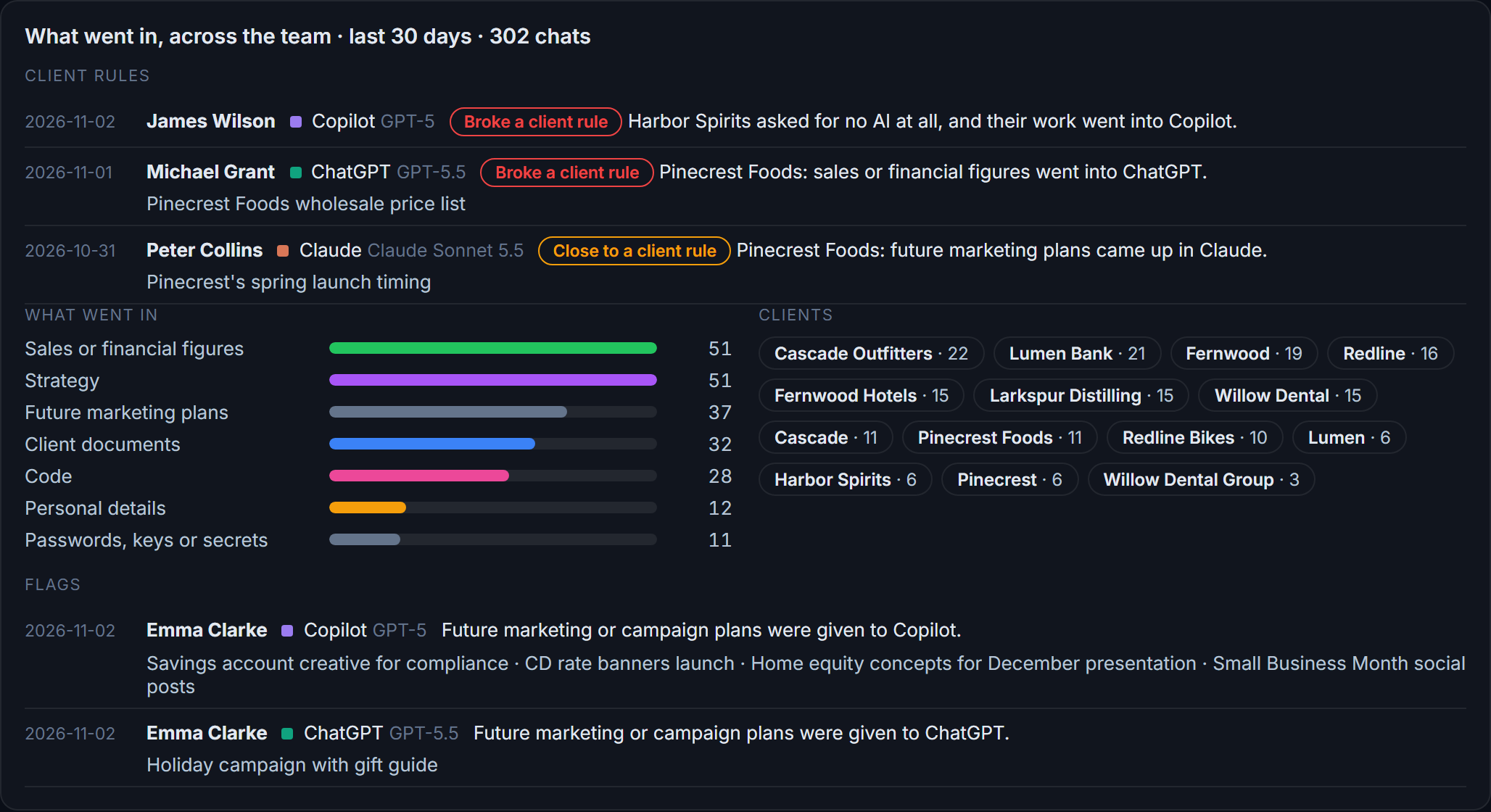
Flags and client rules
What went in across the team: sales figures, strategy, client documents, passwords and keys. Each chat that broke a client rule, or came close, is listed with the person and the tool.
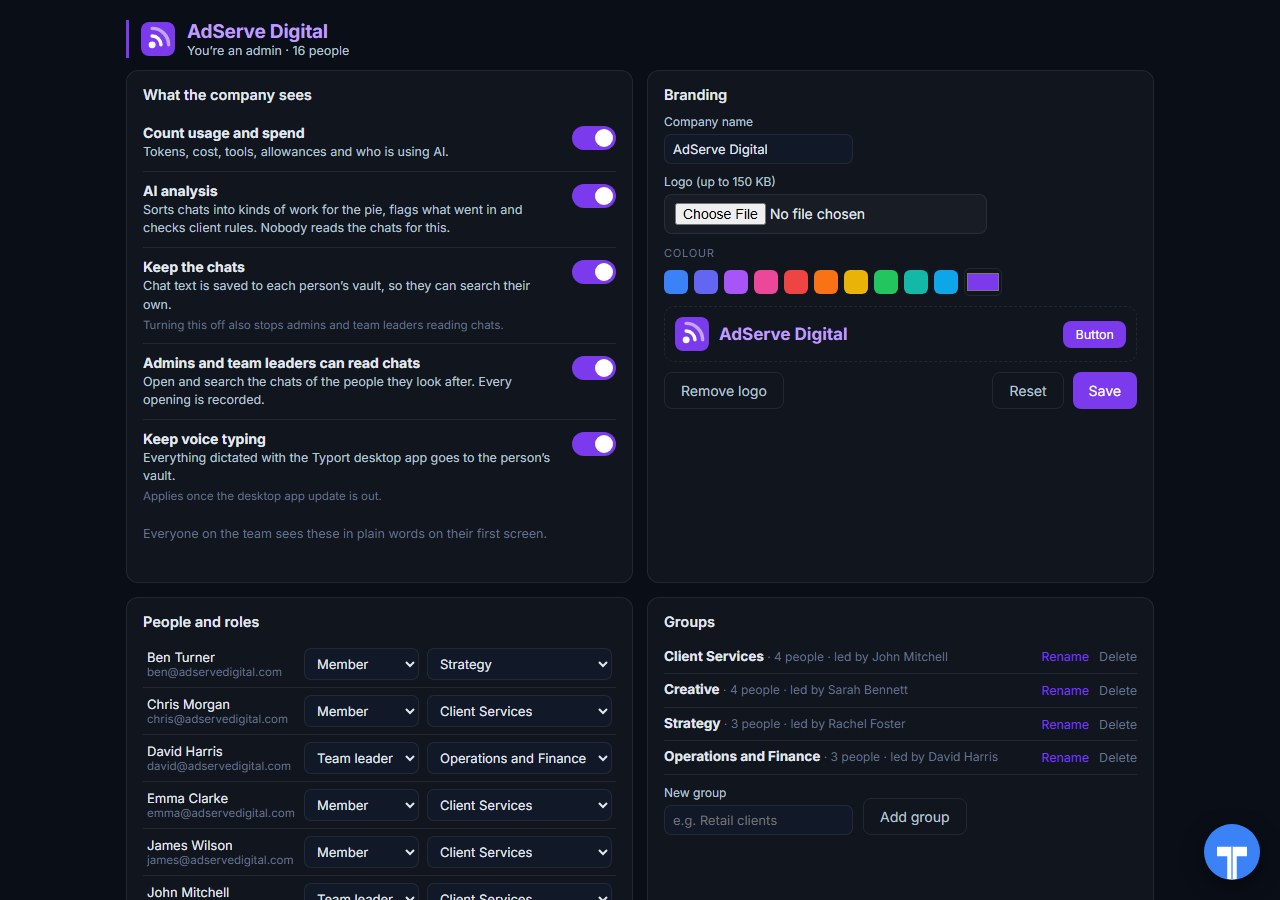
Five switches
Count usage and spend, AI analysis, keep the chats, let admins and team leaders read chats, keep voice typing. Every opening of a chat is recorded, and everyone sees the switches in plain words. Chats in the AI's own temporary or incognito mode are never collected.
Use them together
Defender decides which apps are allowed. Typort shows how the allowed ones are used. Keep Defender for discovery, risk scores and blocking unsanctioned AI apps. Add Typort to see who uses ChatGPT, Claude, Perplexity and Grok, how much, what it is costing, and what the work is.
They run side by side. Typort needs no change to your Defender setup. It is a browser extension and a sign in.
The team view runs on Typort's servers. It is free for a limited time and will move to Typort Pro later.
FAQ
Is Typort a replacement for Defender for Cloud Apps?
No. Defender for Cloud Apps is a cloud access security broker: it discovers apps, scores their risk and can block them. Typort shows how a team uses AI: usage and estimated spend per person, allowances, what the work is, flags and client rules. Many teams will want both.
Does Defender for Cloud Apps show what people type into AI apps?
Not on its own. Microsoft places prompt logging and data loss prevention for AI in Microsoft Purview DSPM for AI. Defender for Cloud Apps works from traffic logs: users, IP addresses, traffic and transactions per app.
Can Typort block a prompt?
No. Typort shows what went in after the fact, with flags and client rules marked broke or close. If you need a paste or a prompt stopped before it is sent, use a tool built to block.
Which AI tools does Typort see?
ChatGPT, Claude, Perplexity and Grok in the browser, through the Typort browser extension. Microsoft 365 Copilot capture is built and comes in the next extension update. It reads what is on the page, so it works on Business and Team seats and needs no API keys from the AI vendors.
Are the dollar figures exact?
No, they are estimates from the tokens in each chat at the AI vendor's API list price. A chat page cannot show system prompts, hidden reasoning, attachments or tool calls, so the figures are a floor. They are there to compare people and tools, not to replace the invoice.
Can staff see what the company sees?
Yes. The five switches are shown to everyone in plain words on their first screen, and every time an admin or team leader opens someone's chat, it is recorded. Chats in the AI's own temporary or incognito mode are never collected.
What does the team view cost?
The team view runs on Typort's servers. It is free for a limited time and will move to Typort Pro later.
Sources
Every Microsoft Defender for Cloud Apps fact on this page comes from Microsoft's own website and documentation, checked on 2 November 2026. Typort facts come from the product itself.
| "Defender for Cloud Apps has added more than a thousand generative AI-related apps to the catalog"; "View out-of-the-box risk assessments for each app, including 90+ risk factors"; "Sanction or unsanction (block) the usage of specific apps"; "You can even automatically unsanction apps that meet the criteria." | Microsoft Learn: discover AI apps |
| "Cloud discovery analyzes your traffic logs against the Microsoft Defender for Cloud Apps catalog of over 31,000 cloud apps"; "Discovery data is analyzed and updated four times a day." | Microsoft Learn: set up cloud discovery |
| "Check the top users and source IP addresses to identify which users are the most dominant users of cloud apps in your organization." | Microsoft Learn: discovered apps |
| "The time latency to block an app via Defender for Endpoint is up to three hours"; "Admins have the option to warn users when they access risky apps." | Microsoft Learn: govern with Defender for Endpoint |
| "Apps in the cloud app catalog are scored based on more than 90 risk factors." | Microsoft Learn: risk score |
| "Microsoft Defender for Cloud Apps is available as a standalone license and is also available as part of the following plans" | Microsoft Learn: Defender service description |
| Microsoft Defender Suite: $12.00 user/month, paid yearly, requires Microsoft 365 E3. Microsoft 365 E5: $60.00 user/month, paid yearly. Checked 2 November 2026. | Microsoft Defender pricing |
typort.com | Typort Business | Typort for compliance | AI usage monitoring | Privacy | Terms
© 2024-2026 Human Compute, LLC. Microsoft, Microsoft Defender and Microsoft 365 are trademarks of the Microsoft group of companies. Typort is not affiliated with or endorsed by Microsoft.