What each one is for
They answer different questions. Microsoft's reports ask "how is Copilot doing?". Typort asks "how is the team using ChatGPT, Claude, Perplexity and Grok, and what is it costing?".
Microsoft's Copilot reports are good at
- Enabled and active Copilot users, and prompts submitted, app by app, from Word and Excel to Outlook and Teams
- A per-user table of Copilot prompts, active days and last activity date in each app, exported to .csv
- Readiness, adoption, impact and sentiment pages for leaders and managers in the Copilot Dashboard
- Group comparisons by organization and job function, with a minimum group size to protect privacy
- Copilot Credits and GitHub Copilot credits in the Consumption Dashboard, with spending policy limits
- Advanced Reporting with more than 100 Copilot metrics, Power BI templates and custom queries
Typort is good at
- Who is using ChatGPT, Claude, Perplexity and Grok, how much, and which tools, per person and over 13 weeks
- Estimated spend per person, with allowances and near or over warnings
- A pie of what the team spends its time with AI doing
- Flags for what went in, and client rules marked broke or close
- Searching the team's chats and meetings, and asking questions of them with Ask Typort
- Five plain switches for what the company sees, shown to everyone on their first screen
What Microsoft's Copilot reports show
From Microsoft's own documentation. Microsoft groups these under Copilot Analytics.
Microsoft 365 admin center: Microsoft Copilot usage report. Enabled users, active users, active users rate, total prompts submitted and prompts per user, with adoption by app. A table lists each licensed user's prompts, active days and last activity date in each Copilot app. Views cover the last 7, 28, 90 or 180 days, and a day's activity typically shows within 48 hours. User names are hidden by default.
Microsoft Copilot Dashboard, in the Viva Insights web app. Readiness, adoption, impact and sentiment for employees with a Copilot licence, over the previous 28 days, with up to a six-day delay. Leaders see the company and their groups; managers see their own teams. Group metrics are hidden for groups smaller than the minimum group size, which is 10 by default and can be set no lower than five.
Copilot Analytics with Viva Insights. Advanced Reporting adds Power BI templates and custom queries over more than 100 Copilot metrics, run by people with the Insights Analyst role. With 50 or more Copilot licences, or 50 Viva Insights licences, the dashboard adds agent insights, benchmarks, sentiment from surveys and week and month trendlines.
Consumption Dashboard. Copilot Credits used by Copilot Cowork and the Work IQ API, and GitHub AI Credits for GitHub Copilot, with usage by team and users near their spending limit. Microsoft says these figures are "for reference only".
What Microsoft's reports need
Copilot licences. Microsoft prices Microsoft 365 Copilot at $30.00 per user a month, paid yearly, as an add-on to a qualifying Microsoft 365 plan. For business plans, Microsoft lists the Microsoft 365 Copilot Business add-on from $21.00 per user a month, paid yearly, offered at $18.00 for the first year until 31 December 2026.
Viva Insights, for some features. Microsoft says a Viva Insights subscription is not required for the Copilot Dashboard. With 1 to 49 Copilot licences and no Viva Insights, some features are left out, among them benchmarks, trendlines and the group view for managers. Microsoft prices Viva Insights at $4.00 per user a month, paid yearly.
The right role. The admin center report is for roles such as Global Administrator, Reports Reader and AI Administrator. The Copilot Dashboard opens automatically for senior leaders in tenants of at least 2,500 users, for Global Administrators, and for enabled managers, delegates and Insights Analysts.
Typort vs Microsoft's Copilot reports, side by side
| Microsoft's Copilot reports | Typort | |
|---|---|---|
| ChatGPT, Claude, Perplexity, Grok | Not among the tools these reports measure | All four, in the browser, in one view |
| Microsoft Copilot itself | Yes, every Copilot app, from Word to Teams | Copilot capture comes in the next extension update |
| Usage per person | Copilot prompts and active days per user, names hidden by default | Tokens, tools and active days per person, with adoption over 13 weeks |
| Spend | Copilot Credits and GitHub AI Credits; seats at a flat licence price | Estimated spend per person and per tool, with an allowance and a near or over warning |
| What the work is | Copilot actions per app, and Cowork usage by task | Chats sorted into kinds of work, shown as a pie |
| Flags and client rules | Not in these reports | Flags for what went in, and chats marked broke a client rule or close to one |
| Small teams | Groups under the minimum group size, 10 by default, are hidden in the dashboard | Every person, by name, with the switches shown to everyone |
| What it needs | Copilot licences, an admin or leader role, Viva Insights for some features | The Typort browser extension and a sign in |
See it in Typort
A walk through the team page: ChatGPT, Claude, Perplexity and Grok in one view, with usage and estimated spend per person and what the work is.
What you get
Screens from a sample 16-person agency.
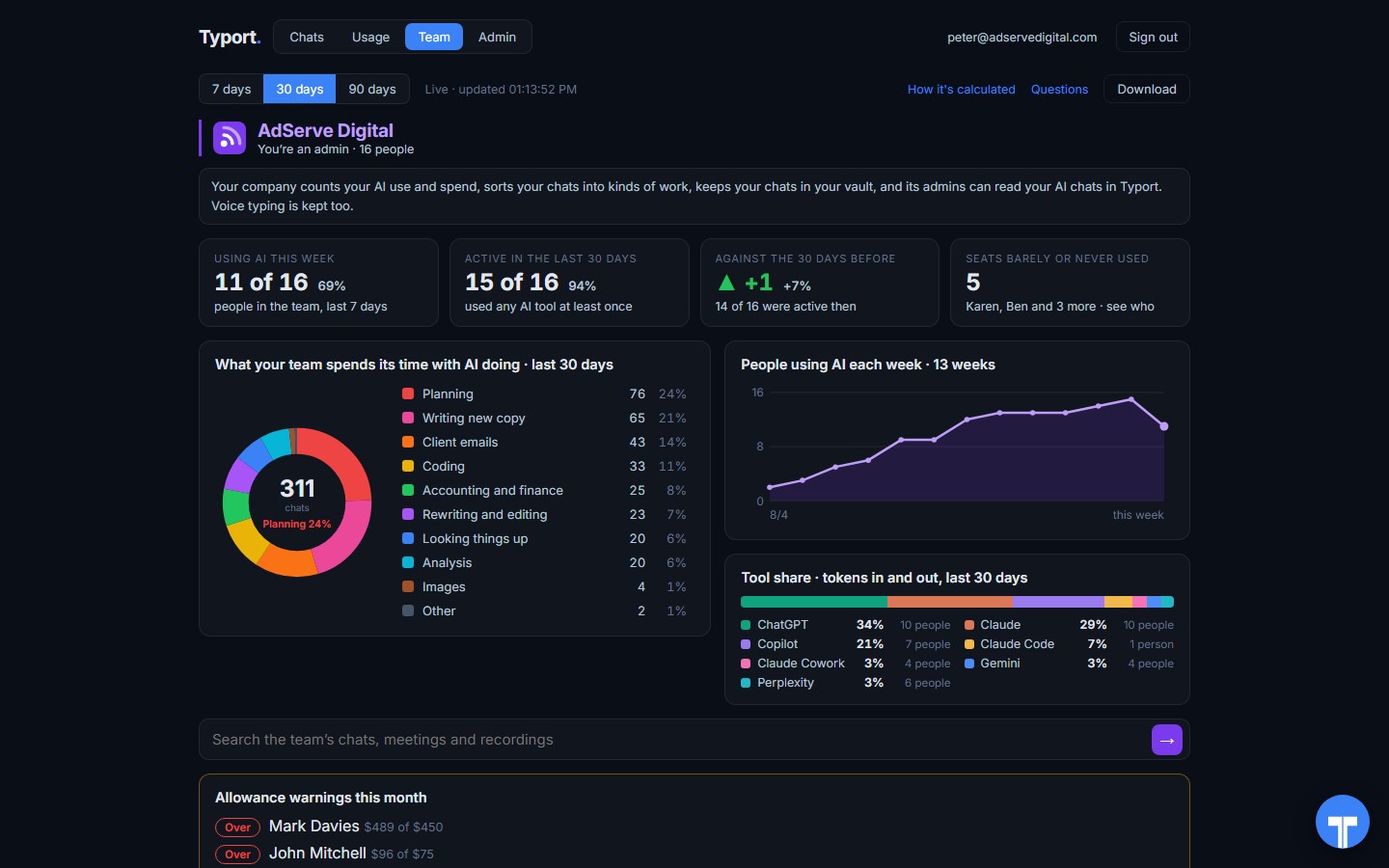
The team page
Who is using AI this week, what the work is, people using AI each week, tool share by AI tool, and allowance warnings for anyone near or over.
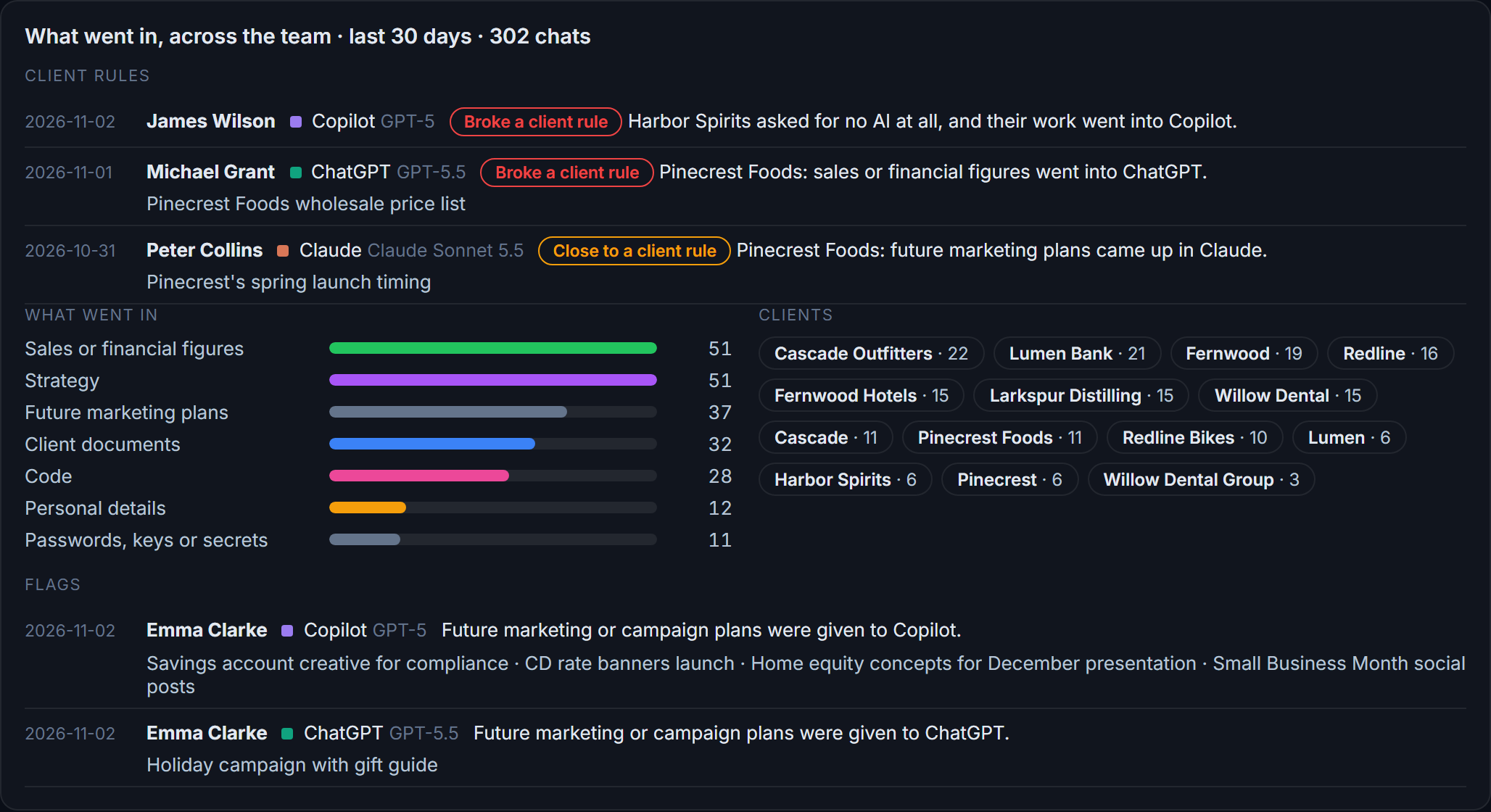
Flags and client rules
What went in across the team: sales figures, strategy, client documents, passwords and keys. Each chat that broke a client rule, or came close, is listed with the person and the tool.
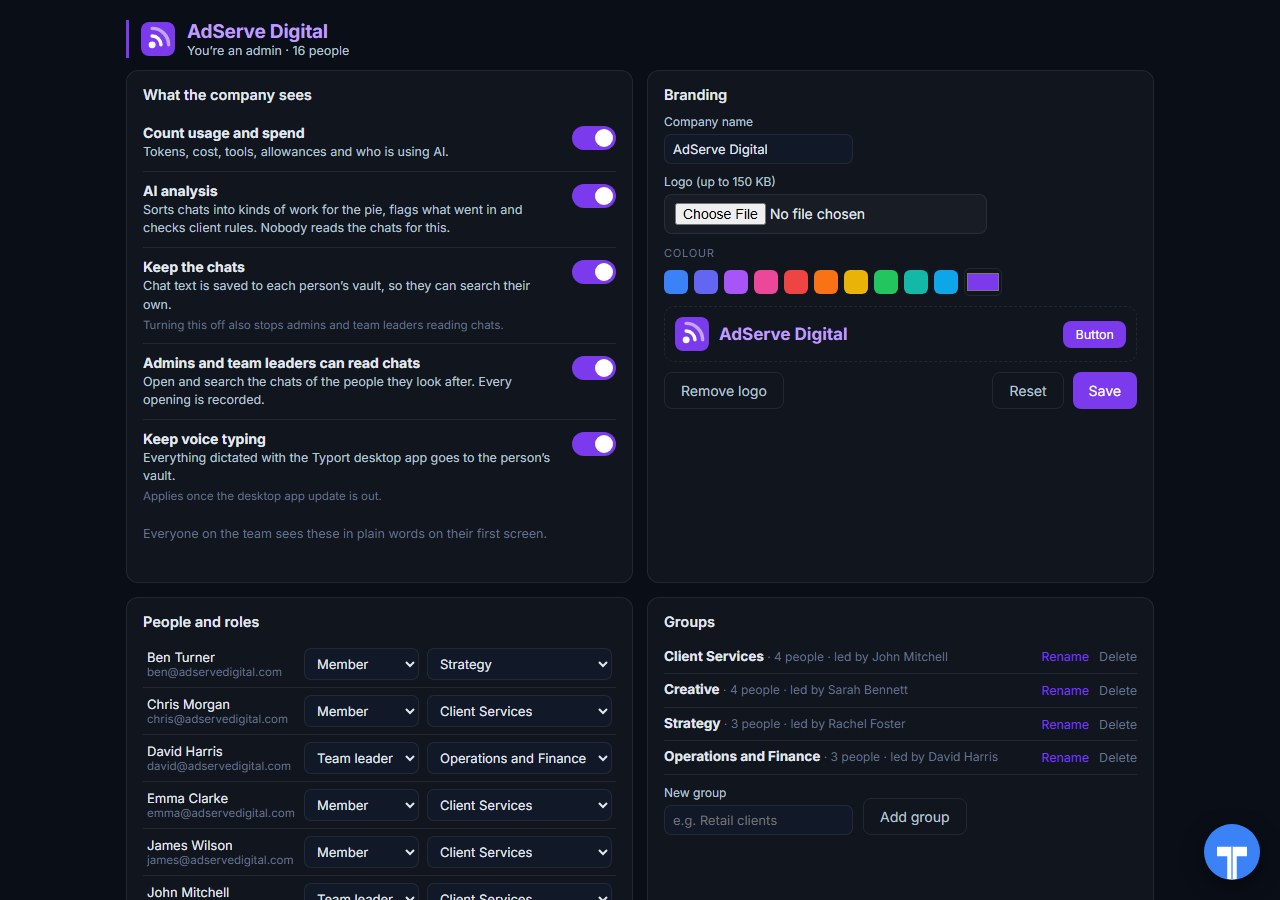
Five switches
Count usage and spend, AI analysis, keep the chats, let admins and team leaders read chats, keep voice typing. Every opening of a chat is recorded, and everyone sees the switches in plain words. Chats in the AI's own temporary or incognito mode are never collected.
Use them together
For Copilot itself, Microsoft's reports are the place today. They see every Copilot app, from Word to Teams, with adoption, impact and credits. Typort's Copilot capture is built and comes in the next extension update.
Typort adds the other tools in one view. Most teams do not use Copilot alone. Typort shows who is using ChatGPT, Claude, Perplexity and Grok, what it is costing, what the work is, and which client's material is going where. It needs no change to your Microsoft 365 setup, and people sign in with Microsoft or a work email.
The team view runs on Typort's servers. It is free for a limited time and will move to Typort Pro later.
FAQ
Is Typort a replacement for the Microsoft Copilot Dashboard?
No. Microsoft's reports measure Microsoft Copilot in depth, app by app, from Word to Teams. Typort shows how a team uses ChatGPT, Claude, Perplexity and Grok: usage and estimated spend per person, what the work is, flags and client rules. A team that uses Copilot and other AI tools will want both.
Does Typort see Microsoft Copilot?
Not yet. Microsoft 365 Copilot capture is built and comes in the next extension update. Until then, Microsoft's own reports are the place to see Copilot usage.
Do Microsoft's Copilot reports show ChatGPT, Claude, Perplexity or Grok?
Microsoft's documentation describes these reports measuring Microsoft Copilot, Copilot Chat, agents, and Copilot and GitHub AI credits. ChatGPT, Claude, Perplexity and Grok are not among the tools they measure.
What do Microsoft's Copilot reports cost?
Microsoft says a Viva Insights subscription is not required for the Copilot Dashboard, but which features you get depends on how many Copilot licences you have. Microsoft lists Microsoft 365 Copilot at $30.00 per user a month, paid yearly, as an add-on to a qualifying Microsoft 365 plan, and Microsoft Viva Insights at $4.00 per user a month, paid yearly. Prices checked 2 November 2026.
Why are some groups blank in the Copilot Dashboard?
Microsoft hides group metrics for groups smaller than the minimum group size, which is 10 employees by default and must be at least five. In the admin center report, user names are hidden by default until a Global Administrator turns that off.
Are Typort's dollar figures exact?
No, they are estimates from the tokens in each chat at the AI vendor's API list price. They are there to compare people and tools, not to replace the invoice.
Can staff see what the company sees?
Yes. The five switches are shown to everyone in plain words on their first screen, and every time an admin or team leader opens someone's chat, it is recorded. Chats in the AI's own temporary or incognito mode are never collected.
What does the team view cost?
The team view runs on Typort's servers. It is free for a limited time and will move to Typort Pro later.
Sources
Every Microsoft fact on this page comes from Microsoft's own documentation and pricing pages, checked on 2 November 2026. Typort facts come from the product itself.
| Enabled Users, Active Users, Active users rate, Total prompts submitted, Average prompts submitted per user, Adoption by app; per-user "Prompts submitted (any app)", "Active Days" and last activity date per Copilot app; "the last 7, 28, 90, or 180 days"; "typically becomes available within 48 hours"; "export the report data into an Excel .csv file". | Microsoft Learn: Microsoft Copilot usage report |
| Roles that can view usage reports include Global Administrator, Reports Reader and AI Administrator; "By default, all reports hide user information such as usernames, display names, groups, and sites"; "Global administrators can update the settings to display concealed information". | Microsoft Learn: admin center usage reports |
| "Readiness, adoption, impact, and sentiment"; "data over the previous 28 days. There's up to a six-day data delay"; "Managers see adoption and impact insights specific to their own teams"; "metrics aren't shown for groups that are smaller than the minimum group size"; automatic access for senior leaders where "The tenant has at least 2,500 users"; feature availability for 1 to 49 Copilot licences versus 50 or more; "No, a Viva Insights subscription is not required to access Copilot Dashboard." | Microsoft Learn: Microsoft Copilot Dashboard |
| Group-level metrics "for groups that meet or exceed the minimum group size you set, which by default is 10 employees"; the size "must be at least five". | Microsoft Learn: manage Copilot Dashboard settings |
| Copilot Analytics covers the admin center report, the Copilot Dashboard, the Agent Dashboard, the Consumption Dashboard, Copilot Analytics reports and Advanced Reporting; "more than 100 Copilot metrics"; "Only users with the Insights Analyst role can set up and run customized queries." | Microsoft Learn: Copilot Analytics introduction |
| "how Copilot Credits and GitHub AI Credits are consumed across agents, services, and users"; "Consumption data is currently available only for Copilot Cowork and the Work IQ API"; "Credit usage information in this dashboard is for reference only." | Microsoft Learn: Consumption Dashboard |
| Microsoft 365 Copilot: "$30.00 user/month, paid yearly", "A separate license for a qualifying Microsoft 365 plan is required." Microsoft 365 Copilot Business (add-on): "Originally starting from $21.00 now starting from $18.00", paid yearly, for the first year, 1 July to 31 December 2026. Checked 2 November 2026. | Microsoft 365 Copilot enterprise, Microsoft 365 Copilot pricing |
| Microsoft Viva Insights: "$4.00 user/month, paid yearly (Annual commitment)". Checked 2 November 2026. | Microsoft Viva Insights |
typort.com | Typort Business | Typort for compliance | AI usage monitoring | Privacy | Terms
© 2024-2026 Human Compute, LLC. Microsoft, Microsoft 365, Microsoft Copilot and Microsoft Viva are trademarks of the Microsoft group of companies. Typort is not affiliated with or endorsed by Microsoft.