What each one is for
They answer different questions. Cledara asks "what is our software costing, and who uses it?". Typort asks "what is the team doing with AI, and what went in?".
Cledara is good at
- A virtual card for each subscription, with spend limits and budgets
- Renewal reminders with what similar companies pay
- Approval workflows for new tools, routed to finance and IT
- Finding seats nobody uses, and taking them back
- Capturing invoices and syncing them to Xero, QuickBooks and NetSuite
- Daily AI API spend against a budget, for OpenAI, Anthropic and Cursor
Typort is good at
- Who is using AI, how much, and which tools, per person and over time
- Estimated spend per person, with allowances and warnings
- A pie of what the team spends its time with AI doing
- Flags for what went in, and client rules marked broke or close
- Searching the team's chats and meetings, and asking questions of them with Ask Typort
- Five plain switches for what the company sees, shown to everyone on their first screen
What Cledara does for AI
From Cledara's own website.
AI API spend. Cledara says it "connects to each AI provider, tracks usage daily against the budget you set", and that its AI dashboard tracks tools "such as OpenAI, Anthropic and Cursor".
Who used which tool. Its Engage browser extension finds the tools people use. Cledara says: "To gather usage insights we gather the username and timestamp only." It "cannot track behavior, history, website content".
Paying and approving. A virtual card per subscription, invoice capture, and requests routed to finance and IT for approval.
What it costs
Published prices, in pounds. Cledara lists Basic at £75 a month for up to 20 apps, Premium at £200 a month for up to 75 apps, and Pro from £500 a month, with add-ons.
Typort vs Cledara, side by side
| Cledara | Typort | |
|---|---|---|
| Pay for and approve software | Virtual cards, approvals and invoice sync | Not something Typort does |
| AI API spend | Daily, against a budget, for OpenAI, Anthropic and Cursor | Not the focus. Typort counts the chats people have, not the API bills |
| Chat seat usage per person | Username and time of use, from its browser extension | Tokens, tools and active days per person, with adoption over 13 weeks |
| Spend on chat seats | Subscription cost per tool | Estimated spend per person and per tool for chat seats, with an allowance and a near or over warning |
| What the work is | Not collected: it records the username and timestamp only | Chats sorted into kinds of work, from client emails to coding, shown as a pie |
| What went in | Not collected | Flags for personal details, client figures, passwords and keys, and rules per client marked broke or close |
| What it needs | Accounting, HR and identity connections, and the Engage extension | The Typort browser extension and a sign in with Microsoft or a work email. No API keys |
See it in Typort
A walk through the team page: who uses which AI tool, what it is costing, and what the work is.
What you get
The team page, flags and client rules, and the five switches.
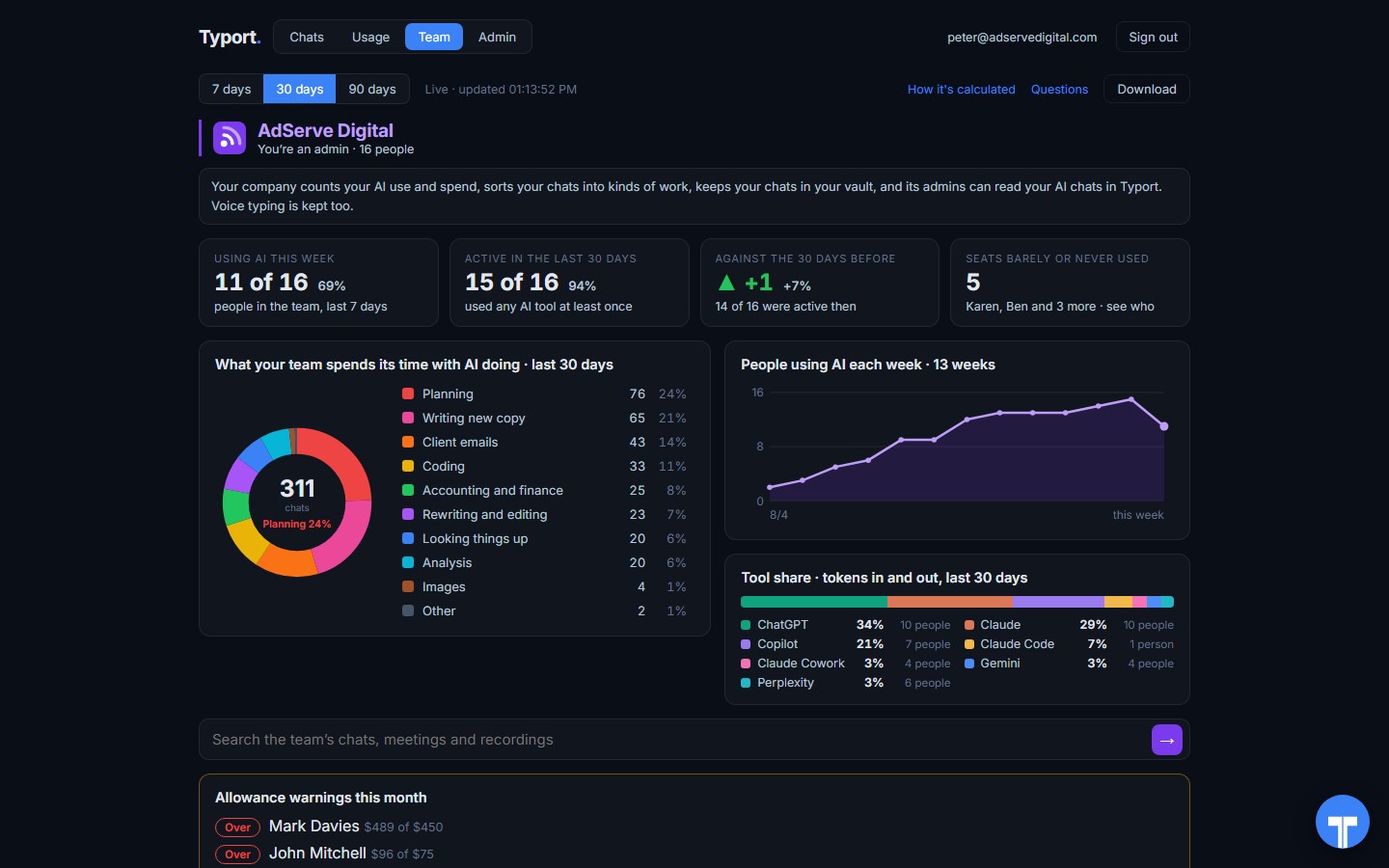
The team page
Who is using AI this week, what the work is, people using AI each week, tool share by AI tool, and allowance warnings for anyone near or over.
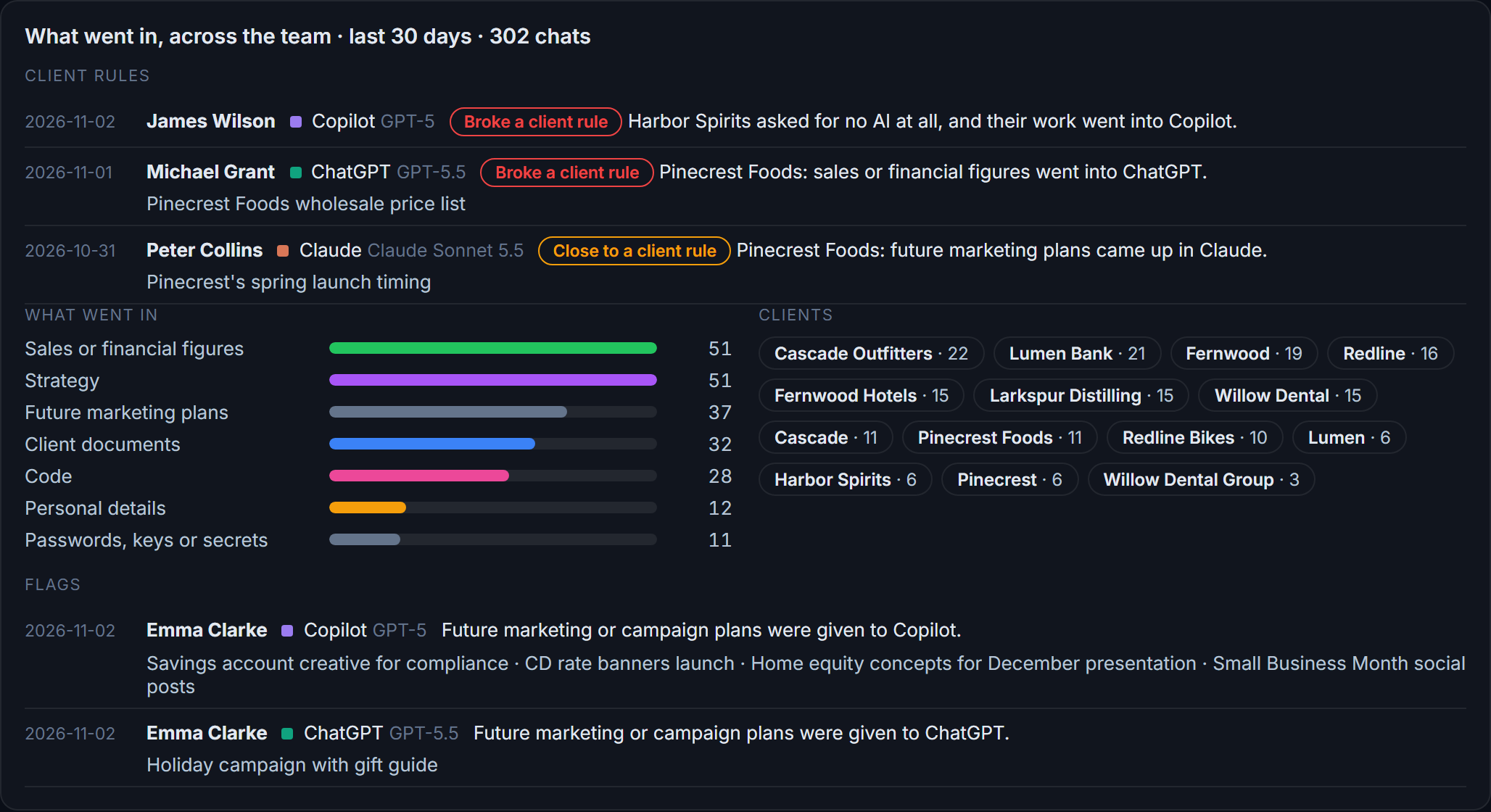
Flags and client rules
What went in across the team: sales figures, strategy, client documents, passwords and keys. Each chat that broke a client rule, or came close, is listed with the person and the tool.
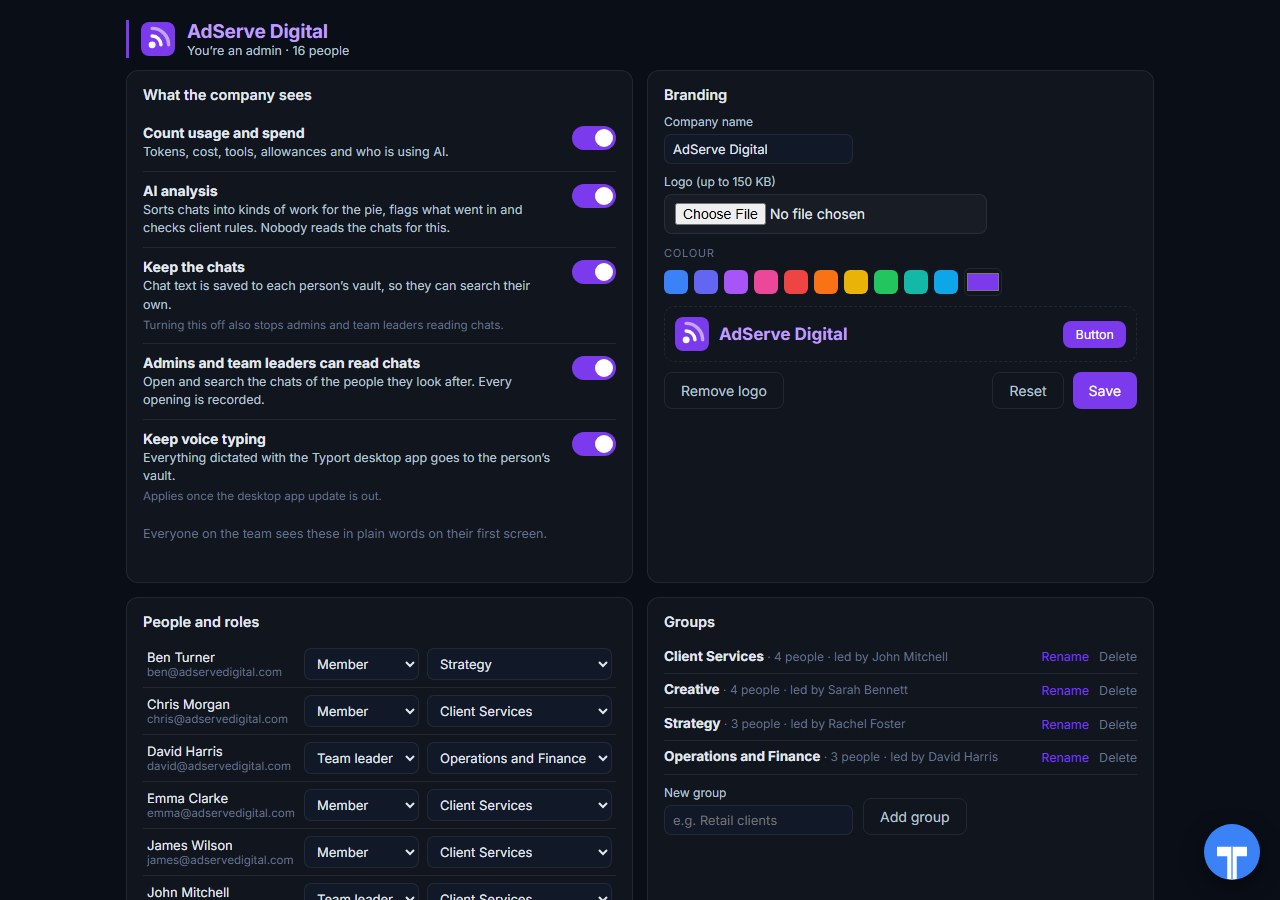
Five switches
Count usage and spend, AI analysis, keep the chats, let admins and team leaders read chats, keep voice typing. Every opening of a chat is recorded, and everyone sees the switches in plain words. Chats in the AI's own temporary or incognito mode are never collected.
Use them together
Cledara looks after the software bill. Typort looks inside the AI seats. Keep Cledara for cards, invoices, renewals, approvals and AI API budgets. Add Typort to see who actually uses ChatGPT, Claude, Perplexity and Grok, how much, what the work is, and what went in.
They do not overlap much. A spend tool counts licences, logins and invoices across hundreds of apps. Typort reads the AI chat pages people use, so it can tell you what the seats are being used for.
The team view runs on Typort's servers. It is free for a limited time and will move to Typort Pro later.
FAQ
Is Typort a replacement for Cledara?
No. Cledara pays for, approves and tracks software subscriptions and AI API spend. Typort shows how a team uses AI chat tools: usage and estimated spend per person, what the work is, flags and client rules.
Does Cledara see what people type into AI tools?
No. Cledara says its extension gathers the username and timestamp only, and cannot track website content.
Does Typort show unused AI seats?
Yes, for the AI tools it sees. The team page lists seats barely or never used, with names, and how many people used AI this week and in the last 30 days.
Which AI tools does Typort see?
ChatGPT, Claude, Perplexity and Grok in the browser, through the Typort browser extension. Microsoft 365 Copilot capture is built and comes in the next extension update. It reads what is on the page, so it works on Business and Team seats and needs no API keys from the AI vendors.
Are the dollar figures exact?
No, they are estimates from the tokens in each chat at the AI vendor's API list price. A chat page cannot show system prompts, hidden reasoning, attachments or tool calls, so the figures are a floor. They are there to compare people and tools, not to replace the invoice.
Can staff see what the company sees?
Yes. The five switches are shown to everyone in plain words on their first screen, and every time an admin or team leader opens someone's chat, it is recorded. Chats in the AI's own temporary or incognito mode are never collected.
What does the team view cost?
The team view runs on Typort's servers. It is free for a limited time and will move to Typort Pro later.
Sources
Every Cledara fact on this page comes from Cledara's own website and documentation, checked on 2 November 2026. Typort facts come from the product itself.
| "Cledara connects to each AI provider, tracks usage daily against the budget you set"; "A virtual card for each subscription rather than each person."; "A reminder before every renewal, plus what similar companies pay" | cledara.com |
| "To gather usage insights we gather the username and timestamp only."; "We do not collect any other information and cannot track behavior, history, website content, passwords or anything else." | Cledara Engage |
| "Cledara's AI dashboard tracks usage-based AI tools such as OpenAI, Anthropic and Cursor, with daily spend and budgets." | Cledara blog |
| "Basic" "£75/mo", "Premium" "£200/mo", "Pro" "from £500/mo". Checked 2 November 2026. | Cledara pricing |
typort.com | Typort Business | Typort for compliance | AI usage monitoring | Privacy | Terms
© 2024-2026 Human Compute, LLC. Cledara is a trademark of its respective owner. Typort is not affiliated with or endorsed by Cledara.