What each one is for
They answer different questions. Netskope asks "is our AI use safe, and which apps are allowed?". Typort asks "how is the team using AI, and what is it costing?".
Netskope is good at
- Identifying more than 3,300 generative AI apps, and scoring the risk of more than 370
- Telling a personal ChatGPT from the company one, and treating them differently
- Controlling actions inside AI apps: upload, download, copy, print
- Inspecting every prompt and response with DLP, across more than 3,000 data classifiers
- Coaching pop-ups that send people to approved AI tools
- Finding AI agents, local models and AI browser extensions on each computer
Typort is good at
- Who is using AI, how much, and which tools, per person and over time
- Estimated spend per person, with allowances and warnings
- A pie of what the team spends its time with AI doing
- Flags for what went in, and client rules marked broke or close
- Searching the team's chats and meetings, and asking questions of them with Ask Typort
- Five plain switches for what the company sees, shown to everyone on their first screen
What Netskope does with AI
From Netskope's own website and documentation.
Finds and scores AI apps. Netskope says it "can identify 3,300+ Gen AI apps to control usage", and that its Cloud Confidence Index "covers over 370 genAI apps and 82,000+ SaaS applications".
Shows activity. Its AI dashboard shows "the various applications used, the instance type, and what actions were taken, such as login, post, upload, download, etc."
Protects prompts. Netskope One DLP and AI Guardrails "inspect every prompt and response in real time", and coaching pop-ups steer people "toward corporate-approved AI tools."
Classifies by risk. Its AI inspection engine classifies prompts and responses "by mapping them to MITRE ATLAS and OWASP Top10 LLM frameworks". Netskope's pages do not show AI spend or sort prompts by kind of work.
What it needs
Traffic steered through Netskope. The Netskope Client "is the primary method of steering traffic to the Netskope cloud for real-time inspection", installed through SCCM, Intune or Jamf, with SCIM to Microsoft Entra ID or Okta for production.
A demo. Netskope publishes no price, and offers a demo.
Typort vs Netskope, side by side
| Netskope | Typort | |
|---|---|---|
| Block, control or coach | Yes: block apps, control actions, coach, DLP on prompts | No. Typort shows what went in after the fact |
| App risk scores | More than 370 AI apps in its Cloud Confidence Index | Not something Typort does |
| Usage per person | Apps, instances and actions, and top users by policy event | Tokens, tools and active days per person, with adoption over 13 weeks |
| Spend | Not on Netskope's website | Estimated spend per person, with an allowance and a near or over warning |
| What the work is | Risk categories mapped to MITRE ATLAS and OWASP | Chats sorted into kinds of work, from client emails to coding, shown as a pie |
| Client rules | DLP policies on kinds of sensitive data | Rules per client, with chats marked broke a client rule or close to one |
| What it needs | The Netskope Client on every device, steering traffic to its cloud | The Typort browser extension and a sign in with Microsoft or a work email. No API keys |
| Who sees what | Admin roles in the Netskope console | Five switches, shown in plain words to everyone on the team |
See it in Typort
A walk through the team page: usage and estimated spend per person, what the work is, and the chats that broke or came close to a client rule.
What you get
The team page, flags and client rules, and the five switches.
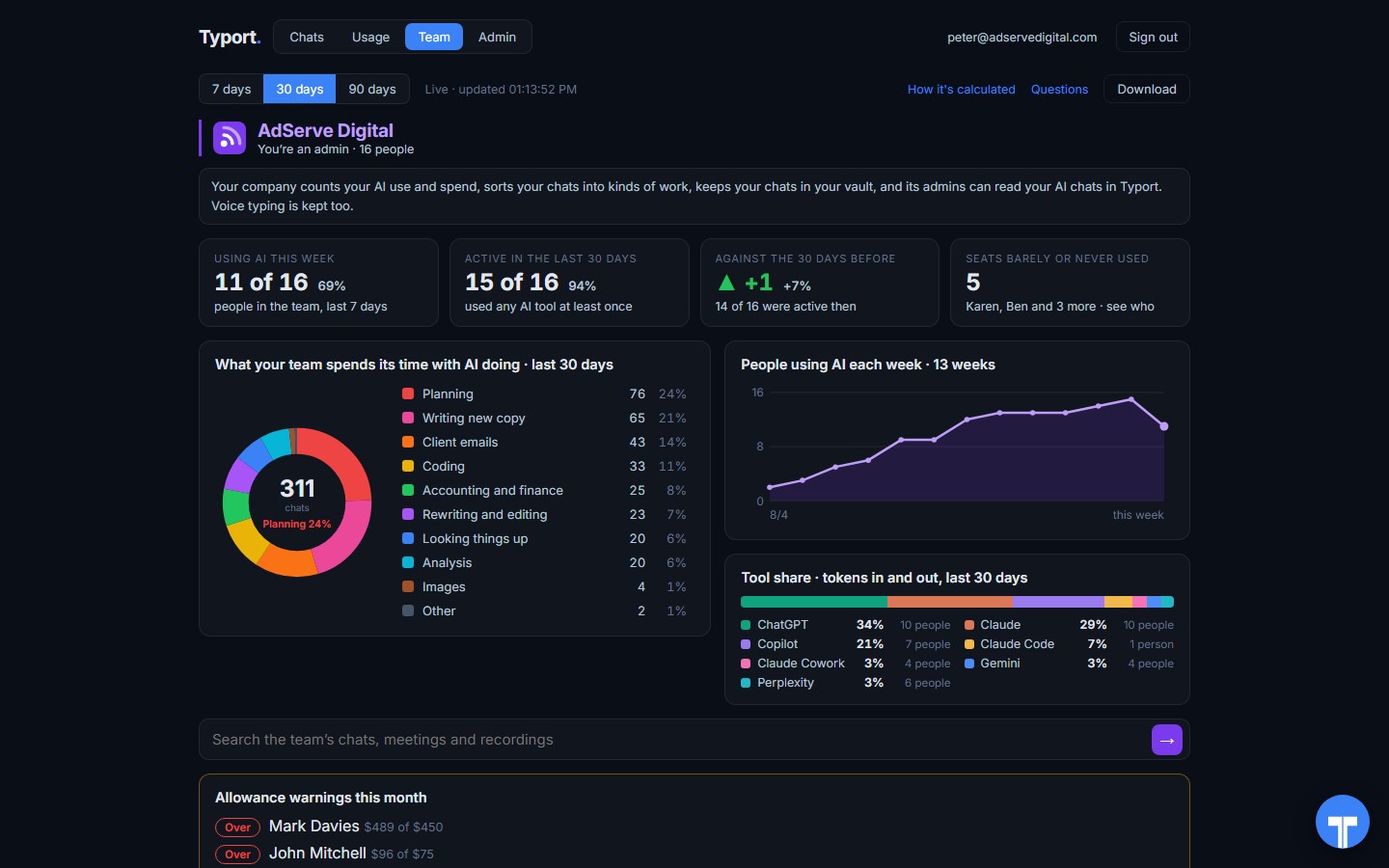
The team page
Who is using AI this week, what the work is, people using AI each week, tool share by AI tool, and allowance warnings for anyone near or over.
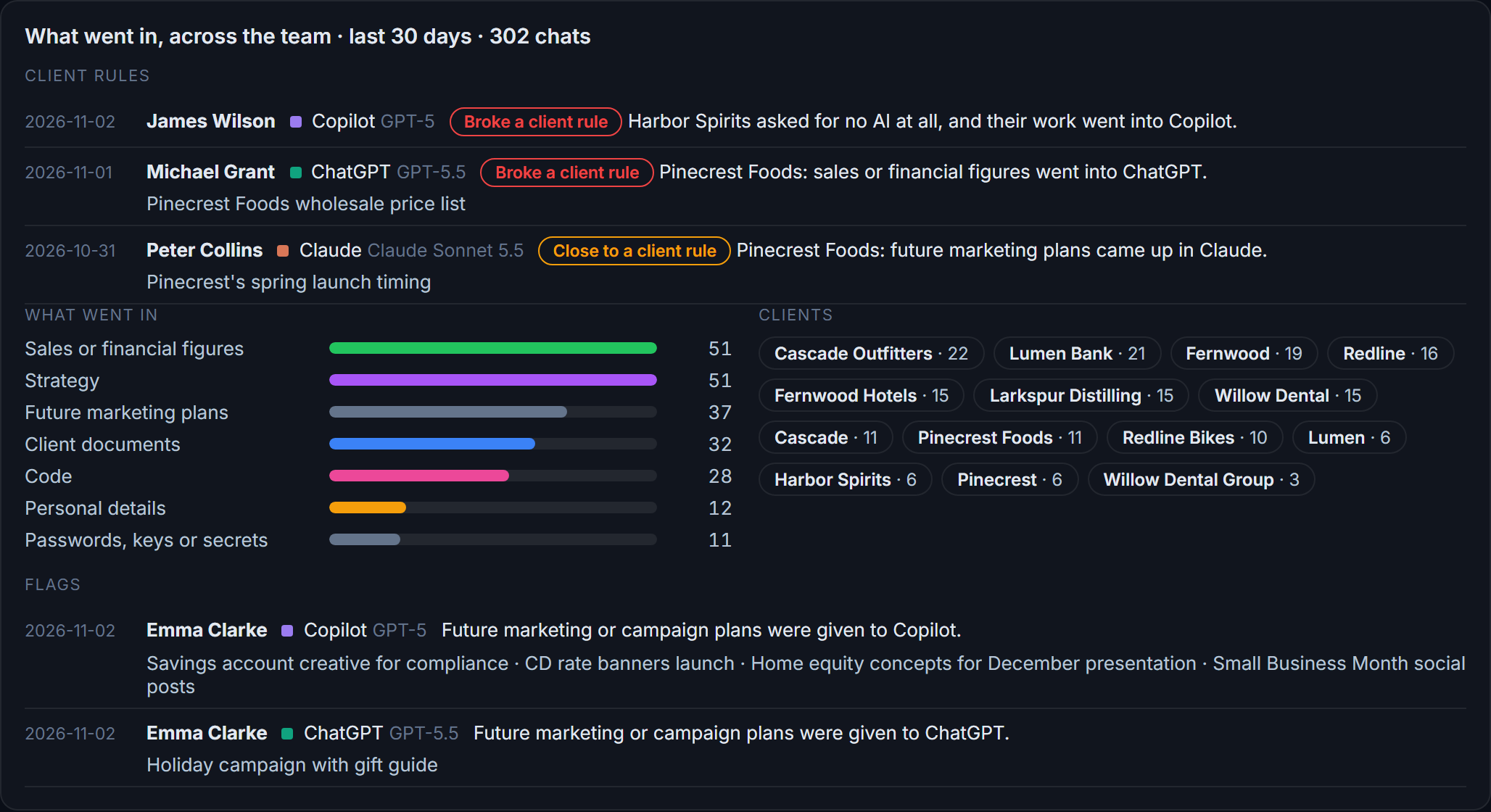
Flags and client rules
What went in across the team: sales figures, strategy, client documents, passwords and keys. Each chat that broke a client rule, or came close, is listed with the person and the tool.
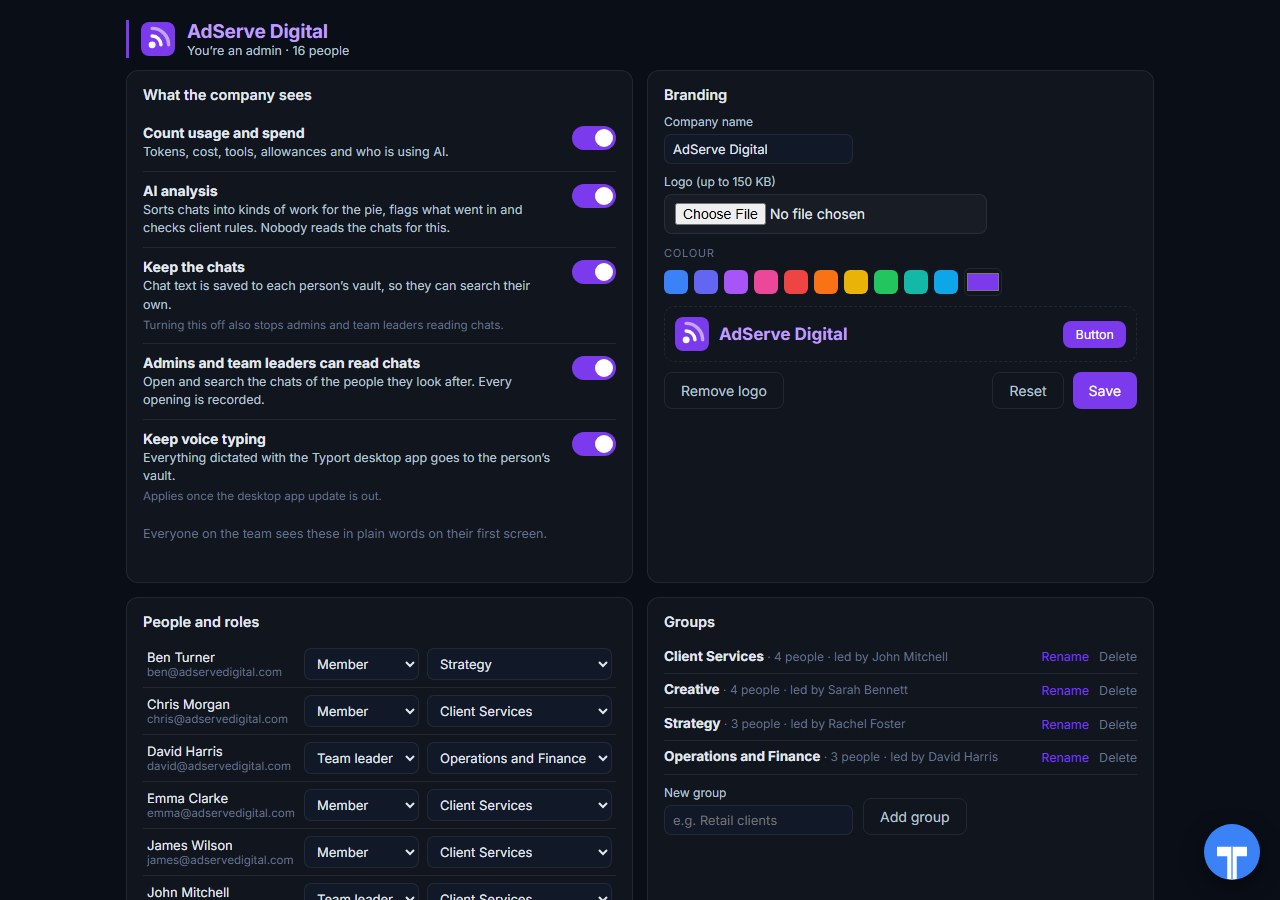
Five switches
Count usage and spend, AI analysis, keep the chats, let admins and team leaders read chats, keep voice typing. Every opening of a chat is recorded, and everyone sees the switches in plain words. Chats in the AI's own temporary or incognito mode are never collected.
Use them together
Netskope guards the traffic. Typort explains the work. Keep Netskope to score AI apps, control actions and stop sensitive data. Add Typort to see who uses which AI tool, how much, what it is costing, and what the work is.
They run side by side. Typort is a browser extension and a sign in. It needs no change to your Netskope steering or policies.
The team view runs on Typort's servers. It is free for a limited time and will move to Typort Pro later.
FAQ
Is Typort a replacement for Netskope?
No. Netskope is a security platform: it steers traffic, scores apps, controls actions and stops data loss. Typort shows how a team uses AI: usage and estimated spend per person, allowances, what the work is, flags and client rules.
Does Netskope show AI spend per person?
Not on Netskope's website. It shows the AI apps used, the actions taken and policy events per user.
Can Typort block a prompt?
No. Typort shows what went in after the fact, with flags and client rules marked broke or close. If you need a paste or a prompt stopped before it is sent, use a tool built to block.
Which AI tools does Typort see?
ChatGPT, Claude, Perplexity and Grok in the browser, through the Typort browser extension. Microsoft 365 Copilot capture is built and comes in the next extension update. It reads what is on the page, so it works on Business and Team seats and needs no API keys from the AI vendors.
Are the dollar figures exact?
No, they are estimates from the tokens in each chat at the AI vendor's API list price. A chat page cannot show system prompts, hidden reasoning, attachments or tool calls, so the figures are a floor. They are there to compare people and tools, not to replace the invoice.
Can staff see what the company sees?
Yes. The five switches are shown to everyone in plain words on their first screen, and every time an admin or team leader opens someone's chat, it is recorded. Chats in the AI's own temporary or incognito mode are never collected.
What does the team view cost?
The team view runs on Typort's servers. It is free for a limited time and will move to Typort Pro later.
Sources
Every Netskope fact on this page comes from Netskope's own website and documentation, checked on 2 November 2026. Typort facts come from the product itself.
| "Netskope can identify 3,300+ Gen AI apps to control usage." | Netskope docs: AI security |
| "Netskope Cloud Confidence Index (CCI) covers over 370 genAI apps and 82,000+ SaaS applications"; "what actions were taken, such as login, post, upload, download, etc."; "inspect every prompt and response in real time"; coaching "steering them toward corporate-approved AI tools." | Netskope: securing generative AI |
| "classifies the prompts and responses by mapping them to MITRE ATLAS and OWASP Top10 LLM frameworks" | Netskope docs: AI Guardrails |
| "The Netskope Client is the primary method of steering traffic to the Netskope cloud for real-time inspection"; "Packaging the Application, like SCCM, Intune, JAMF (recommended)." | Netskope docs: deploy the client |
| No pricing page; "Request A Demo". Checked 2 November 2026. | Netskope: get started |
typort.com | Typort Business | Typort for compliance | AI usage monitoring | Privacy | Terms
© 2024-2026 Human Compute, LLC. Netskope is a trademark of its respective owner. Typort is not affiliated with or endorsed by Netskope.