What each one is for
They answer different questions. Nudge Security asks "which apps and accounts do we have, and are they safe?". Typort asks "how is the team using AI, and what is it costing?".
Nudge Security is good at
- Finding the SaaS and AI apps people sign up for, not only the ones IT bought
- OAuth and integration risk between apps
- MFA alerts, onboarding and offboarding, and access reviews
- Vendor risk insights and breach alerts
- Alerts when the sensitive data you choose shows up in an AI chat
- Nudging people toward safer habits by Slack, email or the browser
Typort is good at
- Who is using AI, how much, and which tools, per person and over time
- Estimated spend per person, with allowances and warnings
- A pie of what the team spends its time with AI doing
- Flags for what went in, and client rules marked broke or close
- Searching the team's chats and meetings, and asking questions of them with Ask Typort
- Five plain switches for what the company sees, shown to everyone on their first screen
What Nudge Security does
From Nudge Security's own website.
Discovery from email. Nudge Security connects once to Google Workspace or Microsoft 365 and treats the machine-generated emails SaaS providers send as a record of sign ups. It builds an inventory of the accounts people create and alerts when new apps appear. Nudge says it deploys in 5 minutes.
A browser extension. It adds real-time login activity, AI adoption and usage trends, file upload monitoring, and API key copy and paste detection. It runs on Chromium browsers, Edge, Firefox and Safari.
AI conversation monitoring. It checks chatbots such as ChatGPT, Gemini and Claude for the data you choose, such as secrets and credentials, PII, PHI or financial information. It sends alerts to Slack, email, Microsoft Teams or a webhook, can mask or store what it finds, and offers the conversation data through an API.
Security around the apps. OAuth and integration risk, MFA alerts, onboarding and offboarding, AI agent discovery, and vendor breach alerts.
What Nudge Security costs
Essential: $750 a month, billed annually, for up to 150 users. Nudge calls it "full platform access for small teams".
Growth: $5 per user a month, billed annually, for 150 to 1,500 users. All features are included on both plans. A few platform features are marked with a "($)" on the pricing page.
Enterprise: custom pricing above 1,500 users. A free trial is offered.
Typort vs Nudge Security, side by side
| Nudge Security | Typort | |
|---|---|---|
| Finding apps | Every SaaS and AI app people sign up for, from email and its browser extension | ChatGPT, Claude, Perplexity and Grok only. Typort does not find other apps |
| Account security | OAuth and integration risk, MFA alerts, offboarding, vendor breach alerts | Not something Typort does |
| Usage per person | AI adoption and usage trends | Tokens, tools and active days per person, with adoption over 13 weeks |
| Spend | Its AI pages do not mention tokens or AI spend per person | Estimated spend per person, with an allowance and a near or over warning |
| What the work is | The sensitive data types it finds in AI chats | Chats sorted into kinds of work, shown as a pie |
| Sensitive data in AI chats | Alerts to Slack, email, Teams or a webhook, with masking | Flags for personal details, passwords and keys, client figures and future campaign plans |
| Client rules | Monitoring for the data types you choose | Rules per client, with chats marked broke a client rule or close to one |
| Block a prompt or paste | Its pages describe alerts, masking and nudges | No. Typort shows what went in after the fact |
| Search and ask | Conversation data through its API | Search the team's chats and meetings, and ask Typort questions that cite the chats |
| What it needs | A connection to Google Workspace or Microsoft 365, plus its browser extension for AI activity | The Typort browser extension and a sign in with Microsoft or a work email |
| Who sees what | The security team, in the Nudge Security console | Five switches, shown in plain words to everyone on the team |
See it in Typort
A short recording of the Typort team page: usage and estimated spend per person, the kind of work, and client rules.
What you get
Screens from a sample 16-person agency.
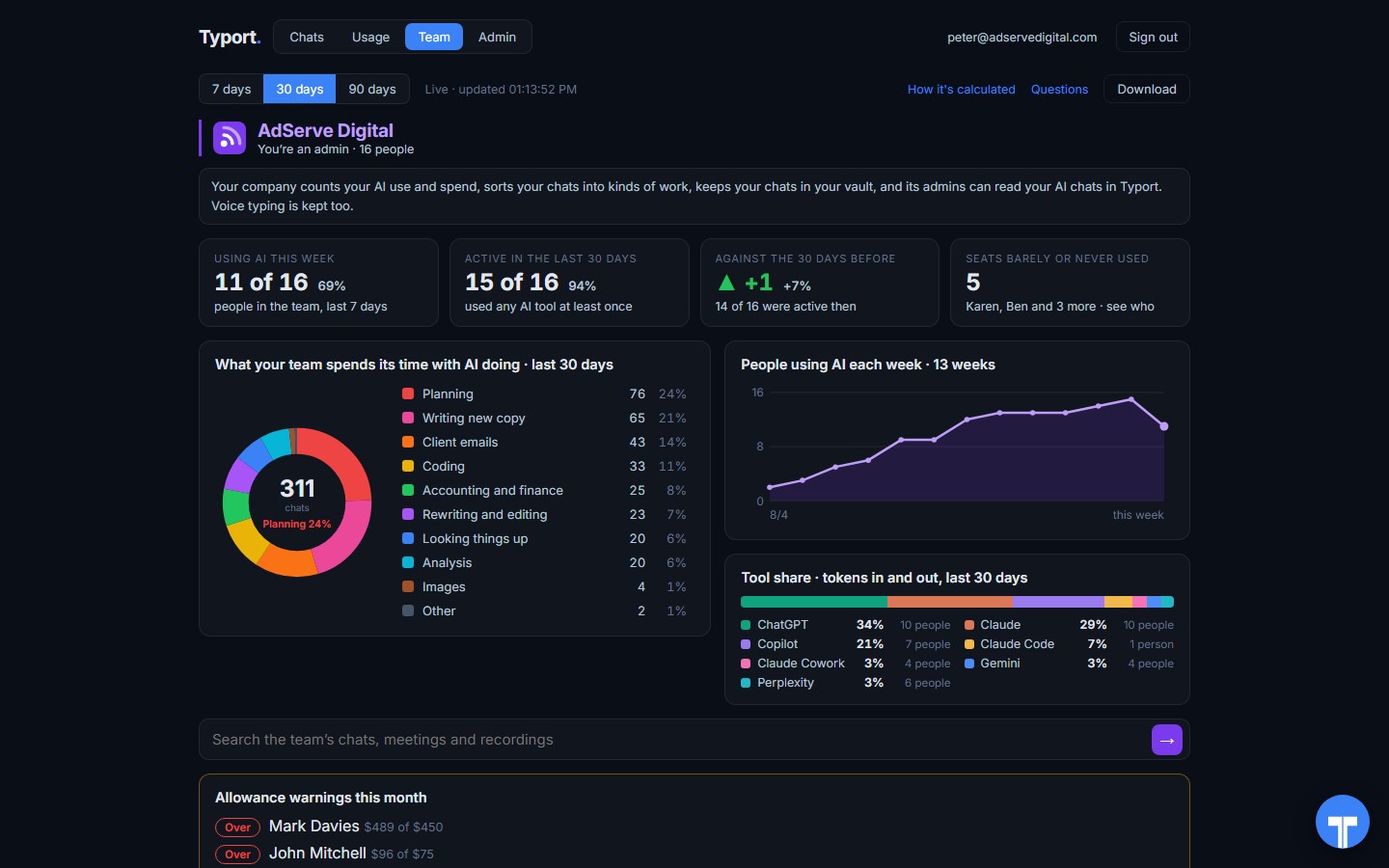
The team page
Who is using AI this week, what the work is, people using AI each week, tool share by AI tool, and allowance warnings for anyone near or over.
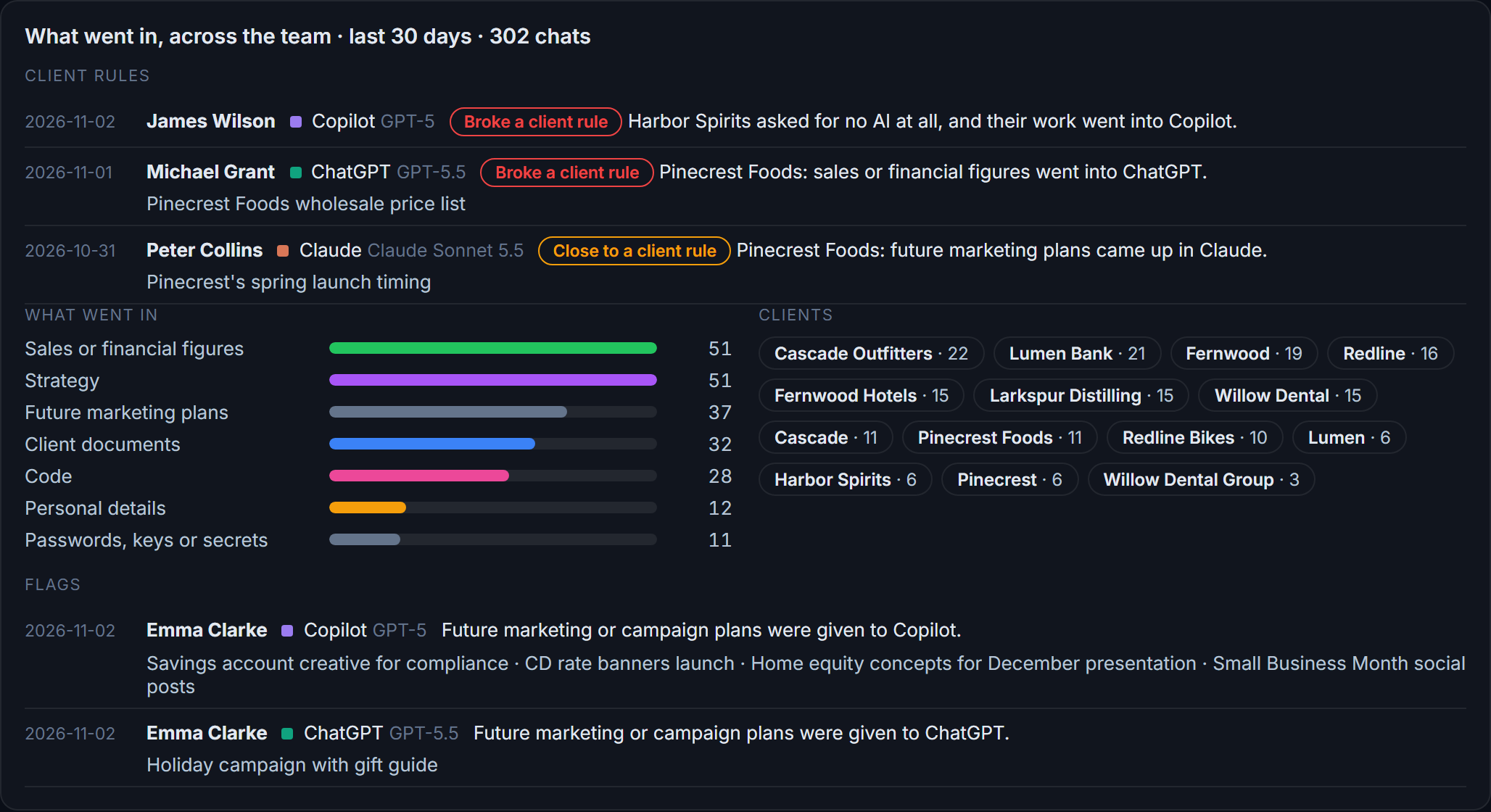
Flags and client rules
What went in across the team: client figures and documents, personal details, passwords and keys. Each chat that broke a client rule, or came close, is listed with the person and the tool.
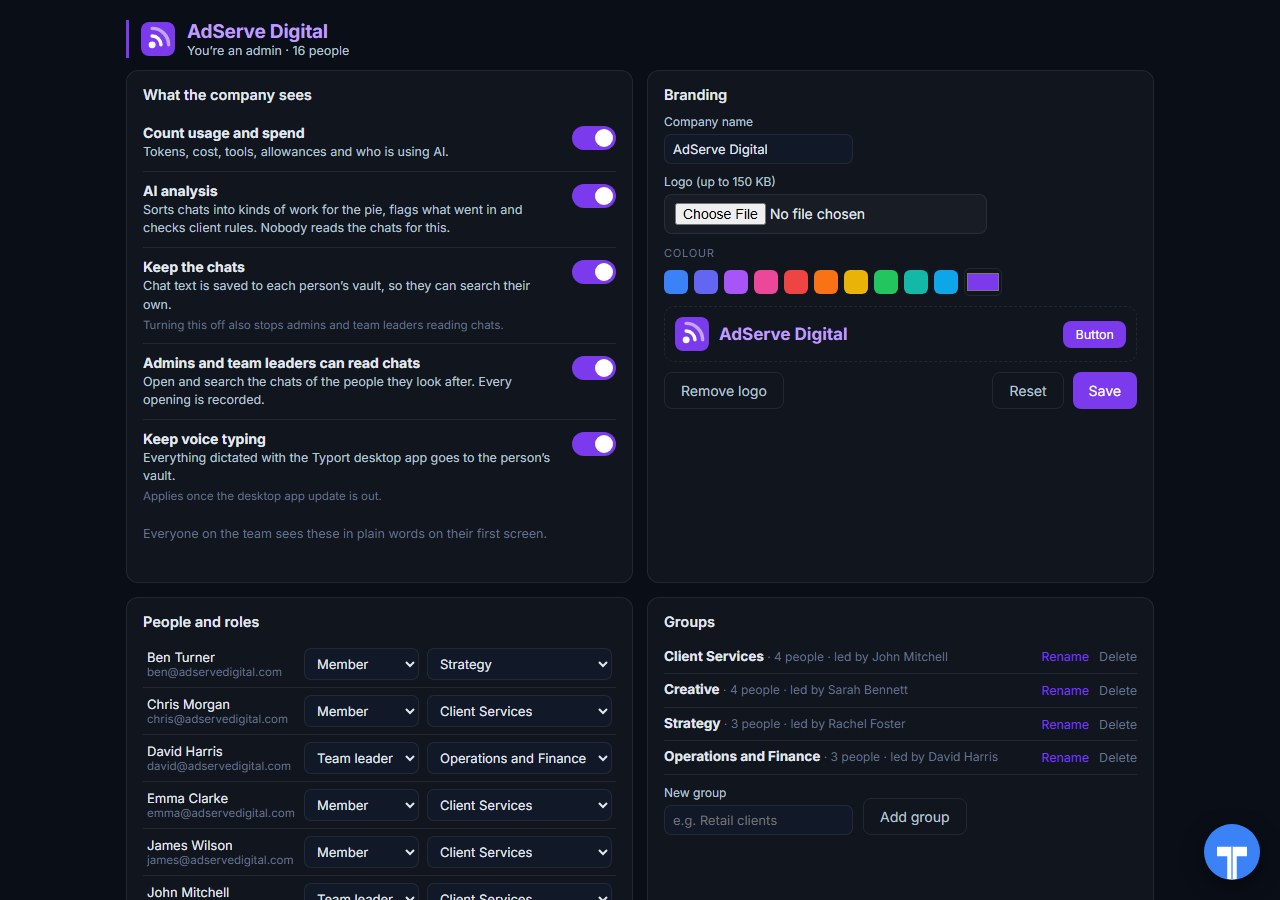
Five switches
Count usage and spend, AI analysis, keep the chats, let admins and team leaders read chats, keep voice typing. Every opening of a chat is recorded, and everyone sees the switches in plain words. Chats in the AI's own temporary or incognito mode are never collected.
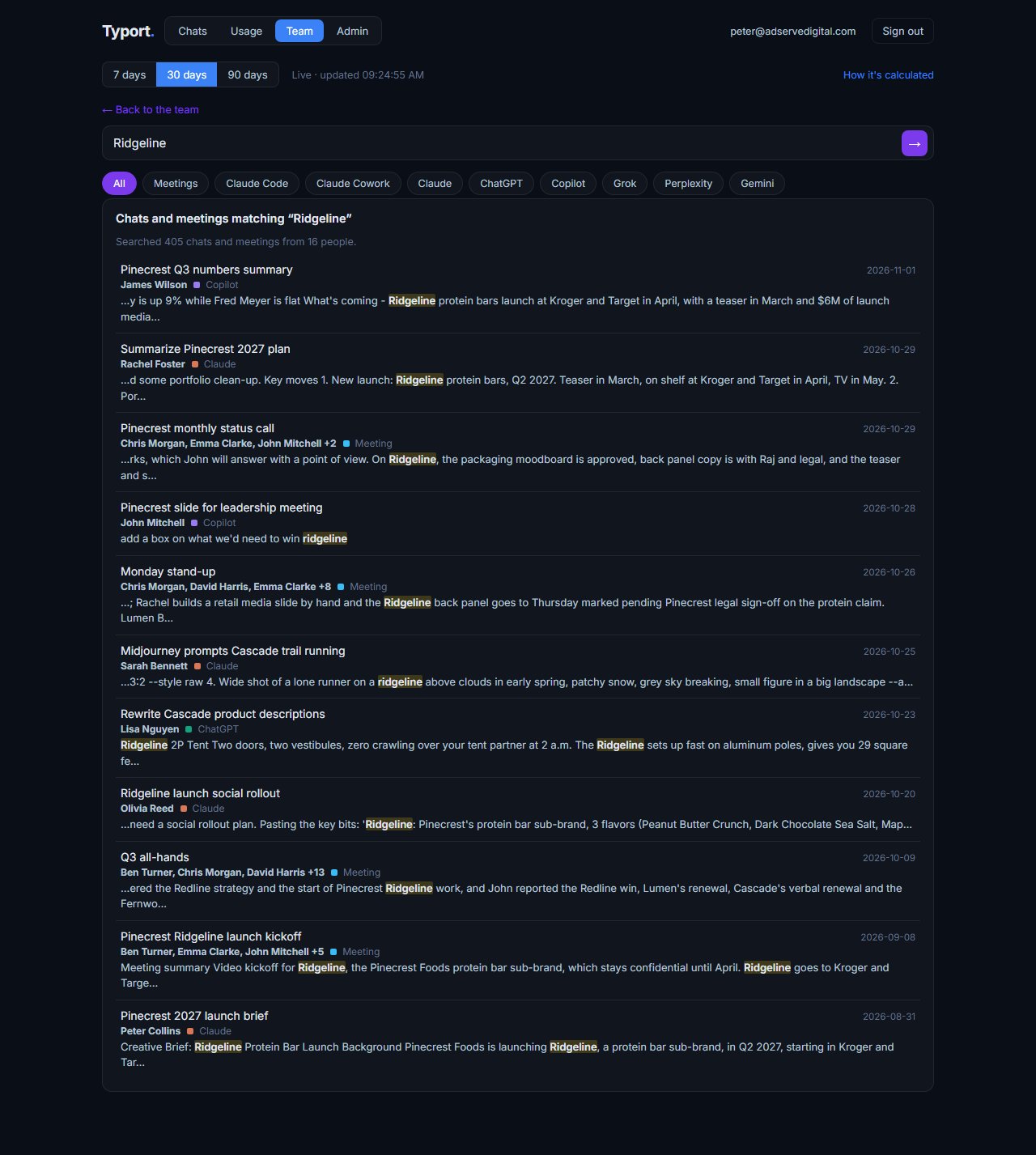
Search the team's work
When the company lets admins and team leaders read chats, one search covers the team's chats and meetings, each with the person, the tool and the date. Ask Typort answers questions in plain words and cites the chats.
Use them together
Nudge Security finds the accounts. Typort shows the work. Nudge Security does the inventory and the account security well: every app people sign up for, OAuth grants, MFA, offboarding and breach alerts. Typort does the view of AI itself: usage and estimated spend per person, what the work is, search across the team's chats, and rules per client.
They run side by side. Keep Nudge Security for discovery, identity and nudges. Add Typort to see who is using which AI tool, what it is costing, what the work is, and which client's material is going where. Typort needs no change to your Nudge Security setup.
The team view runs on Typort's servers. It is free for a limited time and will move to Typort Pro later.
FAQ
Is Typort a replacement for Nudge Security?
No. Nudge Security finds every SaaS and AI app and account across the company and checks they are safe: OAuth and integration risk, MFA, offboarding and vendor breach alerts. Typort shows how a team uses AI: usage and estimated spend per person, allowances, what the work is, flags and client rules. Many teams will want both.
Does Nudge Security watch AI conversations?
Yes. Its AI conversation monitoring looks for the data you choose, such as secrets and credentials, PII, PHI or financial information, in chatbots like ChatGPT, Gemini and Claude. It sends alerts to Slack, email, Microsoft Teams or a webhook, and can mask or store what it finds.
Can Typort block a prompt?
No. Typort shows what went in after the fact, with flags and client rules marked broke or close.
Which AI tools does Typort see?
ChatGPT, Claude, Perplexity and Grok in the browser, through the Typort browser extension. Microsoft 365 Copilot comes in the next extension update, and Gemini is being added. It reads what is on the page, so it works on Business and Team seats and needs no API keys from the AI vendors. Typort does not find other SaaS apps.
What does Nudge Security cost?
Nudge Security publishes its prices: Essential is $750 a month for up to 150 users, Growth is $5 per user a month for 150 to 1,500 users, both billed annually, and Enterprise above 1,500 users is custom.
Are the dollar figures exact?
No, they are estimates from the tokens in each chat at the AI vendor's API list price. They are there to compare people and tools, not to replace the invoice.
Can staff see what the company sees?
Yes. The five switches are shown to everyone in plain words on their first screen, and every time an admin or team leader opens someone's chat, it is recorded. Chats in the AI's own temporary or incognito mode are never collected.
What does the team view cost?
The team view runs on Typort's servers. It is free for a limited time and will move to Typort Pro later.
Sources
Every Nudge Security fact on this page comes from Nudge Security's own website, checked on 2 November 2026. Typort facts come from the product itself.
| Essential: "Up to 150 users", "$750/month", billed annually, "Full platform access for small teams." Growth: 150 to 1,500 users, "$5/user/month", billed annually. Enterprise: "1,500+ users", "Custom". "All features included." Features include "Continuous SaaS & AI discovery", "AI agent discovery & governance", "AI conversation monitoring", "OAuth & integration risk management", "Employee onboarding & offboarding", "Vendor risk insights & breach alerts". Free trial offered. Checked 2 November 2026. | nudgesecurity.com/pricing |
| "Simply connect to Google Workspace or Microsoft 365 to get started." "SaaS providers send machine-generated emails to users", making "email a powerful SaaS security event log." "Deploy in 5 minutes." | Nudge Security: how it works |
| Browser extension: "real-time login activity", "AI adoption and usage trends", "File upload monitoring", "API key copy and paste detection"; works on "Chromium-based browsers, Microsoft Edge, Firefox, Safari, and more". | Nudge Security: browser extension |
| AI conversation monitoring covers "popular AI chatbots your workforce could be using like ChatGPT, Gemini, Claude, and more"; "secrets and credentials, PII, PHI, or financial information"; alerts to "Slack, Email, Microsoft Teams, or via webhook"; "Nudge Security can mask or store detected data based on your configuration"; "Access conversation data via API". | Nudge Security: AI conversation monitoring |
typort.com | Typort Business | Typort for compliance | AI usage monitoring | Privacy | Terms
© 2024-2026 Human Compute, LLC. Nudge Security is a trademark of its owner. Typort is not affiliated with or endorsed by Nudge Security.