What each one is for
They look at different traffic. Portkey sees the API calls sent through it with a key. Business and Team seats people type into in the browser go straight to the AI vendor, so only Typort sees those.
Portkey is good at
- One API for your apps across more than 1,600 models
- Usage limits on cost or tokens, and hourly, daily or per minute rate limits
- Fallbacks between providers and models, and simple and semantic caching
- Redacting sensitive data from a request before it reaches the model
- Logging every request and response it routes, with custom metadata
Typort is good at
- Who is using AI in the browser, how much, and which tools, per person and over 13 weeks
- Estimated spend per person, with allowances and warnings at 80% and 100%
- A pie of what the team spends its time with AI doing
- Flags for what went in, and client rules marked broke or close
- Searching the team's chats and meetings, and asking questions of them with Ask Typort
- Five plain switches for what the company sees, shown to everyone on their first screen
What Portkey does
From Portkey's own website and documentation, and the Palo Alto Networks press release.
An AI gateway for the apps you build. Apps send model requests to Portkey's API, and Portkey routes them to more than 1,600 models through one interface.
Limits, fallbacks and guardrails. For that traffic, Portkey sets usage limits on cost or tokens and rate limits on requests or tokens, falls back between providers and models, caches answers, and can redact sensitive data from a request before it is sent to the model.
Logs. Portkey records the requests and responses it routes, and lets developers tag them with custom metadata.
Now part of Palo Alto Networks. Palo Alto Networks completed its acquisition of Portkey on 29 May 2026. Portkey's site now calls it the Prisma AIRS AI Gateway.
What it does not see. A person chatting in ChatGPT or Claude on a Business or Team seat is using that vendor's own app, not your API key, so the chat never passes through Portkey.
What Portkey costs
From Portkey's own pricing page, checked 2 November 2026.
Open source: free to host yourself. The gateway, retries, routing, guardrails, fallbacks and a basic dashboard, on your own servers.
Developer: free. Up to 10,000 recorded logs a month, kept for 3 days. Portkey says it is "Not suitable for production workloads."
Production: $49 a month. 100,000 recorded logs a month, then $9 for each additional 100,000 requests, with logs kept for 30 days.
Enterprise: no public price; sales quote. SSO, granular budget and rate limits, private cloud or VPC hosting, and compliance features. Portkey's button says "Talk to Us".
Typort vs Portkey, side by side
| Portkey | Typort | |
|---|---|---|
| What it sees | Requests your apps send through Portkey's API | Chats in ChatGPT, Claude, Perplexity and Grok in the browser, on Business and Team seats |
| Usage per person | Request logs, grouped by custom metadata your developers attach | Tokens, tools and active days per person, with adoption over 13 weeks |
| Spend | Cost of the requests it routes, with usage limits on cost or tokens | Estimated spend per person at API list price, with an allowance and a near or over warning |
| Change a request before it is sent | Yes, guardrails can redact sensitive data first | No. Typort shows what went in after the fact |
| Routing, fallbacks, caching | Yes, across providers and models | No. Typort routes nothing |
| What the work is | Not among the features in Portkey's docs | Chats sorted into kinds of work, shown as a pie |
| Client rules | Not among the features in Portkey's docs | Rules per client, with chats marked broke a client rule or close to one |
| What it needs | Code pointed at Portkey's API or SDK | The Typort browser extension and a sign in |
| Who sees what | Role based access, listed with the Production plan | Five switches, shown in plain words to everyone on the team |
See it in Typort
A chat typed into a Claude Team seat in the browser shows up on the Typort team page, with no API key and no gateway in the way.
What you get
Screens from a sample 16-person agency.
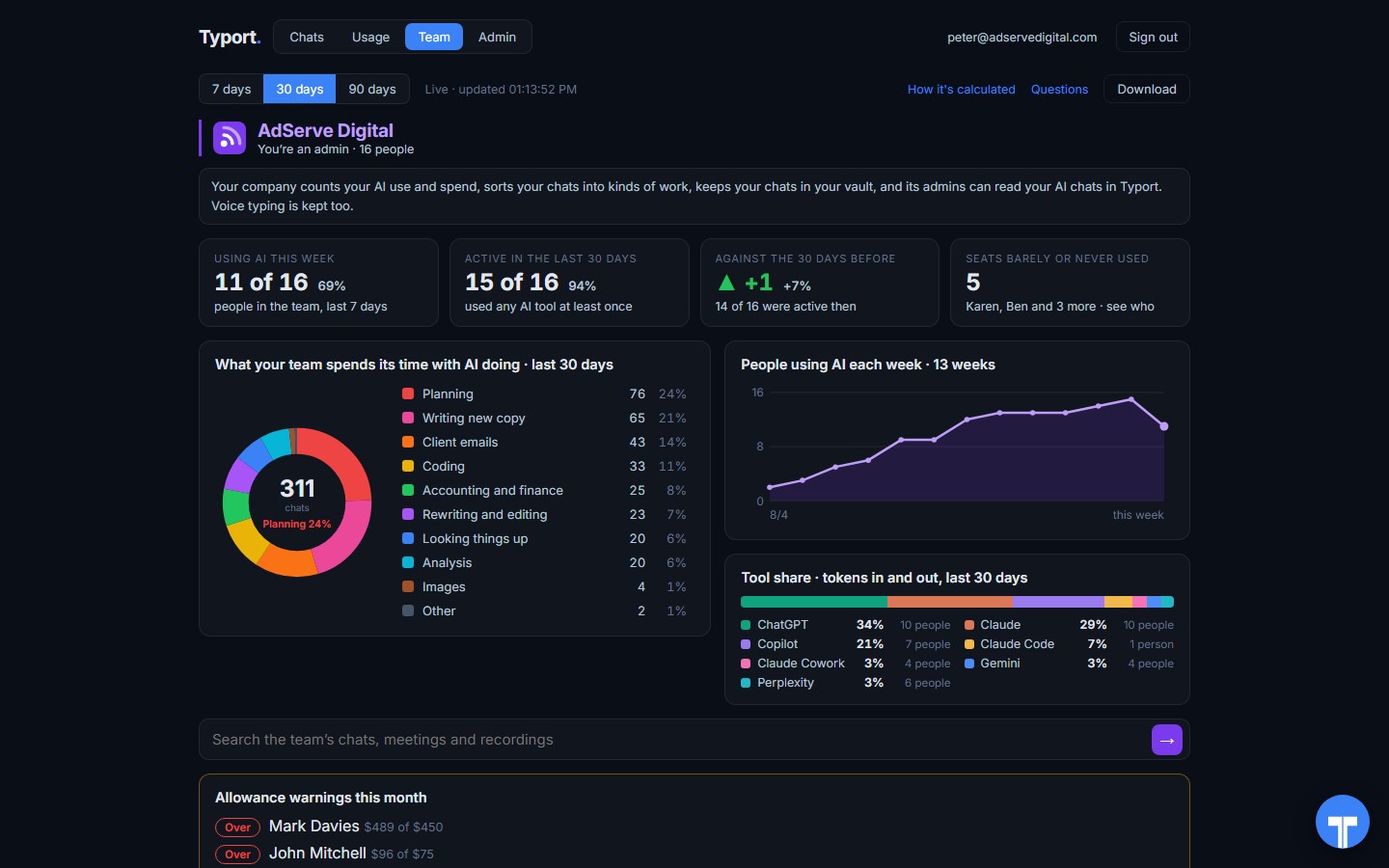
The team page
Who is using AI this week, seats barely or never used, what the work is, tool share by AI tool, and allowance warnings for anyone near or over.
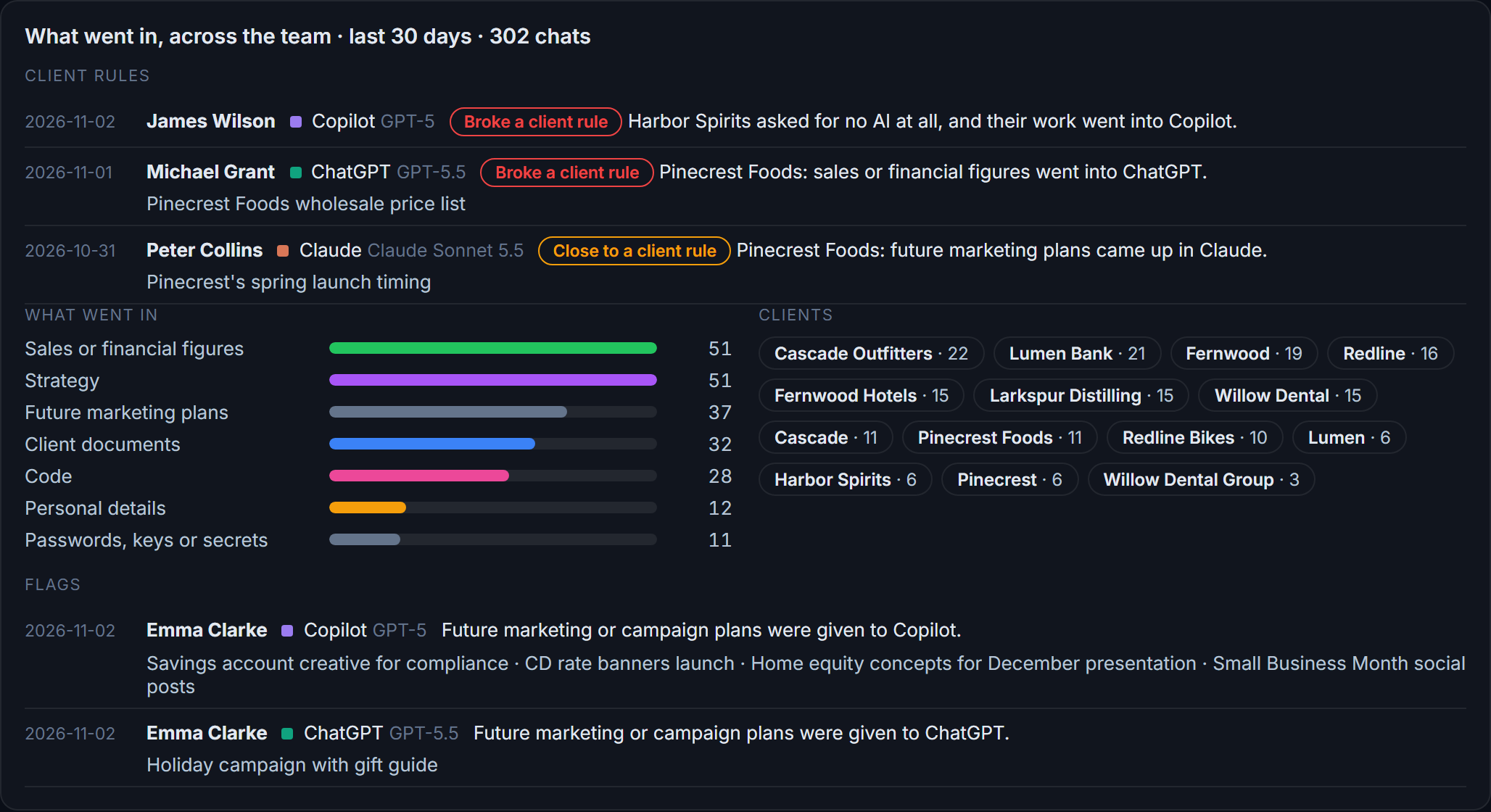
Flags and client rules
What went in across the team: client figures and documents, personal details, passwords and keys. Each chat that broke a client rule, or came close, is listed with the person and the tool.
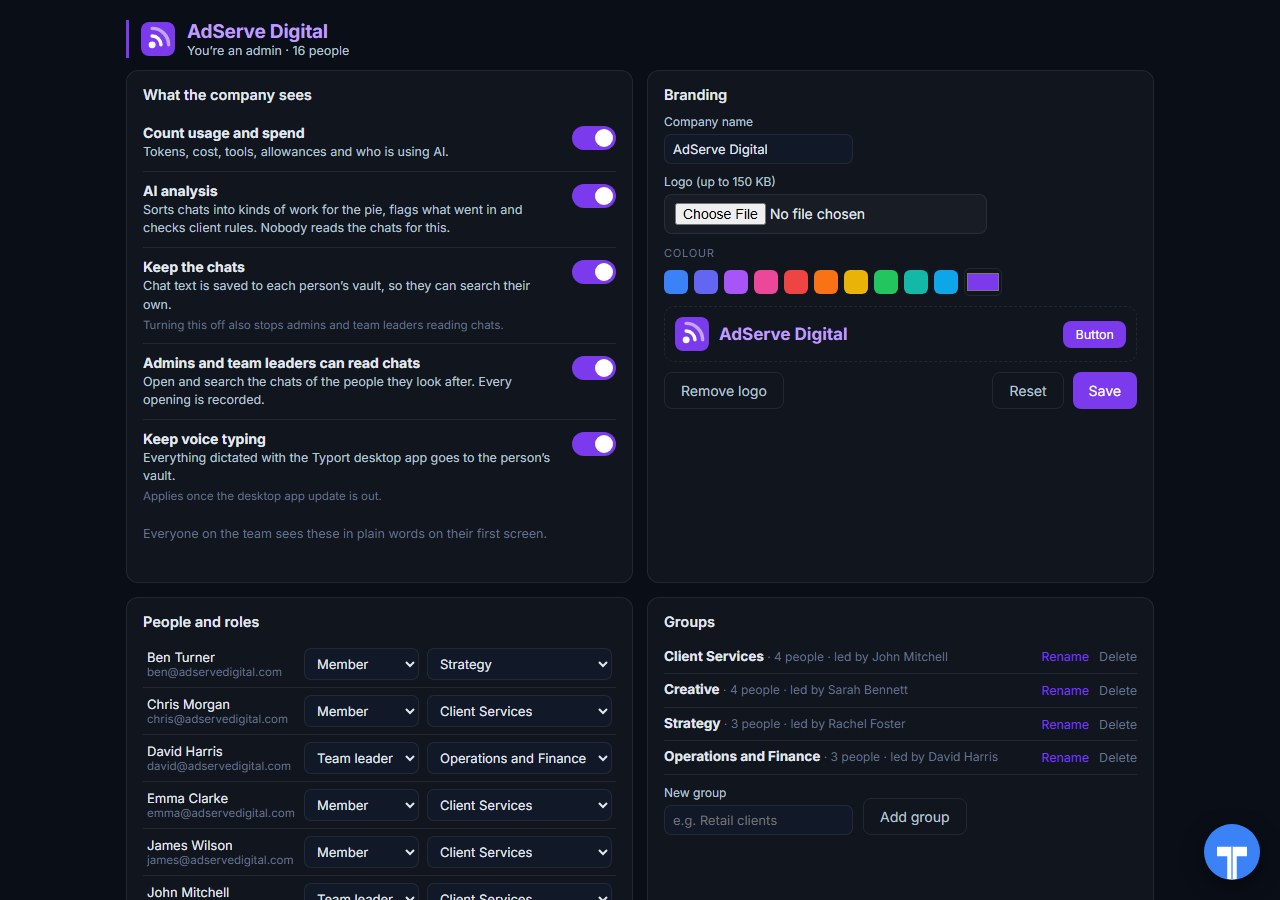
Five switches
Count usage and spend, AI analysis, keep the chats, let admins and team leaders read chats, keep voice typing. Every opening of a chat is recorded, and everyone sees the switches in plain words. Chats in the AI's own temporary or incognito mode are never collected.
Use them together
Portkey for your apps. Typort for the seats. Anything your developers build on model APIs goes through Portkey, with its logs, limits, fallbacks and guardrails. The ChatGPT and Claude seats people type into every day are a different stream, and Typort shows who uses them, what for, roughly what it costs, and what went in.
They run side by side. Typort needs no change to your Portkey setup, and Portkey needs nothing from Typort.
The team view runs on Typort's servers. It is free for a limited time and will move to Typort Pro later.
FAQ
Is Typort a replacement for Portkey?
No. Portkey is an AI gateway: your apps send their model requests through its API, and it routes, logs, limits and guards them. Typort routes nothing. It shows how people use the AI tools they type into in the browser. Many teams will want both.
Does Portkey see what my staff type into ChatGPT or Claude?
No. A gateway sees the requests sent through it. When someone types into ChatGPT or Claude on a Business or Team seat, they are using that vendor's own app, not your API key, so the chat never passes through Portkey. Typort's browser extension sees those chats, per person.
Can Typort block a prompt?
No. Typort shows what went in after the fact, with flags and client rules marked broke or close. Portkey's guardrails can redact sensitive data from a request before it reaches the model, for traffic that goes through Portkey.
Which AI tools does Typort see?
ChatGPT, Claude, Perplexity and Grok in the browser, through the Typort browser extension. It reads the page, so it works on Business and Team seats and needs no API keys from the AI vendors. Microsoft 365 Copilot comes in the next extension update, and Gemini is being added.
What does Portkey cost?
The open source gateway is free to host yourself. Portkey's Developer plan is free with 10,000 recorded logs a month, Production is $49 a month with 100,000 recorded logs, and Enterprise has no public price.
Are the dollar figures exact?
No, they are estimates from the tokens in each chat at the AI vendor's API list price. They are there to compare people and tools, not to replace the invoice.
Can staff see what the company sees?
Yes. The five switches are shown to everyone in plain words on their first screen, and every time an admin or team leader opens someone's chat, it is recorded. Chats in the AI's own temporary or incognito mode are never collected.
What does the team view cost?
The team view runs on Typort's servers. It is free for a limited time and will move to Typort Pro later.
Sources
Every Portkey fact on this page comes from Portkey's own website, pricing page and documentation, and the Palo Alto Networks press release, checked on 2 November 2026. Typort facts come from the product itself.
| Open Source: self host, free. Developer: "Free Forever", 10k recorded logs a month, 3 day log retention, "Not suitable for production workloads." Production: "$49/month", 100k recorded logs a month, "$9 per additional 100k requests", 30 day log retention, role based access control. Enterprise: custom pricing, "Talk to Us", SSO, granular budget and rate limits, private cloud and VPC hosting. Checked 2 November 2026. | Portkey pricing |
| "access 1,600+ LLMs via a unified API"; "Set budget limits"; "automatically redacts sensitive data from your requests before they are sent to the LLM"; "Portkey is now PRISMA AIRS AI Gateway". | portkey.ai |
| Requests go to Portkey's API (api.portkey.ai/v1); "Set usage limits based on costs incurred or tokens used"; "Set hourly, daily, or per minute rate limits on requests or tokens sent"; "Fallback between providers and models for resilience"; simple and semantic caching. | Portkey docs: AI Gateway |
| "Portkey records all your multimodal requests and responses"; "Enrich your LLM APIs with custom metadata". | Portkey docs: Observability |
| Acquisition completed 29 May 2026; "establishing Portkey as the core AI Gateway for Prisma AIRS". | Palo Alto Networks press release |
typort.com | Typort Business | Typort for compliance | AI usage monitoring | Privacy | Terms
© 2024-2026 Human Compute, LLC. Portkey and Prisma AIRS are trademarks of Palo Alto Networks. Typort is not affiliated with or endorsed by Portkey or Palo Alto Networks.