What each one is for
They answer different questions. Purview asks "is our data safe?". Typort asks "how is the team using AI, and what is it costing?".
Microsoft Purview is good at
- Blocking or warning when someone pastes sensitive information into an AI site, from Windows computers onboarded to Purview
- One-click policies that block sensitive prompts in Edge
- Prompts and responses in the unified audit log, with eDiscovery and retention
- Insider risk and communication compliance policies
- A long list of supported AI sites, including chatgpt.com, claude.ai, gemini.google.com and copilot.microsoft.com
Typort is good at
- Who is using AI, how much, and which tools, per person and over time
- Estimated spend per person, with allowances and warnings
- A pie of what the team spends its time with AI doing
- Flags for what went in, and client rules marked broke or close
- Searching the team's chats and meetings, and asking questions of them with Ask Typort
- Five plain switches for what the company sees, shown to everyone on their first screen
What Purview DSPM for AI does
From Microsoft's own documentation. Microsoft now calls this page DSPM for AI (classic) and points new setups to its newer Data Security Posture Management.
Reports and activity. Reports cover Copilot experiences and agents, enterprise AI apps and other AI apps, with total interactions, total visits, sensitive interactions per AI app and insider risk severity. Activity explorer lists each AI interaction, AI website visit and sensitive information type found.
Third-party AI sites in the browser. Visits and pastes on sites such as ChatGPT and Gemini are seen on Windows devices onboarded to Purview, through Edge or the Microsoft Purview extension for Chrome.
Risky users. The Insider Risk Management "Risky AI usage" template scores risky prompts and responses, and that score feeds Adaptive Protection.
Data loss prevention. Endpoint DLP can block a paste, or warn with an option to override. One-click policies include an audit-only policy that finds sensitive content pasted or uploaded to AI sites, and a block-with-override policy for elevated risk users.
What Purview needs
A licence that includes the features. Microsoft's service description lists Endpoint DLP and Insider Risk Management under Microsoft 365 E5 and the Microsoft Purview Suite, among others. Microsoft prices the Purview Suite at $12.00 per user a month, paid yearly, on top of Microsoft 365 E3.
Pay-as-you-go billing for AI apps other than Microsoft 365 Copilot. Microsoft says managing third-party AI interactions "requires you to enable pay-as-you-go billing".
On Microsoft 365 Business Premium, it is an add-on. Microsoft lists a Microsoft Purview Suite for Business Premium add-on, which needs a Business Premium base licence and is capped at 300 seats. Microsoft prices it at $10.00 per user a month, paid yearly.
Set up on each device. Devices onboarded to Purview, and the Purview browser extension for Chrome or an Edge configuration policy.
Typort vs Microsoft Purview, side by side
| Microsoft Purview DSPM for AI | Typort | |
|---|---|---|
| Usage per person | AI interactions and visits in reports and activity explorer | Tokens, tools and active days per person, with adoption over 13 weeks |
| Spend | Not among the AI reports in Microsoft's guide | Estimated spend per person, with an allowance and a near or over warning |
| What the work is | Sensitive information types found in prompts | Chats sorted into kinds of work, shown as a pie |
| Client rules | Data loss prevention policies on sensitive information types | Rules per client, with chats marked broke a client rule or close to one |
| Block a prompt or paste | Yes, with endpoint DLP or Edge policies | No. Typort shows what went in after the fact |
| Audit, eDiscovery, retention | Yes, in the unified audit log and eDiscovery | Search the team's chats and meetings, and export the team table as a spreadsheet |
| What it needs | Purview browser extension, devices onboarded, pay-as-you-go billing | The Typort browser extension and a sign in |
| Who sees what | Role groups in the Purview portal, for example Content Viewer to see prompts | Five switches, shown in plain words to everyone on the team |
See it in Typort
A walk through the team page: usage and estimated spend per person, what the work is, and the chats that broke or came close to a client rule.
What you get
Screens from a sample 16-person agency.
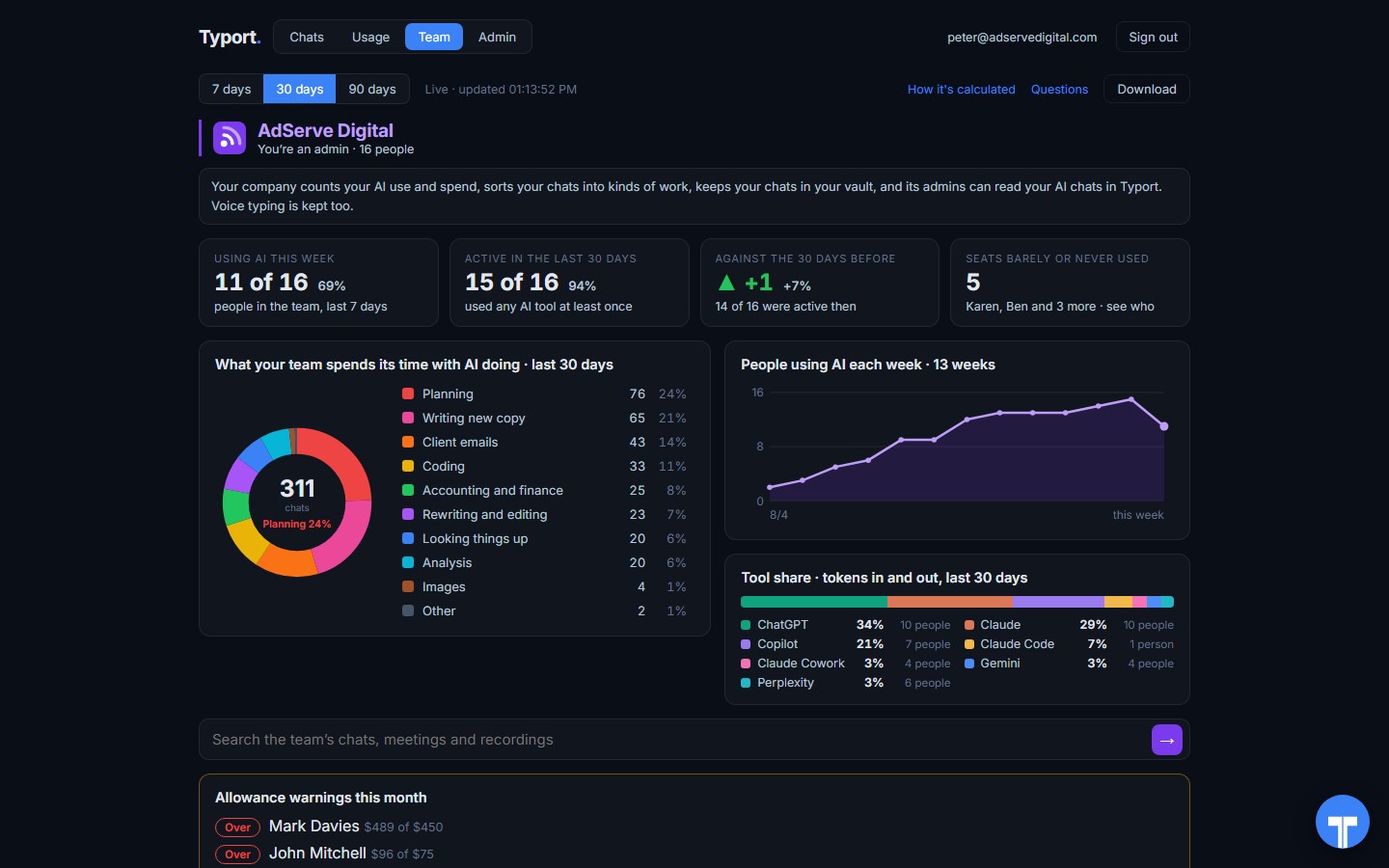
The team page
Who is using AI this week, what the work is, people using AI each week, tool share by AI tool, and allowance warnings for anyone near or over.
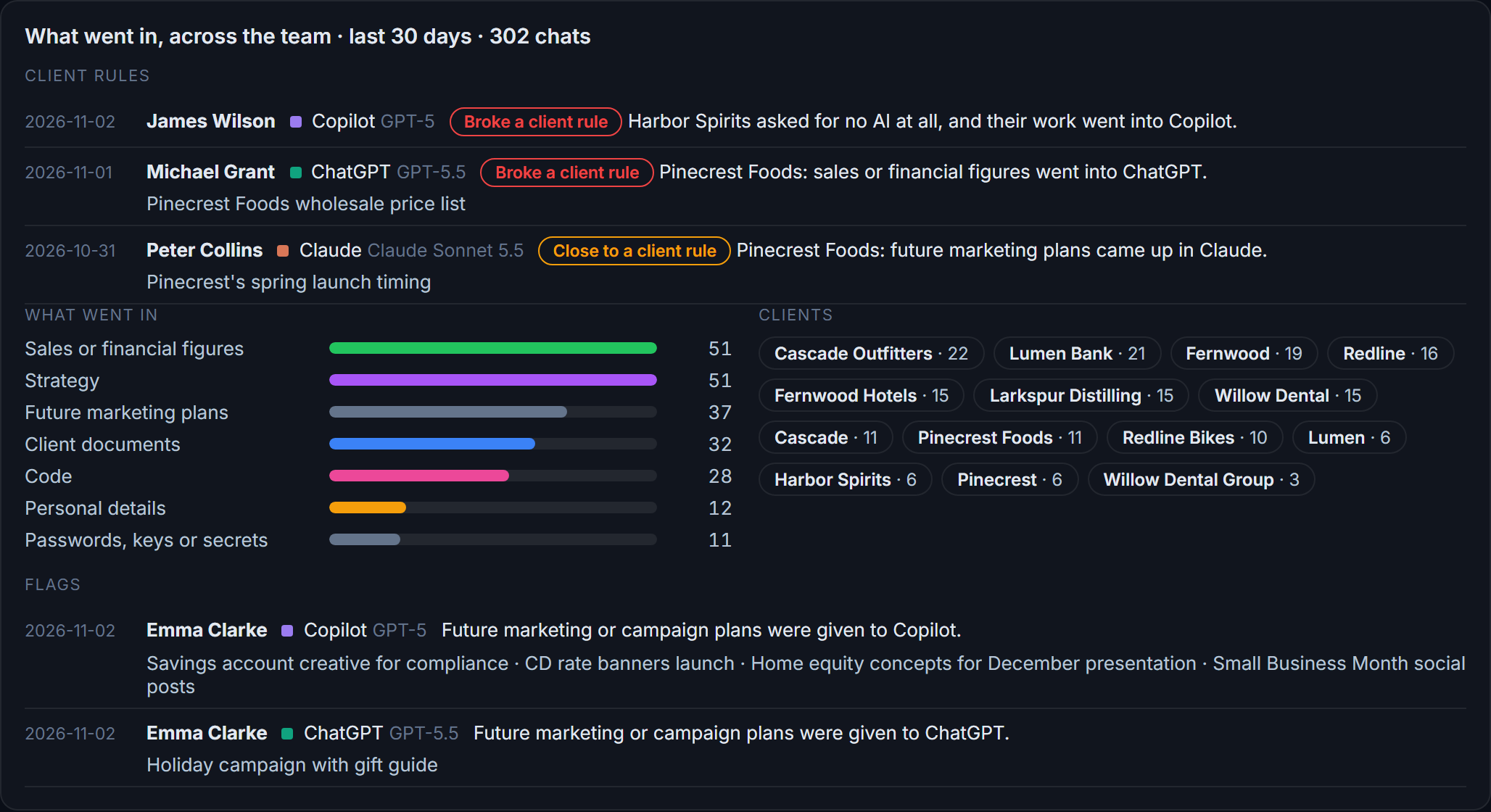
Flags and client rules
What went in across the team: sales figures, strategy, client documents, passwords and keys. Each chat that broke a client rule, or came close, is listed with the person and the tool.
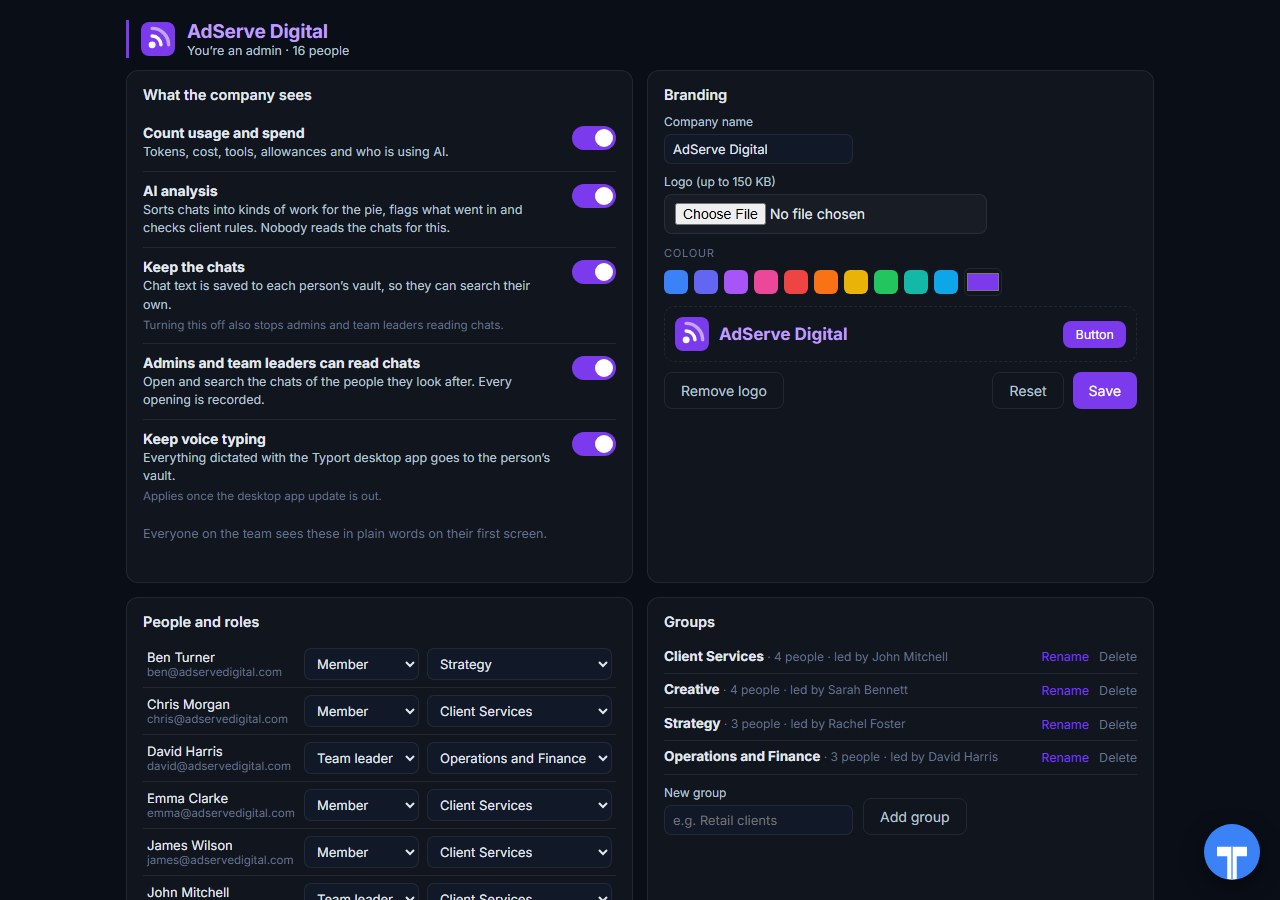
Five switches
Count usage and spend, AI analysis, keep the chats, let admins and team leaders read chats, keep voice typing. Every opening of a chat is recorded, and everyone sees the switches in plain words. Chats in the AI's own temporary or incognito mode are never collected.
Use them together
Purview stops the paste. Typort shows the pattern. Purview does the security half well: the audit log, data loss prevention that blocks or warns, and risk scores for risky users. Typort does the view: usage and estimated spend per person, what the work is, search across the team's chats, and rules per client.
They run side by side. Keep Purview DLP and insider risk on for sensitive information. Add Typort to see who is using which AI tool, what it is costing, what the work is, and which client's material is going where. Typort needs no change to your Purview setup.
The team view runs on Typort's servers. It is free for a limited time and will move to Typort Pro later.
FAQ
Is Typort a replacement for Microsoft Purview?
No. Purview is a data security and compliance suite: audit, data loss prevention, eDiscovery, retention and insider risk. Typort shows how a team uses AI: usage and estimated spend per person, allowances, what the work is, flags and client rules. Many teams will want both.
Can Typort block a prompt?
No. Typort shows what went in after the fact, with flags and client rules marked broke or close. If you need a paste or a prompt stopped before it is sent, that is what Purview data loss prevention does.
Which AI tools does Typort see?
ChatGPT, Claude, Perplexity and Grok in the browser, through the Typort browser extension. Microsoft 365 Copilot capture is built and comes in the next extension update. It reads what is on the page, so it works on Business and Team seats and needs no API keys from the AI vendors.
What does Purview need to cover AI apps?
Microsoft lists Endpoint DLP and Insider Risk Management under licences such as Microsoft 365 E5 and the Microsoft Purview Suite. AI apps other than Microsoft 365 Copilot also need pay-as-you-go billing turned on, and devices onboarded to Purview with the Purview browser extension. On Business Premium, Microsoft offers a Purview Suite for Business Premium add-on.
Are the dollar figures exact?
No, they are estimates from the tokens in each chat at the AI vendor's API list price. They are there to compare people and tools, not to replace the invoice.
Can staff see what the company sees?
Yes. The five switches are shown to everyone in plain words on their first screen, and every time an admin or team leader opens someone's chat, it is recorded. Chats in the AI's own temporary or incognito mode are never collected.
What does the team view cost?
The team view runs on Typort's servers. It is free for a limited time and will move to Typort Pro later.
Sources
Every Microsoft Purview fact on this page comes from Microsoft's own documentation, checked on 2 November 2026. Typort facts come from the product itself.
| "Managing these AI interactions with Microsoft Purview requires you to enable pay-as-you-go billing in your organization." Most capabilities "require the Microsoft Purview browser extension and devices onboarded to Microsoft Purview". | Microsoft Learn: Purview for other AI apps |
| Endpoint DLP policies "warn or block users from sharing sensitive information with third-party generative AI sites"; a one-click policy to "block sensitive info sharing to AI apps in Edge"; prompts and responses are "captured in the unified audit log"; reports show total interactions, total visits, sensitive interactions per AI app and insider risk severity; prompts are shown to the Content Explorer Content Viewer role group. | Microsoft Learn: Purview for other AI apps |
| Supported AI sites include *.chatgpt.com, *.claude.ai, *.gemini.google.com, *.copilot.microsoft.com, *.perplexity.ai and *.grok.com. | Microsoft Learn: supported AI sites |
| "This article is for the classic version of Data Security Posture Management for AI that's now replaced with a new version." Reports by Copilot experiences and agents, Enterprise AI apps and Other AI apps; activity explorer events AI interaction, AI website visit, Sensitive info types. | Microsoft Learn: DSPM for AI (classic) |
| Endpoint DLP can warn or block, for example "a user identified as elevated risk in Adaptive Protection is blocked with the option to override"; "DSPM for AI: Detect sensitive info added to AI sites" runs "in audit mode only"; "DSPM for AI - Block sensitive info from AI sites" gives "a block-with-override to elevated risky users"; pay-as-you-go billing "for AI apps other than Microsoft 365 Copilot"; the browser extension "is also required for Endpoint DLP policies on Windows when you use Chrome". | Microsoft Learn: DSPM for AI considerations |
| Risky AI usage "can help detect and enable risk scoring" for prompts and responses, and "contributes to the user risk scoring in Adaptive Protection"; it needs the Microsoft Purview extension on Chrome or the insider risk extension on Edge. | Microsoft Learn: Insider Risk Management policy templates |
| Microsoft Purview Suite: "$12.00 user/month, paid yearly", "Requires: Microsoft 365 E3; or Office 365 E3 and Enterprise Mobility + Security E3." Microsoft Purview Suite for Microsoft 365 Business Premium: "$10.00 user/month, paid yearly". Checked 2 November 2026. | Microsoft Purview pricing, Microsoft 365 Business Premium add-ons |
| Endpoint DLP and Insider Risk Management licences include Microsoft 365 E5 and Microsoft Purview Suite; "Microsoft Purview Suite for Business Premium" add-ons "require a Microsoft 365 Business Premium base license and are capped at 300 seats total". | Microsoft Learn: Purview service description |
typort.com | Typort Business | Typort for compliance | AI usage monitoring | Privacy | Terms
© 2024-2026 Human Compute, LLC. Microsoft and Microsoft Purview are trademarks of the Microsoft group of companies. Typort is not affiliated with or endorsed by Microsoft.