What each one is for
They do different jobs. Cloudflare Zero Trust asks "who gets in, and what is allowed through the network?". Typort asks "how is the team using AI, and what is it costing?".
Cloudflare Zero Trust is good at
- Access: Zero Trust Network Access to the company's internal apps
- Gateway: a secure web gateway that filters traffic with HTTP policies
- CASB: scanning SaaS settings for problems such as overly permissive sharing
- DLP: inspecting traffic, including prompts to ChatGPT, Claude, Gemini and Perplexity, and blocking sensitive ones
- Shadow IT: a list of the SaaS apps people visit, marked Approved, Unapproved or In review
Typort is good at
- Who is using AI, how much, and which tools, per person and over time
- Estimated spend per person, with allowances and warnings
- A pie of what the team spends its time with AI doing
- Flags for what went in, and client rules marked broke or close
- Searching the team's chats and meetings, and asking questions of them with Ask Typort
- Five plain switches for what the company sees, shown to everyone on their first screen
Use them together
Cloudflare controls the network. Typort shows the AI work. Neither gets in the other's way.
Keep Cloudflare at the network. Access for internal apps, Gateway policies for the web, CASB for SaaS settings, and DLP to block a sensitive prompt before it leaves. That is the control half, and Cloudflare does it well.
Add Typort in the browser. On the AI tools you allow, Typort shows who uses them, what the work is, estimated spend per person against an allowance, and which client's material went where. It needs no change to your Cloudflare setup: no certificate, no routing, no new policy.
One page for the business. The security team keeps the Cloudflare dashboard. Owners and team leaders get adoption, the kind of work, allowances and client rules on one Typort page, without a Cloudflare login.
The team view runs on Typort's servers. It is free for a limited time and will move to Typort Pro later.
What Cloudflare Zero Trust does
From Cloudflare's own documentation.
Gateway and Access. Every plan includes Zero Trust Network Access and a Secure Web Gateway. To inspect HTTPS traffic with HTTP policies, Gateway needs TLS decryption, with a Cloudflare or custom certificate installed on users' devices.
Shadow IT and app scores. Shadow IT SaaS analytics "provides visibility into the SaaS applications your users are visiting", once HTTP filtering is set up, and each app can be marked Approved, Unapproved or In review. Application confidence scorecards rate AI and SaaS apps, including a Generative AI Posture Score.
DLP on AI prompts. AI prompt protection inspects prompts to Google Gemini, ChatGPT, Claude and Perplexity, sorts them into topics such as PII, source code and credentials, and can block sensitive prompts in Gateway HTTP policies. It can optionally log the full prompt for prompts that match a policy.
CASB. Connects to SaaS and cloud APIs to scan for security issues, such as overly permissive sharing settings.
AI Gateway is a separate product. It sits in front of the AI APIs your own apps call, and shows requests, tokens and cost per application, with caching, rate limiting and fallback. Staff chatting on their AI seats do not go through it.
What Cloudflare Zero Trust costs
Free: $0, for teams under 50 users or proof-of-concept tests. Includes ZTNA and the Secure Web Gateway, up to 2 read-only CASB integrations, limited predefined DLP profiles, and logs kept up to 24 hours.
Pay-as-you-go: $7 per user a month. For teams over 50 "solving narrow SSE use cases without enterprise support". Logs kept up to 30 days. Browser isolation is an add-on.
Contract: custom annual price per user. Full-featured DLP and unlimited CASB integrations are add-ons. Logs kept up to 6 months.
Different jobs, side by side
The ticks show who does each job. Most companies need both halves.
| The job | Cloudflare Zero Trust | Typort |
|---|---|---|
| Let people reach internal apps | Yes, with Access (ZTNA) | Not something Typort does |
| Filter web traffic | Yes, with Gateway HTTP policies | Not something Typort does |
| Block a sensitive prompt | Yes, with DLP AI prompt protection in a Gateway policy | No. Typort shows what went in after the fact |
| Scan SaaS settings | Yes, with CASB | Not something Typort does |
| Find unapproved apps | Shadow IT, from Gateway HTTP traffic | ChatGPT, Claude, Perplexity and Grok only |
| Usage per person | User counts per approval status in Shadow IT | Tokens, tools and active days per person, with adoption over 13 weeks |
| Spend | Not part of Zero Trust. AI Gateway counts cost per application, for API calls | Estimated spend per person, with an allowance and a near or over warning |
| What the work is | Prompt topics for DLP: PII, source code, credentials and similar | Chats sorted into kinds of work, shown as a pie |
| Client rules | DLP profiles you build per app and action | Rules per client, with chats marked broke a client rule or close to one |
| Search and ask | Prompt logs for prompts that match a policy | Search the team's chats and meetings, and ask Typort questions that cite the chats |
| What it needs | Traffic routed through Gateway, and a certificate on each device to inspect HTTPS | The Typort browser extension and a sign in with Microsoft or a work email |
| Who sees what | Admins in the Cloudflare dashboard | Five switches, shown in plain words to everyone on the team |
See it in Typort
A short recording of the Typort team page: who uses AI, what the work is and what it is costing, per person.
What you get
Screens from a sample 16-person agency.
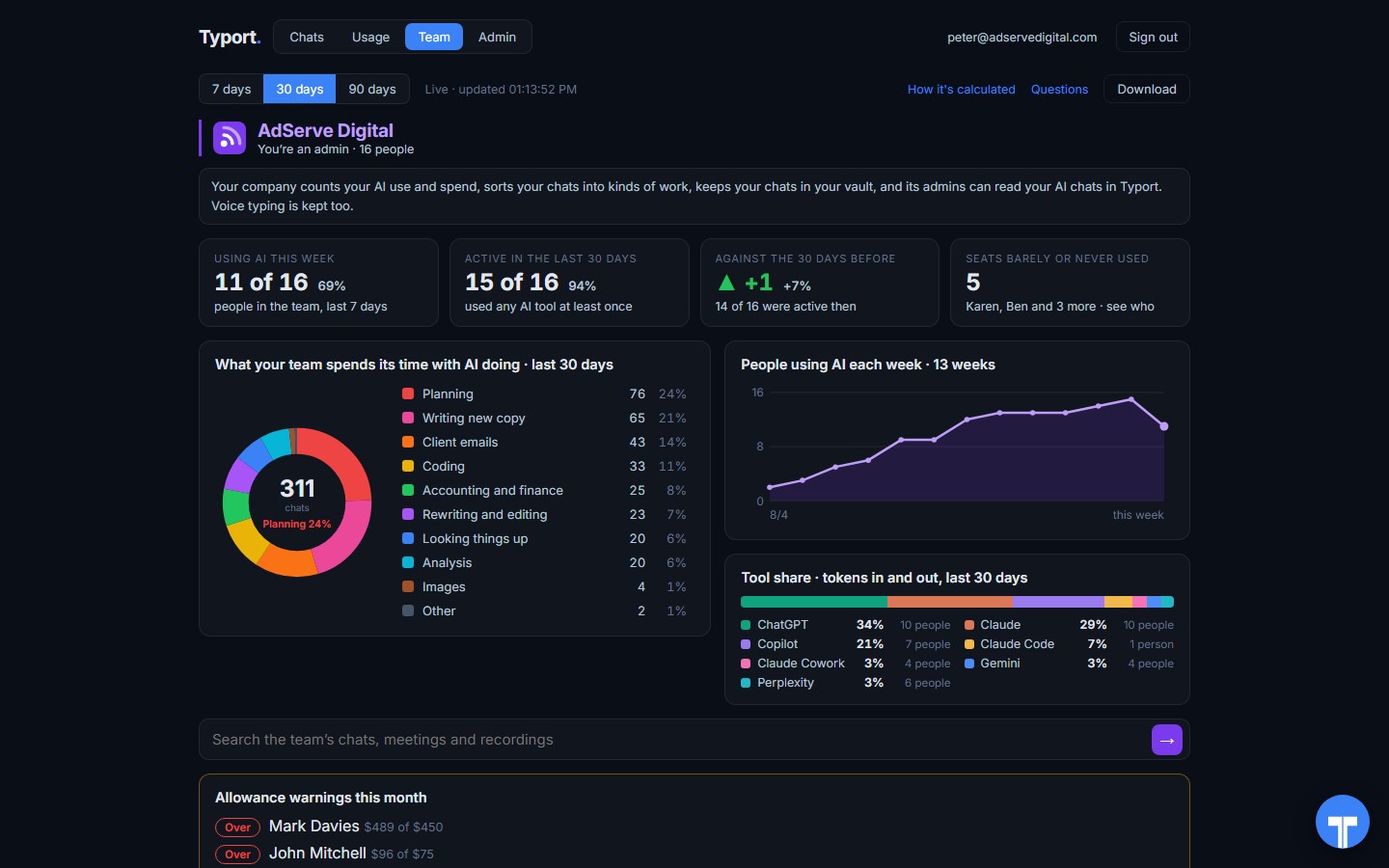
The team page
Who is using AI this week, what the work is, people using AI each week, tool share by AI tool, and allowance warnings for anyone near or over.
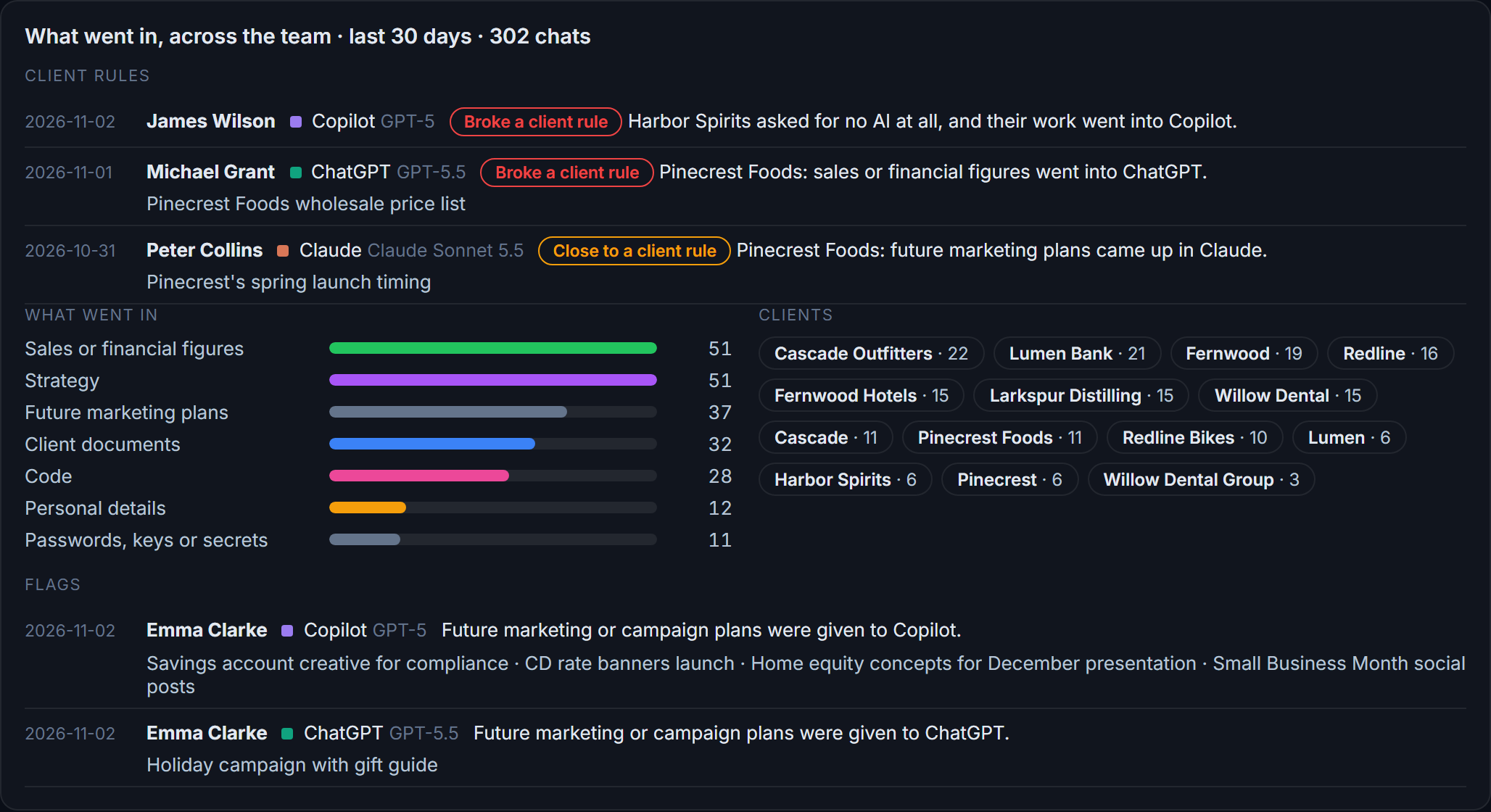
Flags and client rules
What went in across the team: client figures and documents, personal details, passwords and keys. Each chat that broke a client rule, or came close, is listed with the person and the tool.
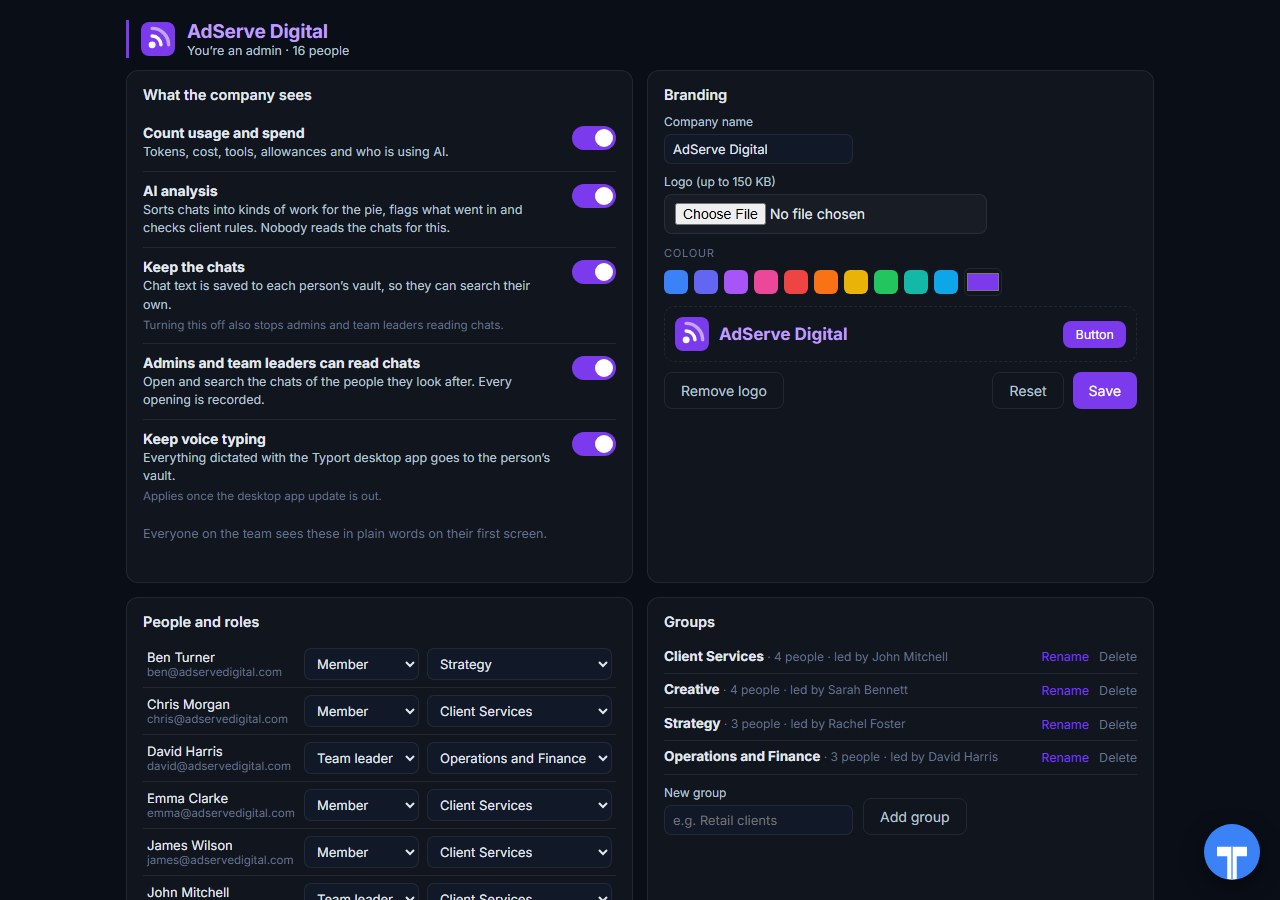
Five switches
Count usage and spend, AI analysis, keep the chats, let admins and team leaders read chats, keep voice typing. Every opening of a chat is recorded, and everyone sees the switches in plain words. Chats in the AI's own temporary or incognito mode are never collected.
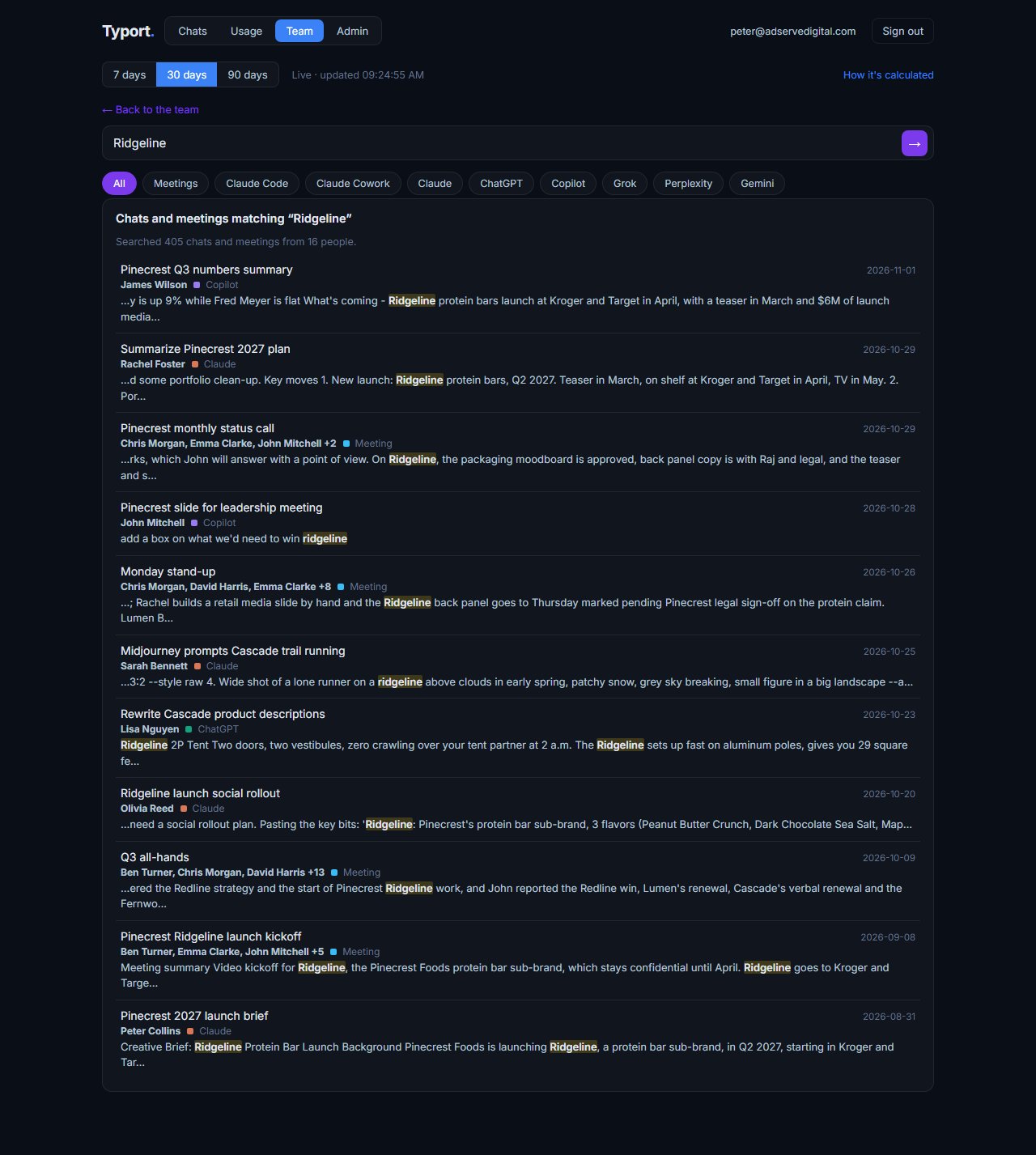
Search the team's work
When the company lets admins and team leaders read chats, one search covers the team's chats and meetings, each with the person, the tool and the date. Ask Typort answers questions in plain words and cites the chats.
FAQ
Is Typort a replacement for Cloudflare Zero Trust?
No. They do different jobs. Cloudflare Zero Trust is a network gateway: it controls who reaches internal apps, filters web traffic, scans SaaS settings and can block sensitive data with DLP. Typort shows how a team uses AI: usage and estimated spend per person, allowances, what the work is, flags and client rules. Many companies will run both.
Is Cloudflare Zero Trust an AI usage tool?
No. It is a network gateway. It can see AI sites in your traffic, list them in Shadow IT, score them, and inspect prompts with DLP. It does not show usage and spend per person, what the work is, or client rules.
What about Cloudflare AI Gateway?
AI Gateway is a separate Cloudflare product for software your company writes. Your apps send their API calls through it, and it shows requests, tokens and cost per application, with caching, rate limiting and fallback. People chatting on their ChatGPT or Claude seats do not go through it.
Can Typort block a prompt?
No. Typort shows what went in after the fact, with flags and client rules marked broke or close. If you need a sensitive prompt stopped before it is sent, Cloudflare DLP in a Gateway HTTP policy can do that.
Which AI tools does Typort see?
ChatGPT, Claude, Perplexity and Grok in the browser, through the Typort browser extension. Microsoft 365 Copilot comes in the next extension update, and Gemini is being added. It reads what is on the page, so it works on Business and Team seats and needs no API keys from the AI vendors, no certificate and no network change.
What does Cloudflare Zero Trust cost?
Cloudflare publishes three plans: Free at $0 for teams under 50 users, Pay-as-you-go at $7 per user a month, and Contract at a custom annual price per user.
Are the dollar figures exact?
No, they are estimates from the tokens in each chat at the AI vendor's API list price. They are there to compare people and tools, not to replace the invoice.
What does the team view cost?
The team view runs on Typort's servers. It is free for a limited time and will move to Typort Pro later.
Keep Cloudflare. See how your team uses AI.
Sources
Every Cloudflare fact on this page comes from Cloudflare's own website and documentation, checked on 2 November 2026. Typort facts come from the product itself.
| Free: "$0", "forever", "Teams under 50 users or enterprise proof-of-concept tests." Pay-as-you-go: "$7" "/user/month", "Teams over 50 solving narrow SSE use cases without enterprise support." Contract: "Custom", "Annual price per user". ZTNA and Secure Web Gateway on all plans; CASB "Up to 2 read-only API integrations" on Free and Pay-as-you-go; DLP "Limited predefined profiles" on Free and Pay-as-you-go, "Full-featured" as a Contract add-on; log retention "Up to 24 hours", "Up to 30 days", "Up to 6 months". Checked 2 November 2026. | Cloudflare SASE and Zero Trust plans |
| "TLS decryption is required for HTTP policies to inspect HTTPS traffic"; "ensure you have installed either a Cloudflare-generated certificate or custom certificate on your users' devices." | Cloudflare docs: TLS decryption |
| "Shadow IT SaaS analytics provides visibility into the SaaS applications your users are visiting"; statuses Approved, Unapproved, In review, Unreviewed; "To allow Cloudflare to discover shadow IT in your traffic, you must set up HTTP filtering." | Cloudflare docs: Shadow IT discovery |
| "Application confidence scorecards provide automated risk assessment for AI and SaaS applications", with "the Application Posture Score and the Generative AI Posture Score." | Cloudflare docs: Application Library |
| AI prompt protection covers "Google Gemini, ChatGPT, Claude, and Perplexity"; content topics "PII, Source Code, Credentials and Secrets, Financial Information, and Customer Data"; DLP profiles in Gateway HTTP policies "to block sensitive prompts"; optional logging to "store the full interaction of prompts that trigger a policy match." | Cloudflare changelog: AI prompt protection |
| CASB "connects to SaaS application and cloud environment APIs to scan for security issues", such as "misconfigurations (such as overly permissive sharing settings)". | Cloudflare docs: CASB |
| AI Gateway: "Observe and control your AI applications with analytics, caching, rate limiting, and model fallback"; "View metrics such as the number of requests, tokens, and the cost it takes to run your application." | Cloudflare docs: AI Gateway |
typort.com | Typort Business | Typort for compliance | AI usage monitoring | Privacy | Terms
© 2024-2026 Human Compute, LLC. Cloudflare is a trademark of Cloudflare, Inc. Typort is not affiliated with or endorsed by Cloudflare, Inc.