What each one is for
They look at different traffic. LiteLLM sees the API calls sent through it with a key. Business and Team seats people type into in the browser go straight to the AI vendor, so only Typort sees those.
LiteLLM is good at
- One OpenAI compatible endpoint for your apps, across more than 100 model providers
- A virtual key per user, team or project, each with its own models, budget and rate limits
- Recording the cost of every request it carries, by key, user, team and tag
- Hard budgets: once a key crosses its budget, requests fail
- Load balancing, fallbacks and retries between deployments
- Sending logs and metrics to Langfuse, Datadog, OpenTelemetry and Prometheus
Typort is good at
- Who is using AI in the browser, how much, and which tools, per person and over 13 weeks
- Estimated spend per person, with allowances and warnings at 80% and 100%
- A pie of what the team spends its time with AI doing
- Flags for what went in, and client rules marked broke or close
- Searching the team's chats and meetings, and asking questions of them with Ask Typort
- Five plain switches for what the company sees, shown to everyone on their first screen
What LiteLLM does
From LiteLLM's own website and documentation.
A gateway you host. LiteLLM's AI Gateway is a self hosted server that gives your applications one OpenAI compatible endpoint for more than 100 providers. The open source gateway is MIT licensed.
Keys, budgets and rate limits. Each user, team or project gets a virtual key with its own models, budget and rate limits. After a key crosses its budget, requests fail. A budget can reset after a set time, such as 30 days.
Spend on what it carries. The gateway records the cost of each request in its spend logs, by key, user, team and tag. Per person figures depend on each key being issued to a named user: LiteLLM's docs say to set a user_id when creating keys.
What it does not see. Its spend logs hold the requests that go through the gateway. A person chatting in ChatGPT or Claude on a Business or Team seat is talking to that company directly, so that work never reaches LiteLLM.
What LiteLLM costs
Open source: free. LiteLLM lists its open source gateway as "Free forever", MIT licensed, and you run it on your own servers.
Enterprise: no public price; sales quote. LiteLLM's Enterprise tier adds "Enterprise support and custom SLAs" and "JWT auth, SSO, and audit logs". The site says "Request pricing".
Typort vs LiteLLM, side by side
| LiteLLM | Typort | |
|---|---|---|
| What it sees | Requests sent through the gateway with a virtual key | Chats in ChatGPT, Claude, Perplexity and Grok in the browser, on Business and Team seats |
| Usage per person | Spend logs by key, user and team, when each key is issued to a named user | Tokens, tools and active days per person, with adoption over 13 weeks |
| Spend | The cost of each request through the gateway | Estimated spend per person at API list price, with an allowance and a near or over warning |
| Hard budgets | Yes. Requests fail once a key crosses its budget | No. Allowances and warnings only, nothing is blocked |
| Routing, fallbacks, retries | Yes, load balancing, fallbacks and retries | No. Typort routes nothing |
| What the work is | Not among the features in LiteLLM's docs | Chats sorted into kinds of work, shown as a pie |
| Client rules | Not among the features in LiteLLM's docs | Rules per client, with chats marked broke a client rule or close to one |
| What it needs | A self hosted server, apps pointed at it, a key per user, team or project | The Typort browser extension and a sign in |
| Who sees what | Role based access, listed with Enterprise | Five switches, shown in plain words to everyone on the team |
See it in Typort
A chat typed into a ChatGPT Team seat in the browser shows up on the Typort team page, with no API key and no gateway in the way.
What you get
Screens from a sample 16-person agency.
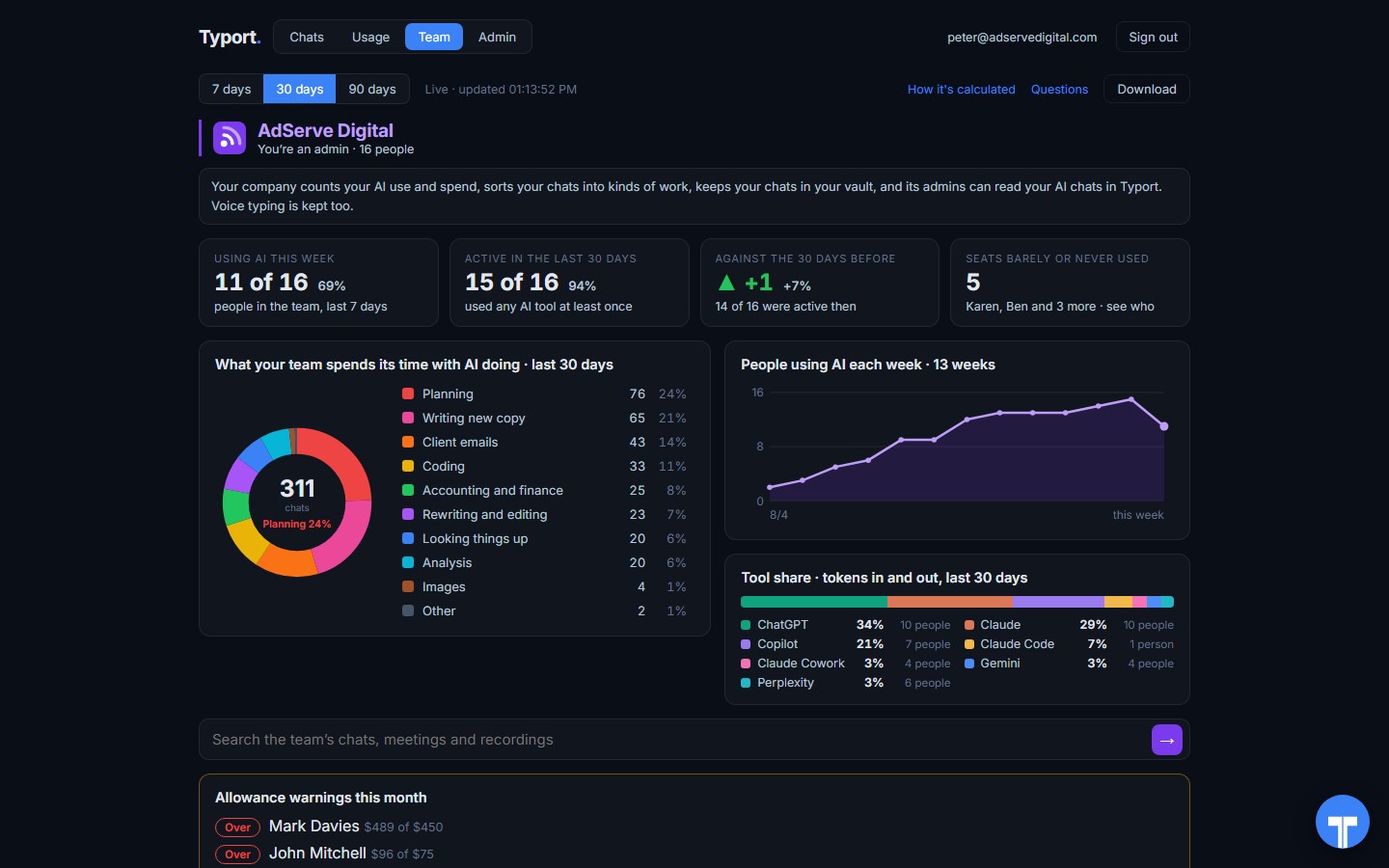
The team page
Who is using AI this week, seats barely or never used, what the work is, tool share by AI tool, and allowance warnings for anyone near or over.
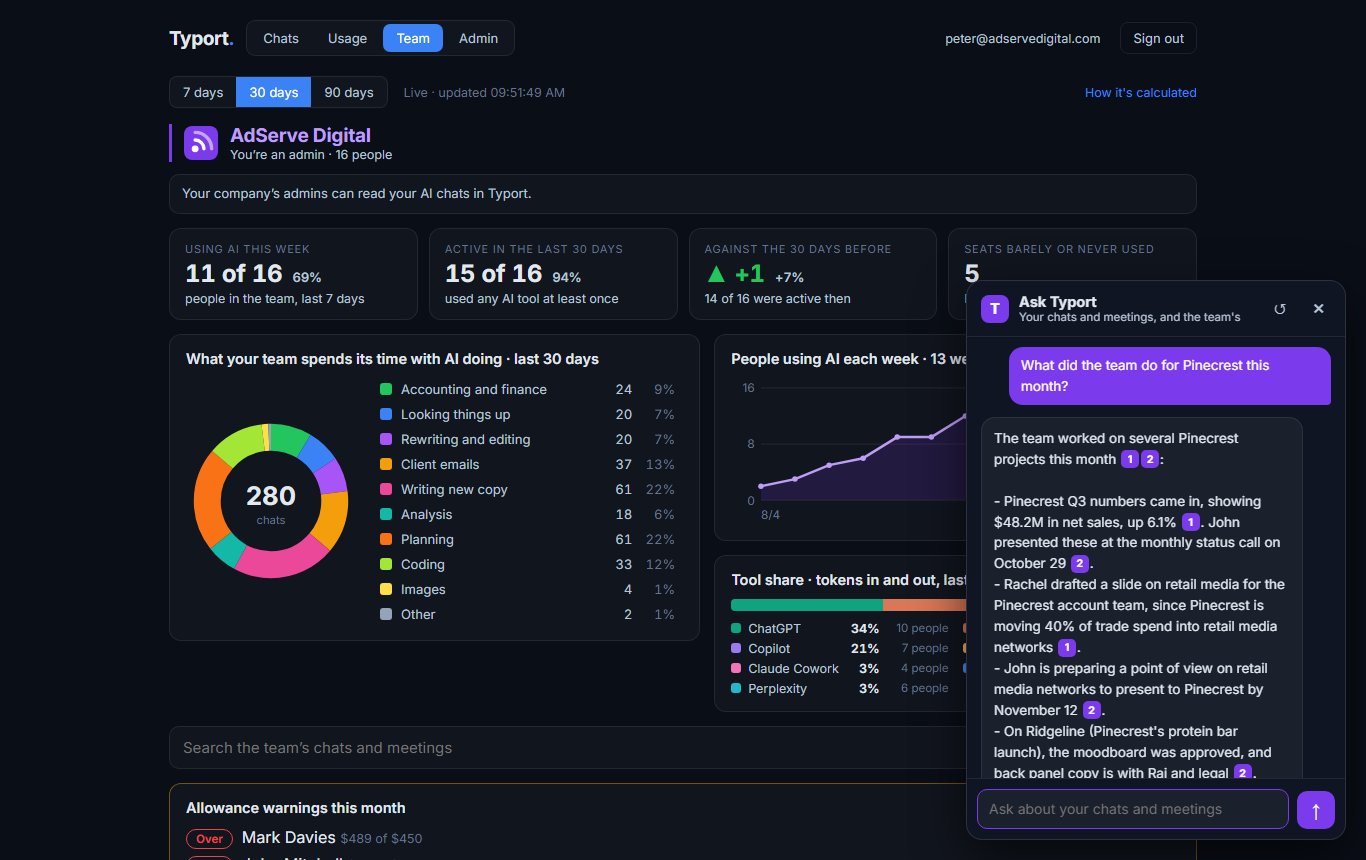
Ask Typort
Ask a question in plain English and get an answer from the team's chats and meetings, with each chat it used cited.
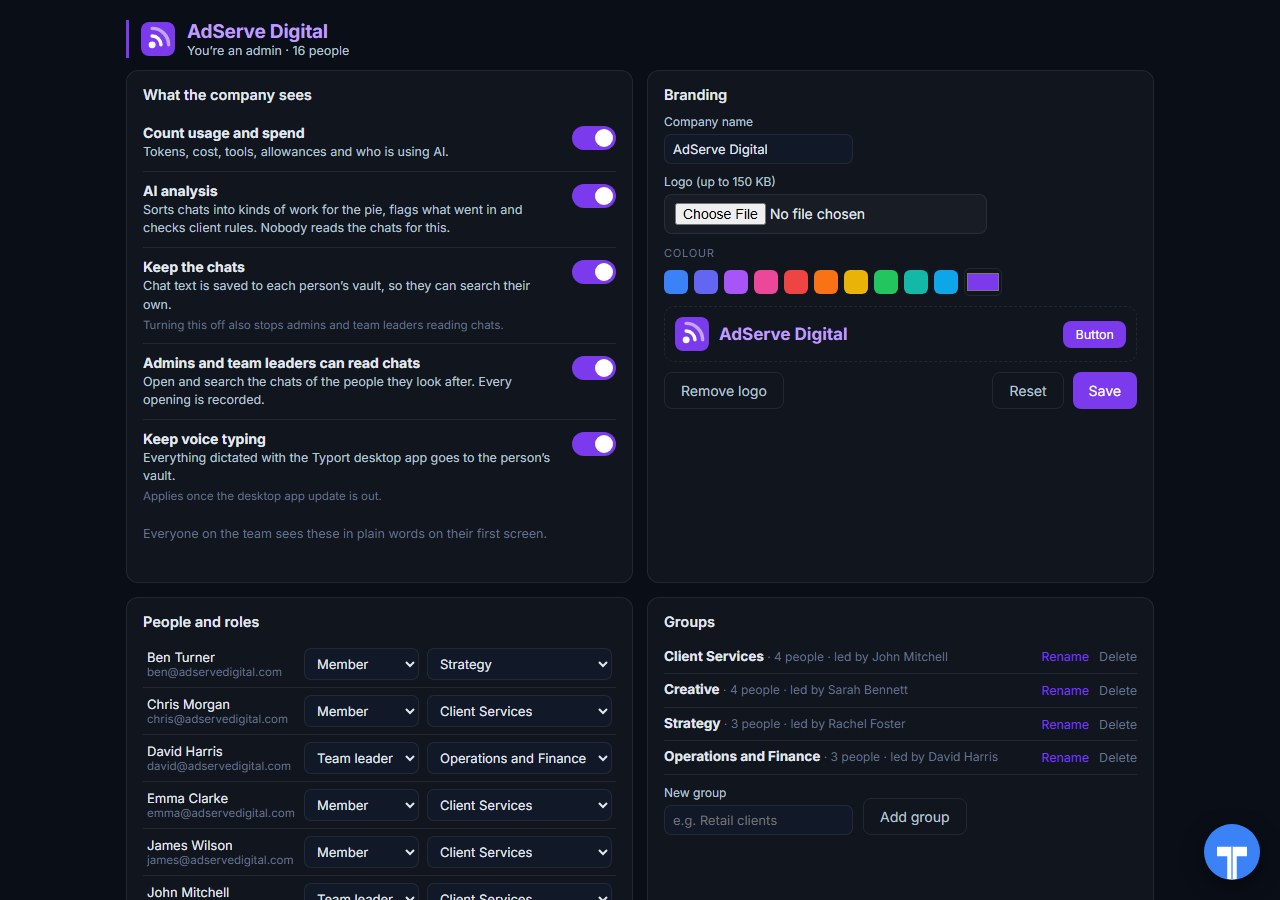
Five switches
Count usage and spend, AI analysis, keep the chats, let admins and team leaders read chats, keep voice typing. Every opening of a chat is recorded, and everyone sees the switches in plain words. Chats in the AI's own temporary or incognito mode are never collected.
Use them together
LiteLLM for your apps. Typort for the seats. Anything your developers build, and any agent that calls a model with an API key, goes through the gateway. That is where routing, hard budgets and per key spend belong. The ChatGPT and Claude seats people type into every day are a different stream, and Typort shows who uses them, what for, roughly what it costs, and what went in.
They run side by side. Typort needs no change to your LiteLLM setup, and LiteLLM needs nothing from Typort.
The team view runs on Typort's servers. It is free for a limited time and will move to Typort Pro later.
FAQ
Is Typort a replacement for LiteLLM?
No. LiteLLM is a gateway: your apps send their requests through it with a key, and it routes them, records their cost and enforces budgets. Typort routes nothing. It shows how people use the AI tools they type into in the browser. Many teams will want both.
Will LiteLLM show what my staff do in ChatGPT or Claude?
No. LiteLLM logs the requests that go through the gateway. When someone chats in ChatGPT or Claude on a Business or Team seat in their browser, the chat goes straight to that company, not through your gateway. That is the part Typort covers.
Can Typort stop someone at a budget?
No. Typort gives each person an allowance and warns admins at 80% and 100%. It does not block anything. LiteLLM can set a hard budget on a key, user or team, and requests fail once a key crosses it, for traffic that goes through the gateway.
Which AI tools does Typort see?
ChatGPT, Claude, Perplexity and Grok in the browser, through the Typort browser extension. It reads the page, so it works on Business and Team seats and needs no API keys from the AI vendors. Microsoft 365 Copilot comes in the next extension update, and Gemini is being added.
What does LiteLLM cost?
LiteLLM's open source gateway is free and MIT licensed, and you host it yourself. Its Enterprise tier has no public price: LiteLLM says request pricing.
Are the dollar figures exact?
No, they are estimates from the tokens in each chat at the AI vendor's API list price. They are there to compare people and tools, not to replace the invoice.
Can staff see what the company sees?
Yes. The five switches are shown to everyone in plain words on their first screen, and every time an admin or team leader opens someone's chat, it is recorded. Chats in the AI's own temporary or incognito mode are never collected.
What does the team view cost?
The team view runs on Typort's servers. It is free for a limited time and will move to Typort Pro later.
Sources
Every LiteLLM fact on this page comes from LiteLLM's own website and documentation, checked on 2 November 2026. Typort facts come from the product itself.
| Open source: "Free forever", "the open-source gateway is MIT-licensed". Enterprise: "Enterprise support and custom SLAs", "JWT auth, SSO, and audit logs", "Request pricing". Checked 2 November 2026. | litellm.ai pricing |
| "one OpenAI-compatible endpoint for 100+ LLM providers"; "Each key has its models, budgets, and rate limits"; the gateway "records the cost of each request"; "Load balancing, fallbacks, and retries move traffic between deployments"; "Send logs and metrics to Langfuse, Datadog, OpenTelemetry, Prometheus". | LiteLLM docs: AI Gateway |
| "Track spend for keys, users, and teams across 100+ LLMs"; requests through the proxy are written to LiteLLM_SpendLogs; to track per user spend, set user_id when creating keys. | LiteLLM docs: spend tracking |
| "After the key crosses it's max_budget, requests fail"; "Budget is reset at the end of specified duration"; rate limits apply to any key, user or team. | LiteLLM docs: budgets and rate limits |
typort.com | Typort Business | Typort for compliance | AI usage monitoring | Privacy | Terms
© 2024-2026 Human Compute, LLC. LiteLLM is a trademark of BerriAI. Typort is not affiliated with or endorsed by BerriAI.