What each one is for
They answer different questions. Rippling, nOps and CloudZero ask "what is the AI bill, and whose is it?". Typort asks "how is the team using AI in the chat apps, and what is it costing?".
Rippling, nOps and CloudZero are good at
- OpenAI and Anthropic API spend, read from the vendors' own cost and usage APIs
- Cursor spend, and Amazon Bedrock spend from AWS billing or invocation logs (nOps and CloudZero)
- ChatGPT Enterprise and Claude Enterprise spend per user (nOps and CloudZero)
- Mapping AI spend to employees, departments and GitHub output (Rippling)
- Budgets, spend limit requests and seat limits (nOps)
- Cloud cost as a whole, with AI as one part of it (nOps and CloudZero)
Typort is good at
- Who is using AI, how much, and which tools, per person and over time, on any plan
- Estimated spend per person, with allowances and warnings
- A pie of what the team spends its time with AI doing
- Flags for what went in, and client rules marked broke or close
- Searching the team's chats and meetings, and asking questions of them with Ask Typort
- Five plain switches for what the company sees, shown to everyone on their first screen
How each one gets the numbers
From each vendor's own site and documentation.
Rippling AI Spend Console. Rippling says it connects Anthropic, OpenAI and Cursor "to see AI spend in one place", pulling spend "directly from our vendors" and matching each person by email, employee ID or username. It sets token costs against GitHub pull requests and code reviews. Its AI Gateway, which routes employees' LLM traffic to apply spend limits, has a waitlist. Rippling's pages do not say which OpenAI or Anthropic plans its connectors read.
nOps. Separate connectors for each source. OpenAI Platform and the Claude Console use an admin key and cover API usage only. ChatGPT use comes through a workspace admin key that is "for ChatGPT Enterprise workspaces only", and nOps says ChatGPT Business "does not expose these APIs". Claude use comes through an Analytics API key that is "for Claude Enterprise (claude.ai seats) only". Amazon Bedrock comes from model invocation logs that the customer turns on and stores in S3. There are connectors for Cursor and a self-hosted LiteLLM gateway too.
CloudZero. Read-only connections. OpenAI Platform uses a read-only admin key and OpenAI's Costs API, and CloudZero says ChatGPT workspace usage is billed "on separate surfaces". A preview OpenAI Enterprise connection needs "an OpenAI organization on the enterprise plan". Anthropic Platform uses an admin key and covers API spend only; Anthropic Enterprise uses an Analytics API key, and "Team, Pro, Max, and Free plans are not supported". Amazon Bedrock spend comes through the AWS Cost and Usage Report.
What OpenAI and Anthropic make available
All three tools depend on what the AI vendors expose. This is what their own docs say.
OpenAI API. The Usage and Costs endpoints need an admin key from the API platform's organization settings. They report API activity: by project, model, API key and line item.
ChatGPT. OpenAI says the Compliance Platform "is available to ChatGPT Enterprise and Edu workspaces", and lists admin keys for Enterprise, Edu and Healthcare workspaces. ChatGPT Business is not on either list.
Anthropic API. The Usage and Cost API needs an Admin API key, and "the Admin API is unavailable for individual accounts". It covers Claude Console organizations.
Claude. The Claude Enterprise Analytics API "is available to Claude Enterprise organizations", with a key only the primary owner can create. On seat-based Enterprise plans its cost reports "reflect usage credits only". Claude Team is not covered.
So ChatGPT Business and Claude Team seats used in the browser are not API usage, and the APIs that do reach chat use are for Enterprise plans. Typort reads the chat page instead, so the plan does not matter.
What they cost
From each vendor's own pricing page, checked 2 November 2026.
Rippling. No public price for AI Spend Console. Rippling offers a 30-day free trial with "no Rippling subscription required". Its pricing page says "Rippling plans start at $8 per employee per month, with a monthly base fee", and quotes the rest.
nOps. No public price; sales quote. Cost visibility is "priced as a flat, predictable fixed fee based on your cloud spend", with a 14-day free trial.
CloudZero. No public price; sales quote. CloudZero offers "a single subscription with all capabilities included" and a custom price quote.
Typort. The team view runs on Typort's servers. It is free for a limited time and will move to Typort Pro later.
Typort vs Rippling, nOps and CloudZero, side by side
| Rippling | nOps | CloudZero | Typort | |
|---|---|---|---|---|
| ChatGPT Business and Claude Team | Not stated on Rippling's pages | No. ChatGPT and claude.ai connectors are Enterprise only | No. ChatGPT and claude.ai connections are Enterprise only | Counted per person from the browser, on any plan |
| API spend | OpenAI, Anthropic and Cursor | OpenAI, Anthropic, Cursor, Amazon Bedrock and LiteLLM | OpenAI, Anthropic, Cursor, and Bedrock through AWS billing | No. Typort counts the chats people have, not API bills |
| How it connects | Pulls spend directly from the AI vendors | Admin keys at each vendor; Bedrock logs in S3 | Read-only admin keys at each vendor; the AWS Cost and Usage Report | The Typort browser extension and a sign in. No keys |
| Per person | Spend mapped to employees by email and ID | Per user on ChatGPT Enterprise and Claude Enterprise | Per user on Anthropic Enterprise; by project and model on the APIs | Tokens, tools, active days and estimated spend per person |
| What the work is | Token costs set against GitHub pull requests and code reviews | By model, user and group | By project, model, product and user | Chats sorted into kinds of work, shown as a pie |
| Limits | Through its AI Gateway, which has a waitlist | Budgets, limit requests and Claude Enterprise seat limits | Not on its AI connection pages | An allowance per person, with an 80% and 100% warning. Not a cap |
| Flags and client rules | Not on its AI Spend Console pages | Not on its AI integration pages | Not on its AI connection pages | Flags for what went in, and chats marked broke a client rule or close to one |
See it in Typort
A walk through the team page for ChatGPT Business and Claude Team seats: usage and estimated spend per person, allowances, and what the work is, with no API keys.
What you get
Screens from a sample 16-person agency.
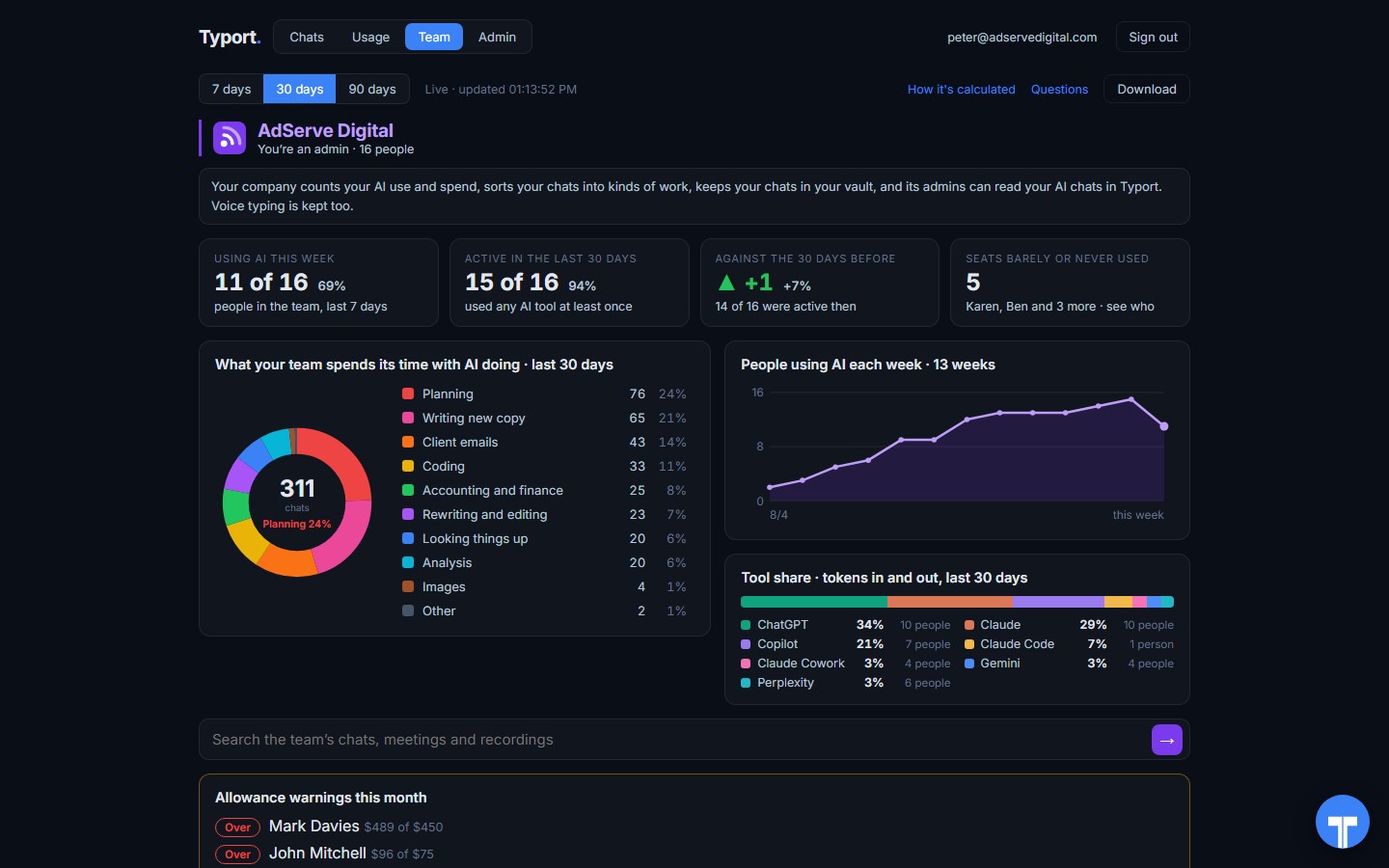
The team page
Who is using AI this week, what the work is, people using AI each week, tool share by AI tool, and allowance warnings for anyone near or over.
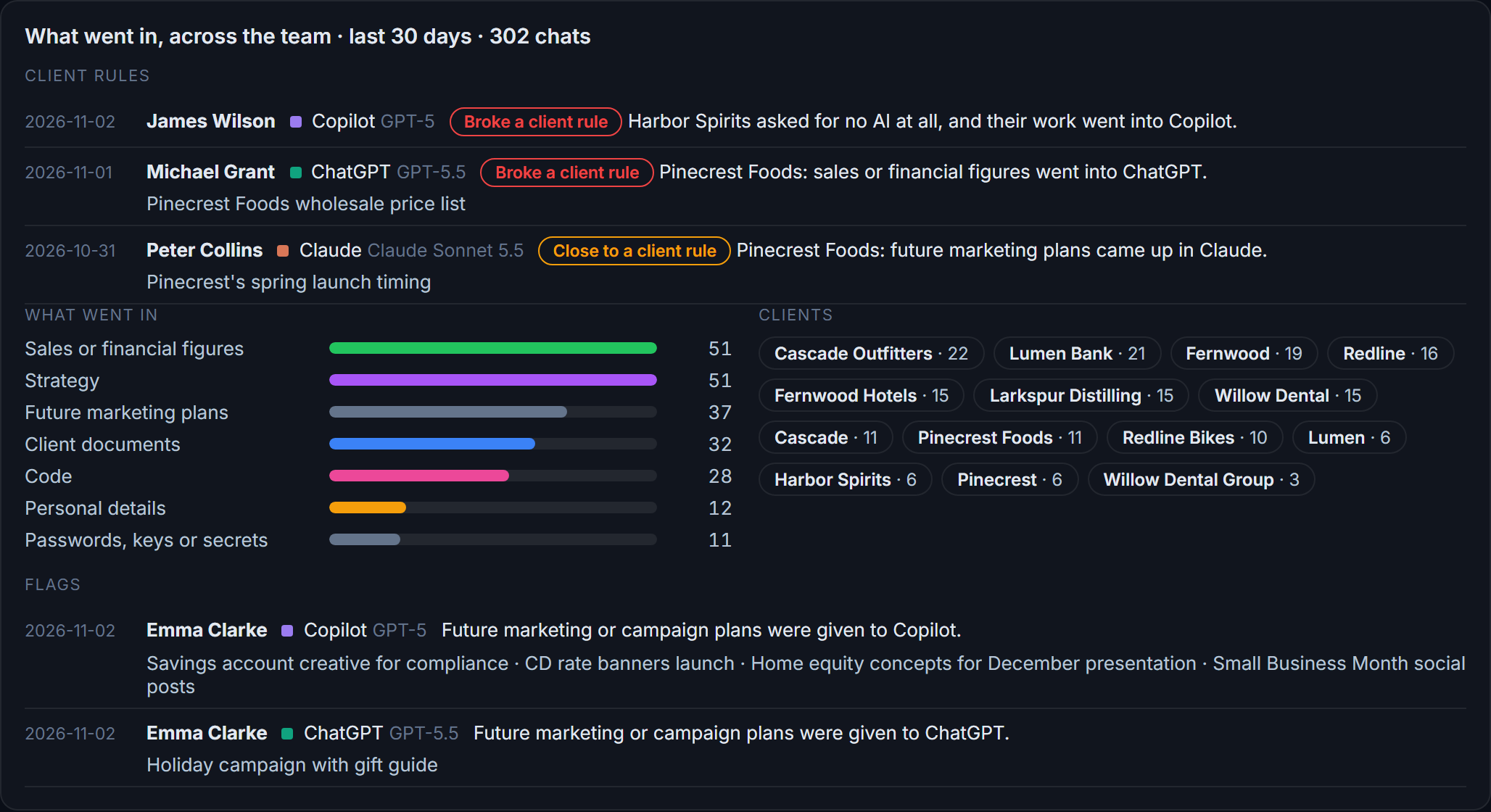
Flags and client rules
What went in across the team: sales figures, strategy, client documents, passwords and keys. Each chat that broke a client rule, or came close, is listed with the person and the tool.
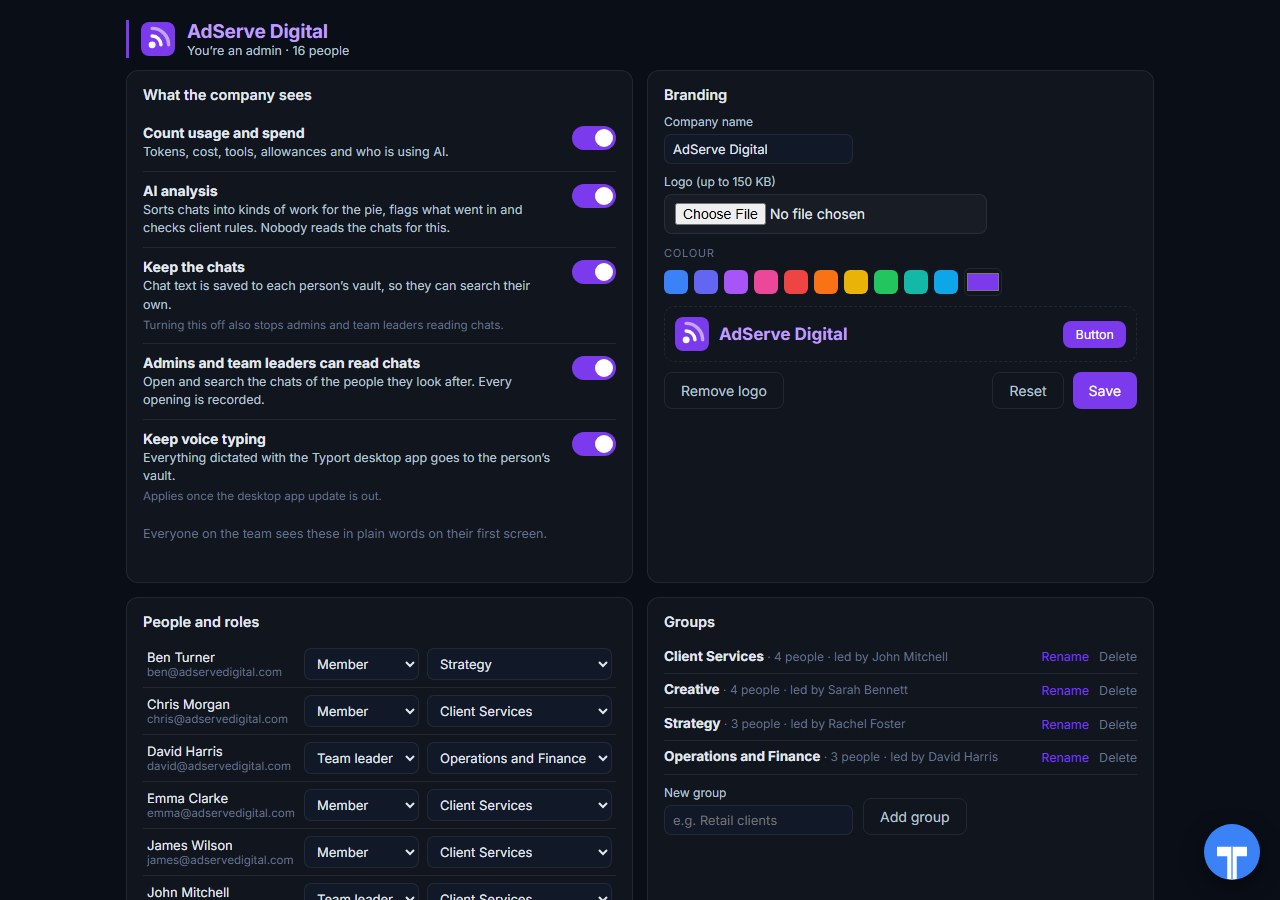
Five switches
Count usage and spend, AI analysis, keep the chats, let admins and team leaders read chats, keep voice typing. Every opening of a chat is recorded, and everyone sees the switches in plain words. Chats in the AI's own temporary or incognito mode are never collected.
Use them together
They read the bill. Typort reads the chats. Rippling, nOps and CloudZero are built for API and cloud spend: OpenAI and Anthropic API keys, Cursor, Amazon Bedrock, and the Enterprise chat plans that publish cost data. Typort covers the chat seats people open every day, on any plan, and shows what the work is.
They run side by side. Keep your spend tool on the API keys and the cloud bill. Add Typort to see who uses ChatGPT Business, Claude Team, Perplexity and Grok, how much, against what allowance, and which client's material is going where. Typort needs no keys and no change to your spend tool.
The team view runs on Typort's servers. It is free for a limited time and will move to Typort Pro later.
FAQ
Can nOps or CloudZero see ChatGPT Business or Claude Team?
Not from their docs. Both read OpenAI and Anthropic API usage through admin keys, and both list their ChatGPT and claude.ai connectors as Enterprise only. nOps says ChatGPT Business "does not expose these APIs". CloudZero says Team, Pro, Max and Free Claude plans are not supported.
What about Rippling?
Rippling says AI Spend Console pulls AI spend directly from vendors such as Cursor, OpenAI and Anthropic. Its pages do not say which OpenAI or Anthropic plans that covers. In OpenAI's and Anthropic's own docs, the keys that reach chat use are for Enterprise plans, and Edu at OpenAI.
How does Typort see ChatGPT Business and Claude Team use?
Through the Typort browser extension. It reads ChatGPT, Claude, Perplexity and Grok in the browser, so it works on Business and Team seats and needs no API keys from the AI vendors. Microsoft 365 Copilot capture is built and comes in the next extension update.
Does Typort see API spend or Amazon Bedrock?
No. Typort counts the chats people have in the browser. It does not read API bills, see API traffic that goes through a gateway, or read cloud billing. For API and Bedrock spend, Rippling, nOps and CloudZero are built for it.
Can Typort stop someone who goes over their allowance?
No. An admin sets an allowance per person, and the team page warns at 80% and 100%. It is a warning, not a cap. Typort does not route API calls or block a prompt.
Are the dollar figures exact?
No, they are estimates from the tokens in each chat at the AI vendor's API list price. They are there to compare people and tools, not to replace the invoice.
What does the team view cost?
The team view runs on Typort's servers. It is free for a limited time and will move to Typort Pro later.
Sources
Every Rippling, nOps, CloudZero, OpenAI and Anthropic fact on this page comes from that company's own website or documentation, checked on 2 November 2026. Typort facts come from the product itself.
| "Connect Anthropic, OpenAI, and Cursor to see AI spend in one place." AI Gateway: "Route your employees' LLM traffic through Rippling to track usage, attribute costs, and apply spend limits", with "Join the waitlist". | Rippling: AI Spend Console |
| "We used our Data Cloud infrastructure to pull AI spend directly from our vendors (such as Cursor, OpenAI, and Anthropic)"; matches emails, employee IDs, usernames and display names to employee profiles; "you can try AI Spend Console for free with a 30 day trial. No Rippling subscription required." | Rippling blog: Introducing AI Spend Console |
| "Rippling plans start at $8 per employee per month, with a monthly base fee." Checked 2 November 2026. | Rippling pricing |
| "This integration is for ChatGPT Enterprise workspaces only"; "the workspace is on ChatGPT Business, which does not expose these APIs"; "They never return your seat license, your included credit allowance, or a negotiated per-credit rate." | nOps: ChatGPT Enterprise |
| OpenAI Platform: an "OpenAI Platform Admin API key" to "bring API usage and billing into Inform". Anthropic: "This integration is for Claude Platform / Console (programmatic API usage) only." Claude: "This integration is for Claude Enterprise (claude.ai seats) only." | nOps: OpenAI, nOps: Anthropic, nOps: Claude Enterprise |
| Bedrock: "Enable Model invocation logging" with an S3 destination; nOps reads "Amazon Bedrock Model Invocation Logs from AWS (via S3 large data delivery)". Other connectors: Cursor, LiteLLM; AI budgets, spend limit requests and wallets. | nOps: Amazon Bedrock, nOps docs index |
| Cost visibility "priced as a flat, predictable fixed fee based on your cloud spend"; "nOps offers a 14 day free trial". No dollar figures. Checked 2 November 2026. | nOps pricing |
| OpenAI: "uses a read-only Admin API key and OpenAI's Costs API"; "OpenAI bills ChatGPT workspace usage and API Platform usage on separate surfaces"; OpenAI Enterprise (preview) needs "An OpenAI organization on the enterprise plan"; "Usage that falls inside a seat's included allowance carries no cost from OpenAI." | CloudZero: Connecting to OpenAI |
| Anthropic Platform: Admin API key, API token spend only. Anthropic Enterprise: Analytics API key; "Team, Pro, Max, and Free plans are not supported." "All connections are read-only." Bedrock spend through the AWS Cost and Usage Report. | CloudZero: Connecting to Anthropic, CloudZero: AI Platforms, CloudZero: Bedrock spend |
| "CloudZero offers a single subscription with all capabilities included"; "Request a custom price quote". No dollar figures. Checked 2 November 2026. | CloudZero pricing |
| Usage and Costs endpoints need an admin key from the organization's admin keys page; costs can be grouped by project, line item and API key. | OpenAI: Usage API and Cost API |
| "The Compliance Platform is available to ChatGPT Enterprise and Edu workspaces." Admin keys "are available for eligible managed ChatGPT workspaces, including ChatGPT Enterprise, ChatGPT Edu, and ChatGPT for Healthcare workspaces." | OpenAI: Compliance Platform, OpenAI: Admin keys |
| "The Admin API is unavailable for individual accounts." The Usage and Cost API gives "historical API usage and cost data for your organization"; Claude Enterprise organizations use an Analytics API key instead. | Anthropic: Usage and Cost API |
| "The Claude Enterprise Analytics API is available to Claude Enterprise organizations"; "Only the primary owner of the organization can enable API access and create Analytics API keys"; cost and usage endpoints "for seat-based Enterprise plans, they reflect usage credits only." | Anthropic: Analytics APIs |
typort.com | Typort Business | Typort for compliance | AI usage monitoring | Privacy | Terms
© 2024-2026 Human Compute, LLC. Rippling is a trademark of People Center, Inc. nOps and CloudZero are trademarks of their respective owners. OpenAI, ChatGPT, Anthropic and Claude are trademarks of their respective owners. Typort is not affiliated with or endorsed by Rippling, nOps or CloudZero.