What each one is for
They answer different questions. Torii asks "which apps do we have, who has a seat, and what are we paying?". Typort asks "how is the team using AI, and what is the work?".
Torii is good at
- Finding every app the company uses, from SSO, finance data, integrations and a browser extension
- Seats, contracts and renewals, with license reclamation based on usage
- An AI module with tokens, sessions, active users and adoption by department
- Billed cost from vendor admin APIs for Cursor, OpenAI, Claude Platform and Claude.ai
- Token tracking for developer tools such as Claude Code, Gemini CLI and Codex
- Warning or blocking a chat message with personal or financial details before it is sent
Typort is good at
- Who is using AI, how much, and which tools, per person and over time
- Estimated spend per person, with allowances and warnings
- A pie of what the team spends its time with AI doing
- Flags for what went in, and client rules marked broke or close
- Searching the team's chats and meetings, and asking questions of them with Ask Typort
- Five plain switches for what the company sees, shown to everyone on their first screen
How Torii sees AI use
From Torii's own support docs. Torii names four sources for its AI module.
Torii AI Lens, a Chrome extension. It syncs OpenAI, Cursor, Lovable, Claude Platform, Claude.ai, ChatGPT and Base44. An admin signs in to each AI product and clicks Sync data, and the extension reads the vendor's admin views: members, seats, usage, billing, credits and API keys. For ChatGPT the admin signs in to chatgpt.com and admin.openai.com as a workspace admin. Torii says it uses an extension because most of that admin data "is not available through a corresponding public API".
Vendor admin APIs. Billed cost for Cursor, OpenAI, Claude Platform and Claude.ai. Torii says Claude.ai cost needs a Claude Enterprise plan: "the Analytics API is not available on Team plans". Its ChatGPT integration syncs members and groups, and needs an admin key that OpenAI offers only for ChatGPT Enterprise, Edu and Healthcare workspaces.
AI Telemetry. Token tracking for developer command-line tools such as Claude Code, Gemini CLI and Codex.
Integrations you already have. Microsoft 365 Copilot adoption comes from Microsoft Graph, and its cost is the license price recorded in Torii.
The Torii browser extension for staff. A separate extension finds the business apps people log in to and records "the Torii user ID and the visit time in the app". It can also warn or block a chat message with sensitive data, scanned on the device, and Torii says "no browsing history or message content ever leaves the browser".
Typort vs Torii, side by side
| Torii | Typort | |
|---|---|---|
| Find every SaaS app | Yes, from SSO, finance, integrations and its browser extension | No. Typort sees the AI sites it reads, and nothing else |
| Seats, contracts, renewals | Yes, with renewal alerts and license reclamation | No. Typort does not manage seats or pay invoices |
| AI usage per person | Tokens, sessions and active users, synced from the vendor's admin pages and APIs | Tokens, tools and active days per person from their own chats, with adoption over 13 weeks |
| Spend | Billed cost from vendor admin APIs for four products, and an estimated token value for the rest | Estimated spend per person, with an allowance and a near or over warning |
| Business and Team plans | Admin-key integrations need Enterprise. AI Lens reads the admin pages instead, with no Claude.ai cost on Team | Counted from each person's chats on any plan, with no keys |
| What the work is | Not covered. Message content stays in the browser | Chats sorted into kinds of work, shown as a pie |
| Client rules | Not covered in Torii's docs | Rules per client, with chats marked broke a client rule or close to one |
| Block a prompt | Yes. Its extension warns or blocks messages with personal or financial details | No. Typort shows what went in after the fact |
| Developer command-line tools | Yes, with AI Telemetry for Claude Code, Gemini CLI and Codex | No |
| Search the team's chats | Not covered in Torii's docs | Search across chats and meetings, and Ask Typort questions that cite the chats |
| Price | No public price; sales quote | The team view is free for a limited time and will move to Typort Pro later |
See it in Typort
A walk through the team page: usage and estimated spend per person on ChatGPT and Claude, what the work is, and seats that are barely used.
What you get
Screens from a sample 16-person agency.
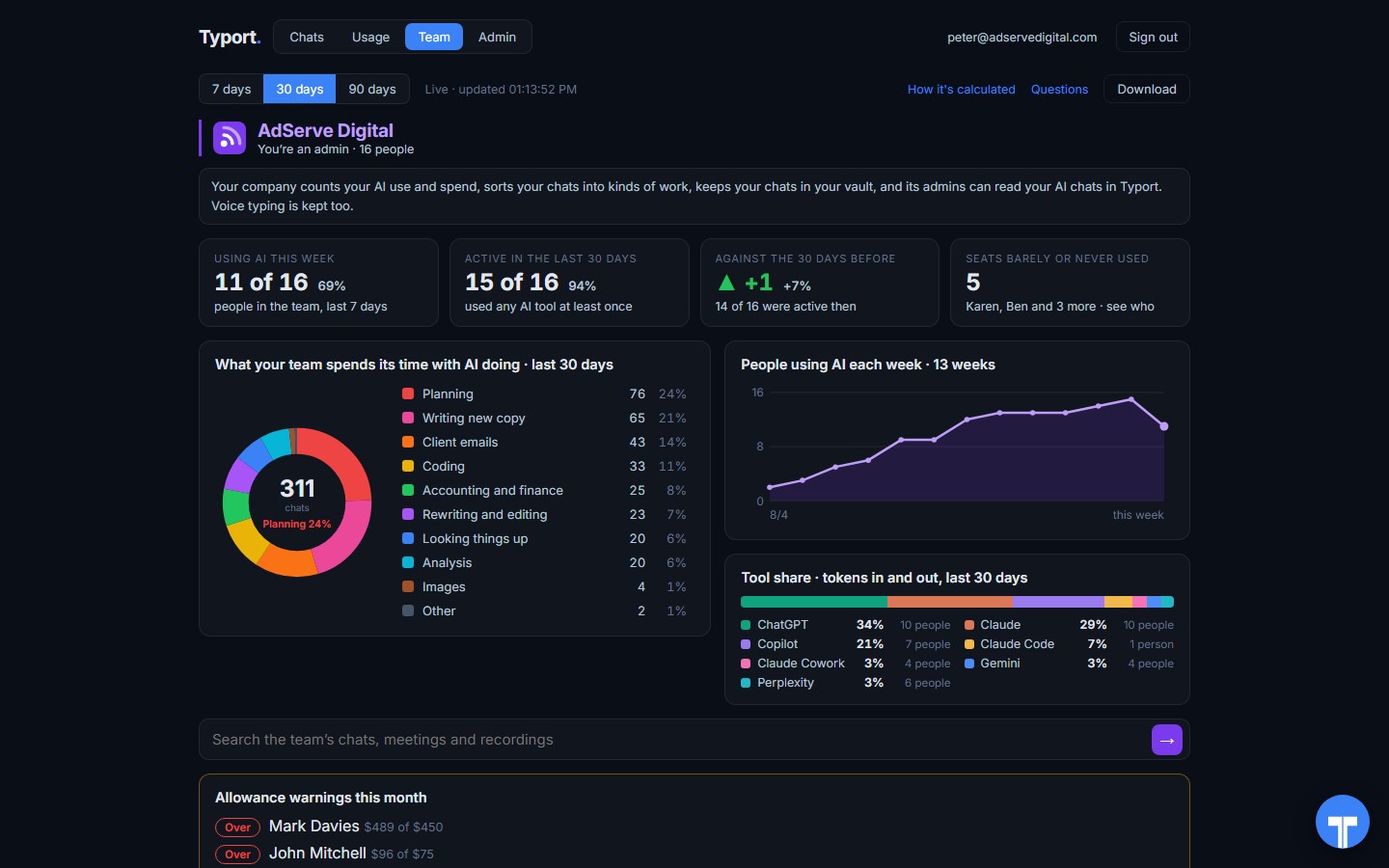
The team page
Who is using AI this week, seats barely or never used, what the work is, people using AI each week, tool share by AI tool, and allowance warnings for anyone near or over.
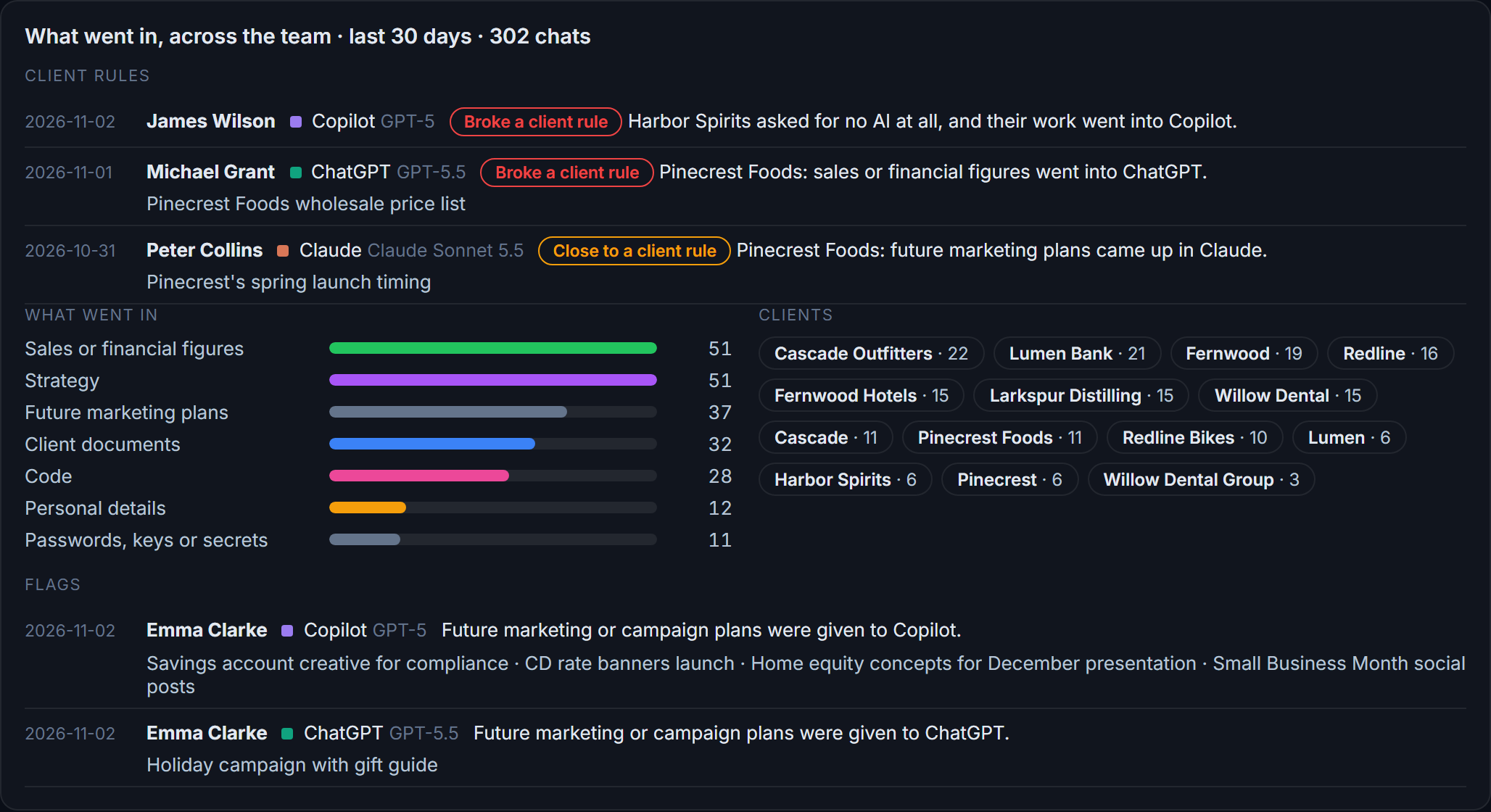
Flags and client rules
What went in across the team: sales figures, strategy, client documents, passwords and keys. Each chat that broke a client rule, or came close, is listed with the person and the tool.
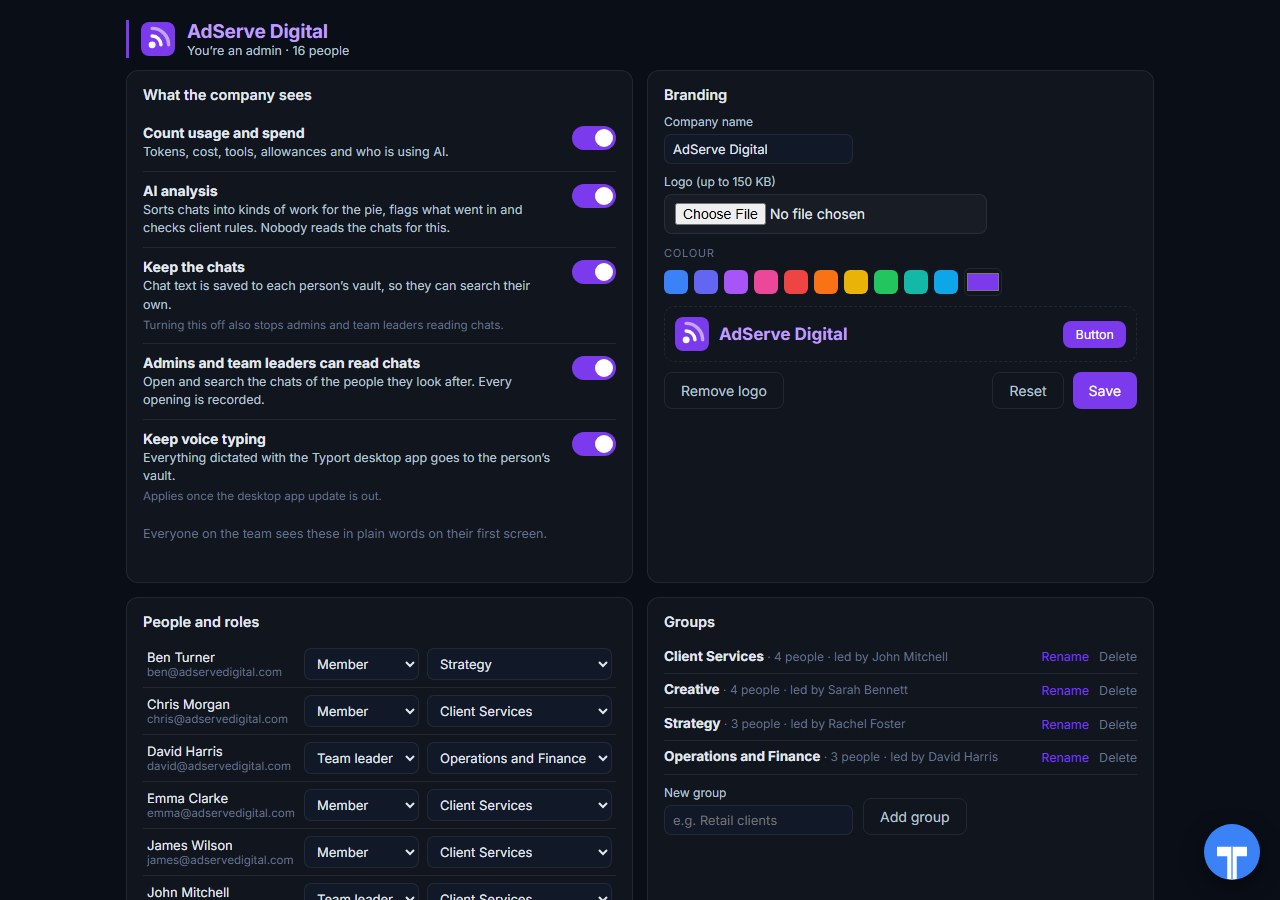
Five switches
Count usage and spend, AI analysis, keep the chats, let admins and team leaders read chats, keep voice typing. Every opening of a chat is recorded, and everyone sees the switches in plain words. Chats in the AI's own temporary or incognito mode are never collected.
Use them together
Torii runs the stack. Typort shows the work. Torii does the inventory well: every app, every seat, every contract and renewal, and AI tokens at the account level. Typort does the view of AI use itself: usage and estimated spend per person, what the work is, search across the team's chats, and rules per client.
Seat decisions get easier with both. Torii tells you who holds a ChatGPT or Claude seat and what it costs. Typort shows who is barely using theirs and what the people who use it are doing with it, on Business and Team plans as well as Enterprise.
The team view runs on Typort's servers. It is free for a limited time and will move to Typort Pro later.
FAQ
Is Typort a replacement for Torii?
No. Torii is a SaaS management platform: it finds every app the company uses, tracks seats, contracts and renewals, and has an AI module for AI tools. Typort shows what each person does with AI: usage and estimated spend per person, allowances, what the work is, flags and client rules. Many teams will want both.
Does Torii see ChatGPT and Claude use?
Yes, at the account level. Torii's ChatGPT and Claude.ai integrations use admin keys that, in Torii's own docs, need ChatGPT Enterprise, Edu or Healthcare, or Claude Enterprise. For other plans, its Torii AI Lens extension reads the vendor's admin pages while an admin is signed in. On a Claude Team plan, Torii says Claude.ai cost figures are not available.
How is Typort's view different?
Typort reads each person's own chats through the Typort browser extension, so it works on Business and Team seats and needs no API keys from the AI vendors. Because it sees the chats, it can show what the work is, flag what went in, check client rules and let the team search its chats. Torii's own docs say its extension keeps message content in the browser.
Can Typort block a prompt?
No. Typort shows what went in after the fact, with flags and client rules marked broke or close. Torii's browser extension has a data loss prevention option that warns or blocks a message with personal or financial details before it is sent.
Which AI tools does Typort see?
ChatGPT, Claude, Perplexity and Grok in the browser, through the Typort browser extension. Microsoft 365 Copilot capture is built and comes in the next extension update. Typort does not find other SaaS apps, and it does not count developer command-line tools.
What does Torii cost?
Torii publishes no price. Its pricing page lists its products and asks you to get started with its sales team.
Are the dollar figures exact?
No, they are estimates from the tokens in each chat at the AI vendor's API list price. They are there to compare people and tools, not to replace the invoice.
What does the team view cost?
The team view runs on Typort's servers. It is free for a limited time and will move to Typort Pro later.
Sources
Every Torii fact on this page comes from Torii's own website and support docs, checked on 2 November 2026. Plan limits were also checked against OpenAI's and Anthropic's own docs. Typort facts come from the product itself.
| No prices published. The page lists IGA, SMP (App Discovery, Savings, and Renewals) and AI Management, each with a "Get started" button. Checked 2 November 2026. | Torii pricing |
| Discovery from "finance and expense data, your IdP and SSO, direct integrations with the systems you already run", and "a browser extension that catches tools employees sign up for on their own". "Automatic license reclamation based on live usage data." "AI contract ingestions, renewal clause detection, and auto-alerts." | Torii SaaS management |
| "Four complementary mechanisms feed the module": the Torii AI Lens browser extension, AI Telemetry for "Claude Code, Gemini CLI, and Codex", vendor admin APIs for billed cost, and existing integrations such as Microsoft 365 Copilot. "Tokens, sessions, active users, and estimated token value over time." | Torii: What is the Torii AI Module? |
| AI Lens "syncs OpenAI, Cursor, Lovable, Claude Platform, Claude.ai, ChatGPT, and Base44". For ChatGPT, "make sure you are signed in to both chatgpt.com and admin.openai.com as a workspace admin". "Dollar figures collected by AI Lens are an estimated token value based on standard API rates." | Torii: Syncing AI app data with AI Lens |
| Administrative data visible in the vendor's console "is not available through a corresponding public API"; the extension "reads the same administrative views the customer is already entitled to see". | Torii AI Lens white paper |
| Claude.ai cost "Requires a Claude Enterprise plan; the Analytics API is not available on Team plans." "On a Team plan the cost figures are not available, and the rest of the Claude.ai page continues to be synced by AI Lens." | Torii: Syncing AI cost data, Torii: Claude AI integration |
| Torii's ChatGPT integration syncs "People in your ChatGPT Enterprise workspace" and groups. "Admin keys are only available for eligible managed ChatGPT workspaces (ChatGPT Enterprise, Edu, and ChatGPT for Healthcare workspaces)." | Torii: ChatGPT integration |
| OpenAI: Admin keys "are available for eligible managed ChatGPT workspaces, including ChatGPT Enterprise, ChatGPT Edu, and ChatGPT for Healthcare workspaces". Anthropic: "The Claude Enterprise Analytics API is available to Claude Enterprise organizations." | OpenAI help: Admin keys, Claude docs: Analytics APIs |
| The extension "analyzes user behavior to detect logins to business applications"; "the only information recorded - is the Torii user ID and the visit time in the app"; "Torii measures days used per month for each business application". | Torii: Introduction to the browser extension |
| The extension monitors "text entered into AI chat tools like ChatGPT, Gemini, and Claude", and "warns the user or blocks the message before it's sent". "No browsing history or message content ever leaves the browser." | Torii: Browser extension DLP |
typort.com | Typort Business | Typort for compliance | AI usage monitoring | Privacy | Terms
© 2024-2026 Human Compute, LLC. Torii is a trademark of its respective owner. Typort is not affiliated with or endorsed by Torii.