What each one is for
They answer different questions. Ramp asks "what are our AI API keys and provider bills costing?". Typort asks "how is the team using its ChatGPT, Claude and other chat seats, and what is the work?".
Ramp is good at
- One view of API spend across Anthropic, OpenAI, Gemini, Cursor, AWS Bedrock, Azure OpenAI and Fireworks AI
- Spend by provider, model, project, API key and user
- Mapping every key to an owner, department and project
- Weekly briefings and spike alerts by Slack or email
- ChatGPT Enterprise and Claude Enterprise usage, and hard limits on ChatGPT Enterprise
Typort is good at
- ChatGPT Business and Claude Team seats, counted per person from the browser
- Estimated spend per person, with allowances and 80% and 100% warnings
- A pie of what the team spends its time with AI doing
- Flags for what went in, and client rules marked broke or close
- Searching the team's chats and meetings, and asking questions of them with Ask Typort
- Five plain switches for what the company sees, shown to everyone
What Ramp AI Spend Management does
From Ramp's own website and help center.
API spend in one place. Ramp connects to AI providers with an admin API key and shows "AI spend by provider, model, project, API key, and user". The help center lists Anthropic, OpenAI, Cursor, Gemini, AWS Bedrock, Azure OpenAI and Fireworks AI. Google Cloud needs a billing export to BigQuery, and AWS Bedrock an IAM role.
Chat plans: Enterprise only. For ChatGPT and Claude.ai usage, Ramp needs ChatGPT Enterprise or Claude Enterprise. Its help page says "ChatGPT Business and personal accounts are not supported" and "Claude Team is not supported."
Briefings and alerts. A weekly briefing on what changed and what drove it, and spike alerts by Slack or email.
Limits. Spend limits by API key, user, department or company need a paid subscription. For Anthropic and OpenAI Platform they "send notifications and do not prevent provider charges." Ramp says "Hard limits apply only to ChatGPT Enterprise workspace usage limits."
What Ramp costs
From Ramp's own pages, checked 2 November 2026.
The dashboard starts free. Ramp says "Every business can start free with a unified dashboard, basic briefings, and anomaly detection." You do not need to be a Ramp card and expense customer.
Spend limits are paid, with no public price. Ramp says "AI Spend Limits are available through an active AI Spend Management subscription." Neither the AI cost monitoring page nor Ramp's pricing page gives a price for it: no public price; sales quote.
Ramp's main plans are for cards and expenses. Ramp's pricing page lists Ramp Free at "$0/mo/user", Plus at "$15/mo/user" plus a platform fee based on team size, and Enterprise at a custom price. AI Spend Management is not priced there.
Typort vs Ramp, side by side
| Ramp AI Spend Management | Typort | |
|---|---|---|
| ChatGPT Business and Claude Team | Not supported, according to Ramp's help page | Counted per person from the browser, on any plan |
| API spend across providers | Anthropic, OpenAI, Gemini, Cursor, AWS Bedrock, Azure OpenAI and Fireworks AI | No. Typort counts the chats people have, not API bills or gateway traffic |
| Breakdown | Provider, model, project, API key and user | Person, tool, model and the kind of work, with tokens and estimated spend at API list price |
| Setup | Admin or API keys, an AWS IAM role, a BigQuery billing export, or an Enterprise chat plan | A browser extension and a sign in. No keys |
| Limits | Paid. For Anthropic and OpenAI Platform they notify and do not stop charges. Hard limits only for ChatGPT Enterprise | A monthly allowance per person, marked Within, Near or Over. A warning, not a cap |
| What went in | Not covered on Ramp's AI spend pages | Flags for personal details, passwords and keys, and client figures, plus rules per client |
| Search the team's chats | Not covered on Ramp's AI spend pages | When the company turns it on, admins and team leaders search the chats and meetings of the people they look after |
| Pay bills, manage cards | Yes, Ramp's main business | No |
See it in Typort
ChatGPT Business and Claude Team use counted per person, with estimated spend, allowance warnings and the kinds of work.
What you get
Screens from a sample 16-person agency.
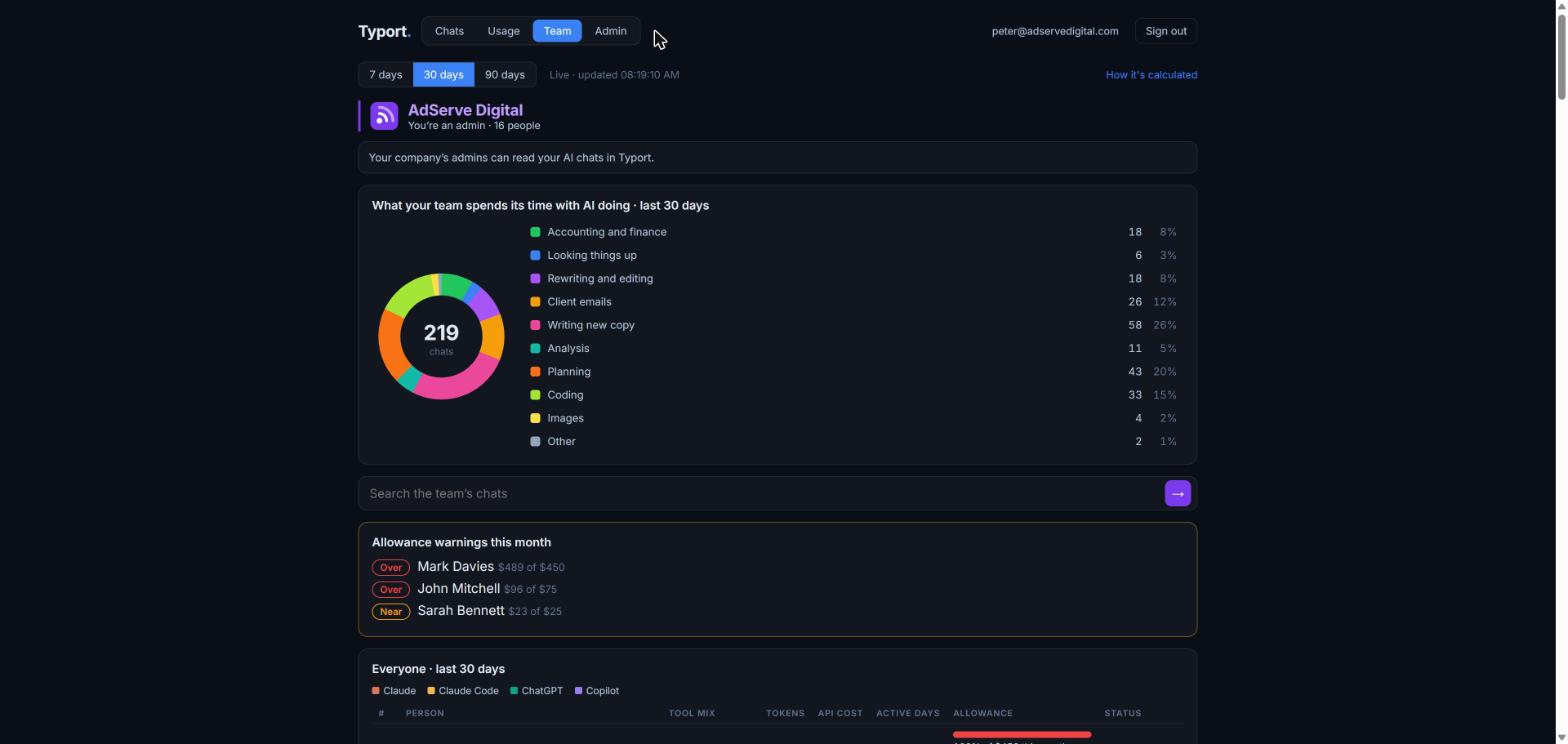
The team page
What the team spends its time with AI doing, as a pie with counts. Below it, allowance warnings for the month and everyone's tools, tokens, estimated spend, active days and allowance.
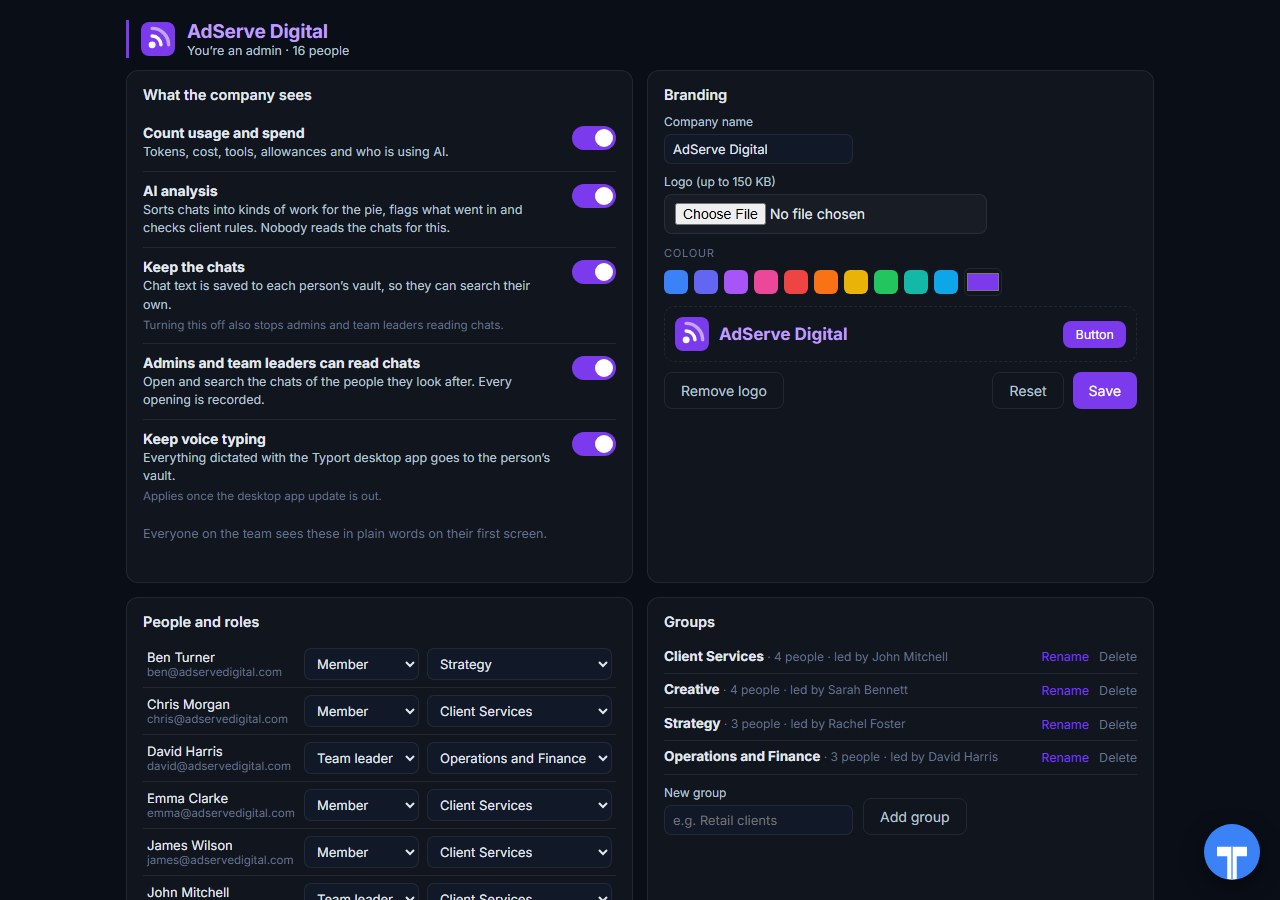
Five switches
Count usage and spend, AI analysis, keep the chats, let admins and team leaders read chats, keep voice typing. Everyone sees the switches in plain words, and every opening of a chat is recorded. Chats in the AI's own temporary or incognito mode are never collected.
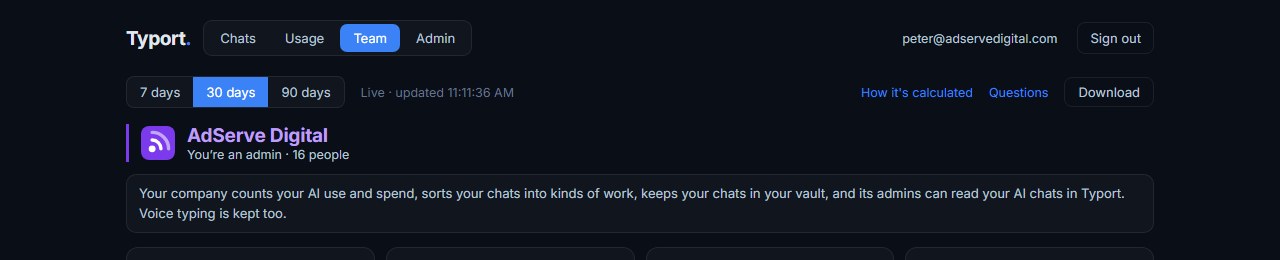
No keys to hand over
Typort reads the chat pages people already use, through its browser extension. A chat page can't show system prompts, hidden reasoning, attachments or tool calls, so the figures are a floor: real use is at least this much. Download the team page as a .csv, never with chat text or titles.
Use them together
Ramp for the API bills. Keys on Anthropic, OpenAI, Gemini, Cursor, AWS Bedrock and the rest, mapped to an owner, department and project, with spike alerts. The dashboard starts free, and you do not need to be a Ramp customer.
Typort for the chat seats. ChatGPT Business, Claude Team and the other chat sites people open every day: who uses them, how much, against what allowance, and what the work is.
The team view runs on Typort's servers. It is free for a limited time and will move to Typort Pro later.
FAQ
Does Ramp's AI spend tracking support ChatGPT Business or Claude Team?
No. Ramp's help page says: "ChatGPT Business and personal accounts are not supported" and "Claude Team is not supported." For ChatGPT and Claude.ai usage it needs ChatGPT Enterprise or Claude Enterprise.
How does Typort see ChatGPT Business and Claude Team use?
Through the Typort browser extension. It reads the chat page, so it works on Business and Team seats and needs no API keys from the AI vendors and no Enterprise plan. A web chat page can't show system prompts, hidden reasoning, attachments or tool calls, so the browser figures are a floor: real use is at least this much.
Can Typort stop someone who goes over their allowance?
No. An admin sets a monthly allowance per person, and the team page marks each person Within, Near or Over, with warnings at 80% and 100%. It is a warning, not a cap.
Does Typort track API spend or pay bills?
No. Typort does not see API traffic, read provider invoices, pay bills or manage cards. That is Ramp's side. Typort covers the chat seats people use in the browser.
Should we use Ramp and Typort together?
Yes, if you have both kinds of AI spend. Ramp covers API keys and provider bills across Anthropic, OpenAI, Gemini, Cursor, AWS Bedrock and more. Typort covers the chat seats people use every day in the browser, and shows what the work is.
Are Typort's dollar figures exact?
No, they are estimates from the tokens in each chat at the AI vendor's API list price. They are there to compare people and tools, not to replace the invoice.
What does the Typort team view cost?
The team view runs on Typort's servers. It is free for a limited time and will move to Typort Pro later.
See what your team does with AI.
Sources
Every Ramp fact on this page comes from Ramp's own website and help center, checked on 2 November 2026. Typort facts come from the product itself.
| "ChatGPT Enterprise is required. ChatGPT Business and personal accounts are not supported." "Claude Enterprise is required. Claude Team is not supported." "The dashboard supports Anthropic, OpenAI, Cursor, Gemini, AWS Bedrock, Azure OpenAI, and Fireworks AI usage and cost data." Google Cloud needs a Cloud Billing export to BigQuery; AWS Bedrock needs an IAM role. "User limits are notify-only." | Ramp help: AI Token Spend standalone |
| "AI spend by provider, model, project, API key, and user". "Ramp maps every key to an owner, department, and project, and flags spikes and savings automatically." "AI spend spike alerts via Slack/email". "Spend limits by API key, user, department, or company-level" in the paid column. "Every business can start free with a unified dashboard, basic briefings, and anomaly detection." "Connect in minutes with your admin API key." Checked 2 November 2026. | ramp.com/ai-cost-monitoring |
| "AI Spend Limits are available through an active AI Spend Management subscription." For Anthropic Platform and OpenAI Platform, "limits send notifications and do not prevent provider charges." "Hard limits apply only to ChatGPT Enterprise workspace usage limits." | Ramp help: AI Token Spend Management |
| Ramp Free "$0/mo/user"; Plus "$15/mo/user" "+ Platform fee based on team size"; Enterprise "Custom". No price is listed for AI Spend Management. Checked 2 November 2026. | ramp.com/pricing |
typort.com | Typort Business | Typort for compliance | AI usage monitoring | Privacy | Terms
© 2024-2026 Human Compute, LLC. Ramp is a trademark of its owner. Typort is not affiliated with or endorsed by Ramp.